Create, refine, and share deliverables
You've done the hard thinking. You know what the sources say and where they disagree. Now you get to shape that into something your audience can use. The drafting approach stays the same whether you're writing an executive brief, an onboarding guide, or a supplier comparison. What changes is the format, and that's a decision worth making on purpose.
Choose a format for your reader
Start with the person who'll read it. What do they need to understand or decide?
| If your reader needs to... | Consider |
|---|---|
| Make a decision | A short brief in Word that leads with the decision, then the evidence and trade-offs |
| Discuss options in a meeting | A presentation outline you build into PowerPoint slides |
| Compare or analyze values | A table you carry into an Excel workbook |
| React to a draft that's still evolving | A Copilot Page you can edit and share for informal input |
| Get a quick answer | A checked Chat response |
For the Project Atlas review, your sponsor needs to know what's decided, what needs their decision, and what's at risk. A one-page brief fits, with an optional slide outline if the review is presented in a meeting.
Draft from your checked findings
If you have a workspace for the work, draft there so the result draws on your references and follows your instructions. If your checked findings are in a separate conversation, bring them into the drafting conversation first. If you're working in Chat, give Copilot your checked findings and sources. Either way, state your expectations:
Using the tracker, meeting notes, and my checked findings, draft a one-page executive brief for the project sponsor. Lead with the decision needed, then current status, material risks, and next steps with owners. Keep proposals separate from approved decisions, name the source for key claims, and flag anything the sources don't establish.
Look over the draft before you go further. As a draft gets shorter, qualifications are often the first thing to slip away. If the draft says "The vendor risk is resolved," but your notes show delivery is still outstanding, restore the nuance:
The deck draft lists the vendor risk as closed; last week's notes show delivery is still outstanding. Confirm status with the delivery lead before the review.
Even a short brief needs the reason behind each point, so your reader has enough context to act.
Revise and inspect a Page
A Copilot Page gives you a persistent draft you can edit directly or refine with Copilot. For Project Atlas, use a Page if available to check the wording before carrying it into Word:
- If Edit in Pages is available beneath the draft response or in that response's options menu, select it and choose a new Page. Give it a clear title, such as Project Atlas - brief working draft. A Page created in a workspace stays with that workspace. If the option isn't available, keep the draft in the same chat and continue with the revision there.
- In the Page's editing chat, or in your existing chat if you aren't using Pages, request one bounded revision: "Put the decision needed first. Keep the recorded date, proposed date, approval status, source labels, and next-step owners. Don't add facts or deadlines. Return the complete revised brief."
- Read the revised brief in the Page or chat, not just Copilot's description of its edits. If you're using a Page and the revision appears only in chat, copy it into the Page yourself. Compare the decision, risk, dates, and owners with your checked findings.
- Correct any lost qualification directly or ask for a targeted fix. If a date becomes "confirmed" without an approval source, restore its proposed status before you continue.
The checkpoint is evidence, not fluency. A shorter, clearer draft is an improvement only if it preserves what the sources establish. Keep source labels with the claims they support, including any uncertainties.
Finish the file in its Office app
For this review, the Page or chat holds your working draft and Word holds the brief you hand off. Use the checked draft as your starting point rather than asking for a fresh draft during the transfer:
- Create Project Atlas - executive review brief in Word and save it in OneDrive or SharePoint.
- Copy the checked brief from the Page or chat into the document. Keep the source labels, recorded and proposed dates, and open questions with the relevant claims.
- Use headings to put the decision needed first, followed by current position, material risks, and next steps. Remove duplicated background rather than removing uncertainty to shorten the brief.
- If you use Copilot in Word to refine the wording, provide the relevant sources and checked findings. Limit the request to the intended change, and inspect the resulting document again.
- Compare the finished file with the checked draft and sources. Confirm that dates, approval status, owners, and source labels survive the transfer. Check the word count if the audience has a limit, then save and reopen the file to confirm the version you plan to share.
Copying creates a separate document: later revisions in a Page or chat don't update that copied text in Word. If you revise the draft again, bring across the intended changes and repeat the checks on the Word file.
If you hand this step to Cowork, it can create the Word file for you; run the same checks on the result.
The same handoff principle applies to other formats. For a deck, prepare an outline instead of copying brief paragraphs onto slides. For a workbook, check values, units, and column meanings before analysis; a copied table isn't a validated calculation.
For app-specific practice beyond this handoff, see:
- Draft impactful documents using AI for Copilot in Word.
- Build effective presentations with AI for Copilot in PowerPoint.
- Uncover new data insights with AI for Copilot in Excel.
Check before you share
Before you send anything, run your checks one more time:
| Check | Ask yourself |
|---|---|
| Source checks | After editing, do key claims still pass support, freshness, authority, and coverage? |
| Audience | Does the deliverable give this reader what they need, at the right level of detail? |
| Access | Can the right people open the file, along with only the supporting material they need? |
| Information handling | Have I removed unnecessary personal or confidential details and followed organizational sensitivity-label and sharing requirements? |
Access and inclusion are different decisions. Restricting a source file doesn't protect details already copied into your brief. Inspect the deliverable itself before sharing it.
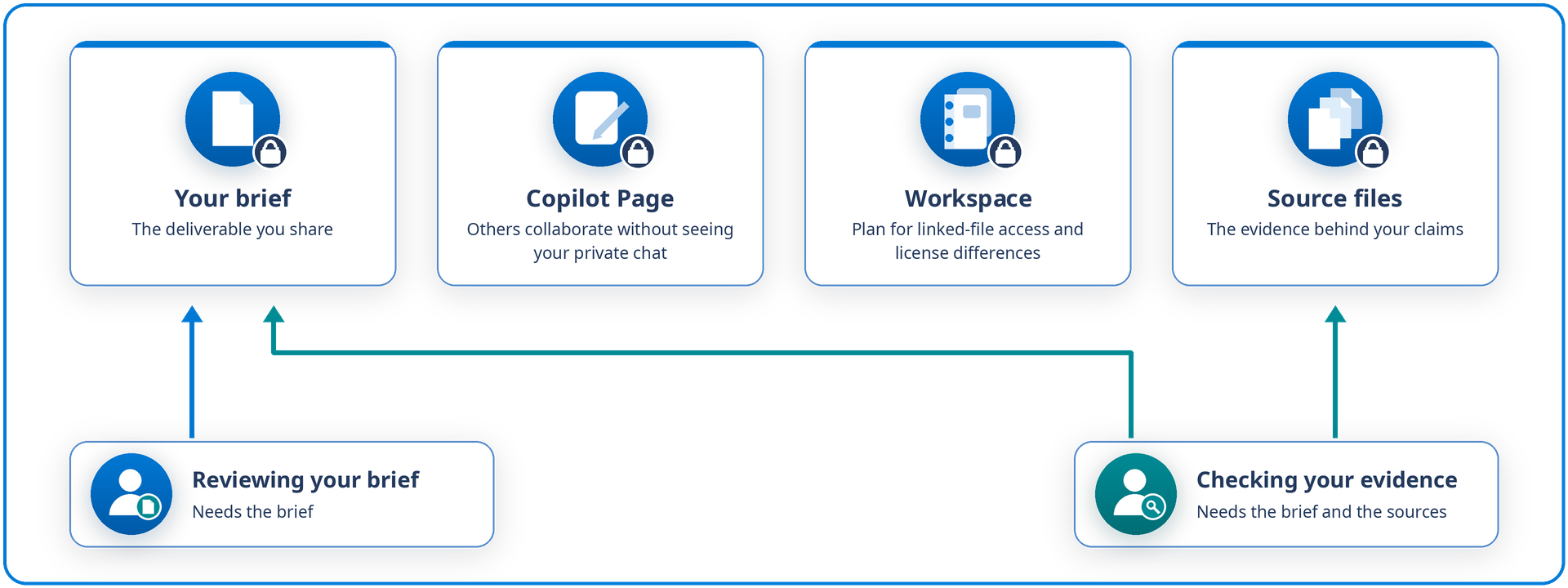
Access deserves a moment of thought, because a deliverable, a Page, a workspace, and the source files each have their own permissions. Someone reviewing your brief doesn't necessarily need every working source, while someone checking your evidence does. Sharing a Page lets others collaborate without seeing your private chat. If you also invite people to the workspace, plan for access to linked files and differences in collaborators' licenses. For details, see How Copilot Pages works.
Bring it to your own work
You're ready to move on when your deliverable fits its audience, key claims trace back to their sources, and the right people have the right access.
Tip
If your next deliverable were a how-to guide instead of a decision brief, what would change about the format? Which checks would stay exactly the same?
Next, you decide how to handle this work the next time it comes around.