Understand Microsoft Foundry governance framework
When your data science team requests an Azure OpenAI deployment, Microsoft Foundry orchestrates a series of governance checks before provisioning any resources. This orchestration happens through four integrated components that work together to enforce enterprise policies while maintaining developer productivity.
Resource catalog: Preapproved AI infrastructure templates
The resource catalog acts as your organization's AI service storefront. Instead of developers creating resources from scratch and potentially misconfiguring security settings, they select from preapproved templates that already embed your security baselines. With this approach, a developer requesting GPU compute automatically gets managed identities enabled, diagnostic logging configured, and network isolation applied—all without understanding the underlying policy requirements. The catalog integrates with Azure Resource Manager and uses Bicep templates to ensure consistent deployments across all environments.
Building on this foundation, the policy engine evaluates each request against your governance rules before any provisioning occurs.
Policy engine: Automated rule evaluation
The policy engine connects to both Azure Policy for platform-level controls and custom Foundry policies for AI-specific requirements. When a developer selects an Azure OpenAI template from the catalog, the engine validates the request against rules like budget thresholds, approved model versions, and data residency requirements. Unlike traditional governance approaches that rely on manual reviews, this automated evaluation happens in seconds and provides immediate feedback to the requester. The engine evaluates security policies (such as requiring private endpoints), cost policies (such as monthly spending caps per business unit), and compliance policies (such as restricting customer data to specific Azure regions) simultaneously.
This becomes especially important when requests exceed standard approval thresholds and require stakeholder review.
Approval workflows: Intelligent request routing
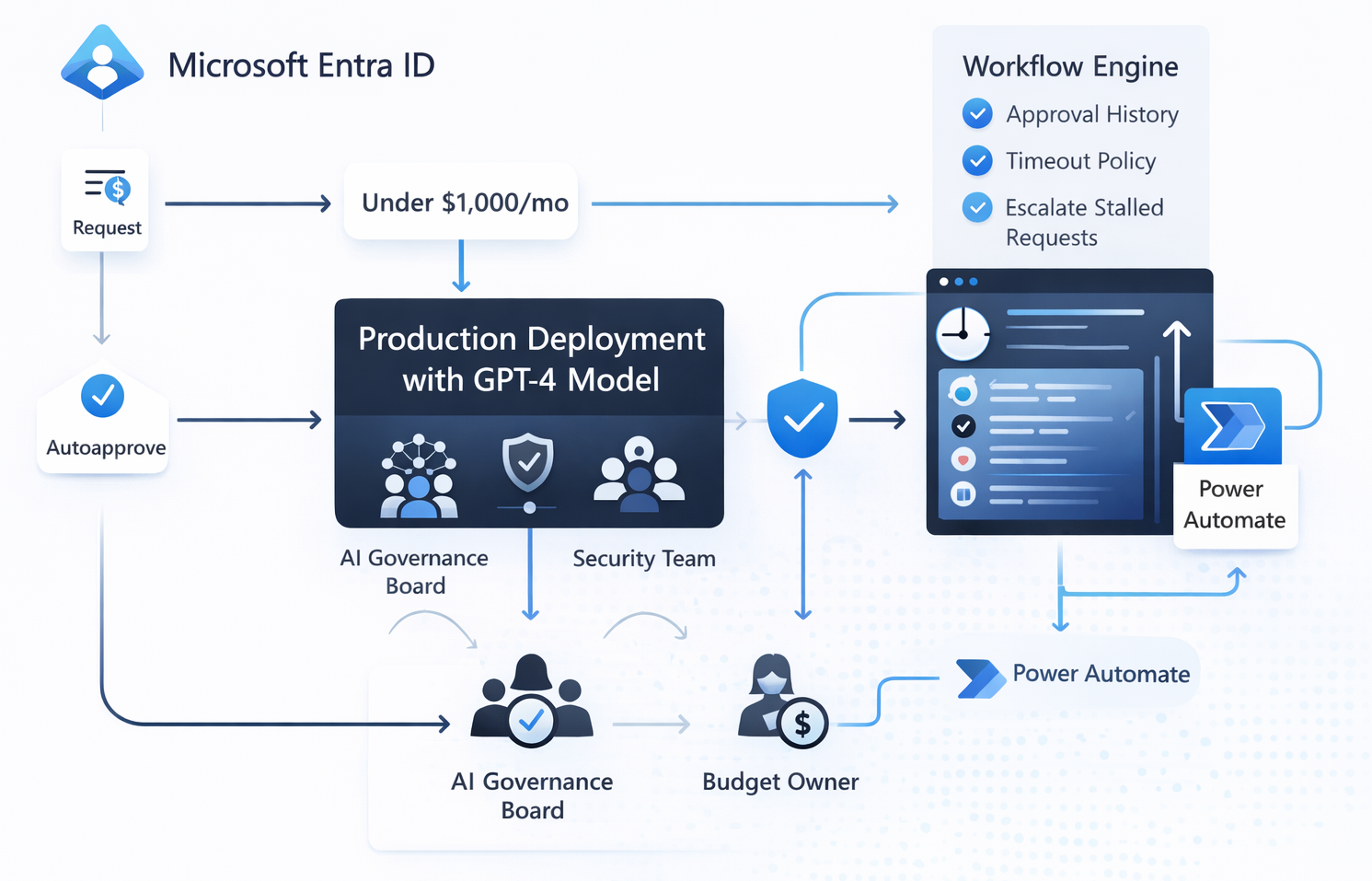
Approval workflows integrate with Microsoft Entra ID to route high-value or high-risk requests to appropriate decision makers. For example, requests under $1,000 monthly cost might autoapprove, while production deployments requiring GPT-4 models trigger a workflow involving the AI governance board, security team, and budget owner. The workflow engine tracks approval history, enforces timeout policies, and escalates stalled requests automatically. With Power Automate integration, you can customize routing logic based on your organizational hierarchy and risk appetite.
 At the same time, continuous monitoring ensures that approved resources remain compliant throughout their lifecycle.
Compliance scanner: Continuous assessment
The compliance scanner continuously evaluates deployed AI resources against your governance policies, detecting configuration drift and unauthorized changes. This scanner integrates with Azure Monitor and Microsoft Defender for Cloud to correlate security alerts with policy violations. Consider what happens when a developer manually disables diagnostic logging on an Azure OpenAI endpoint: the scanner detects the drift within minutes, creates an incident ticket, and optionally autoremediates by re-enabling logging. These compliance results feed governance reports that demonstrate adherence to regulatory frameworks like SOC 2, ISO 27001, or industry-specific requirements.
Now that you understand how these components work together, let's examine the specific integration points that connect Foundry to your existing Azure environment. The following diagram shows how a resource request flows through each governance component:
Integration architecture
Microsoft Foundry doesn't operate in isolation—it extends and orchestrates your existing Azure governance tools. The policy engine uses Azure Policy definitions you created, enriching them with AI-specific rules. Microsoft Entra ID provides the identity foundation for both approval workflows and resource access controls, eliminating duplicate identity management. Azure Monitor streams telemetry from provisioned resources back to the compliance scanner, creating a closed-loop governance system. This integration approach means you're enhancing your current governance investments rather than replacing them.
With this architectural understanding in place, you can now compare how each component contributes to different governance scenarios. The following table maps governance requirements to the Foundry components that address them:
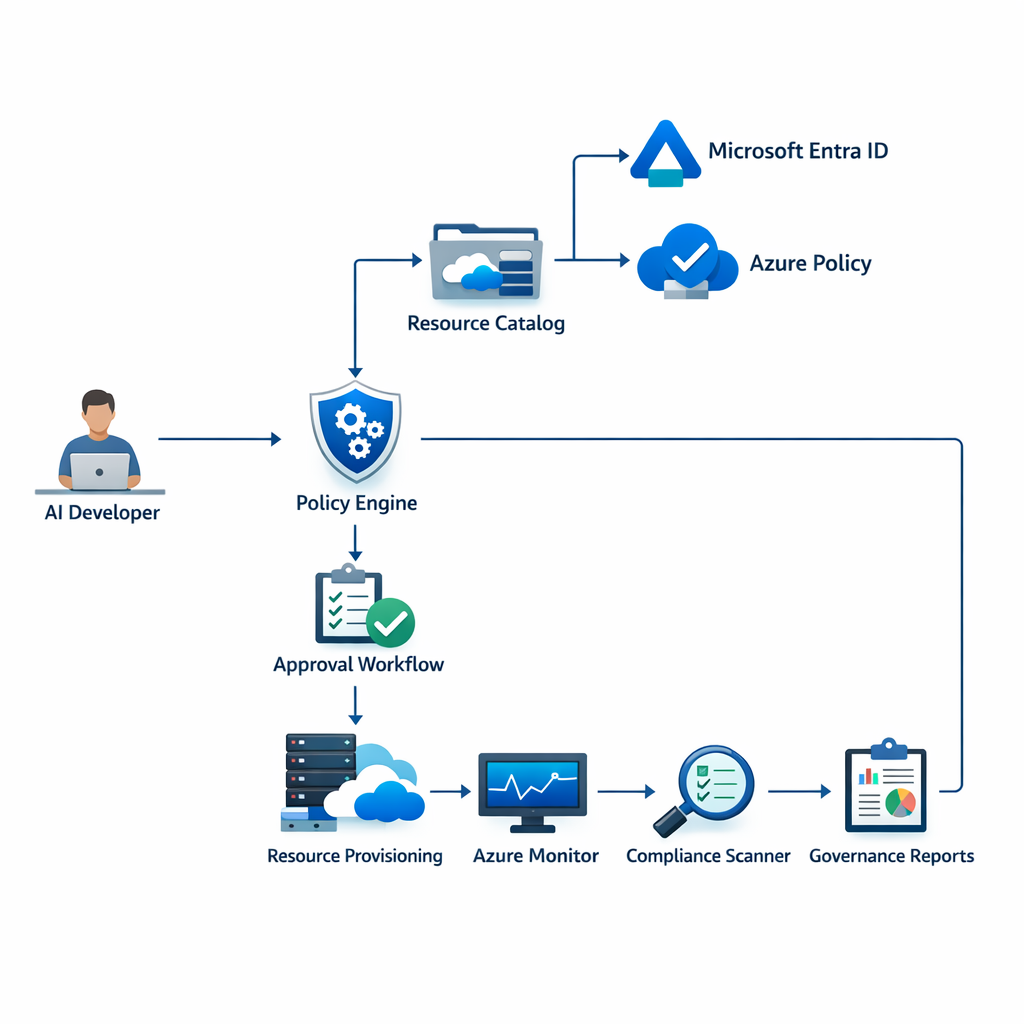
Microsoft Foundry governance architecture showing request flow from developer to provisioned resources with policy checkpoints