Exercise: Configure quotas and rate limits for Microsoft Foundry model deployments
This section covers two hands-on exercises that explore governance policies for AI infrastructure using Microsoft Foundry.
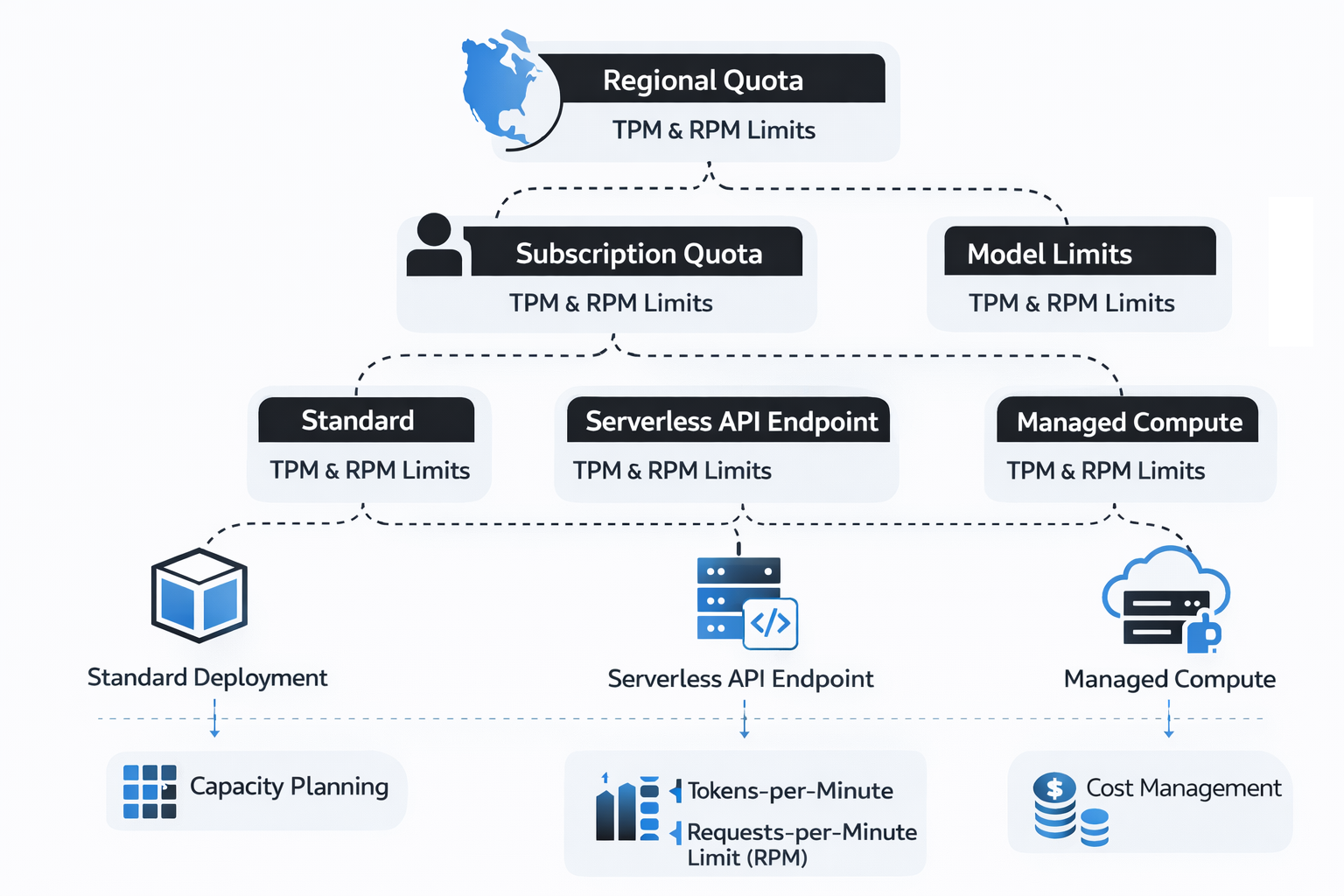
Exercise 1 focuses on understanding and configuring quotas and limits for Microsoft Foundry model deployments. In this exercise, learners explore how token‑based rate limits and subscription‑level quotas apply across different deployment options, including standard deployments, serverless API endpoints, and managed computes. By examining how tokens‑per‑minute (TPM) and requests‑per‑minute (RPM) limits are enforced at regional, subscription, and model levels, learners gain insight into how capacity planning and quota allocation affect scalability, cost management, and deployment strategy for enterprise AI workloads.
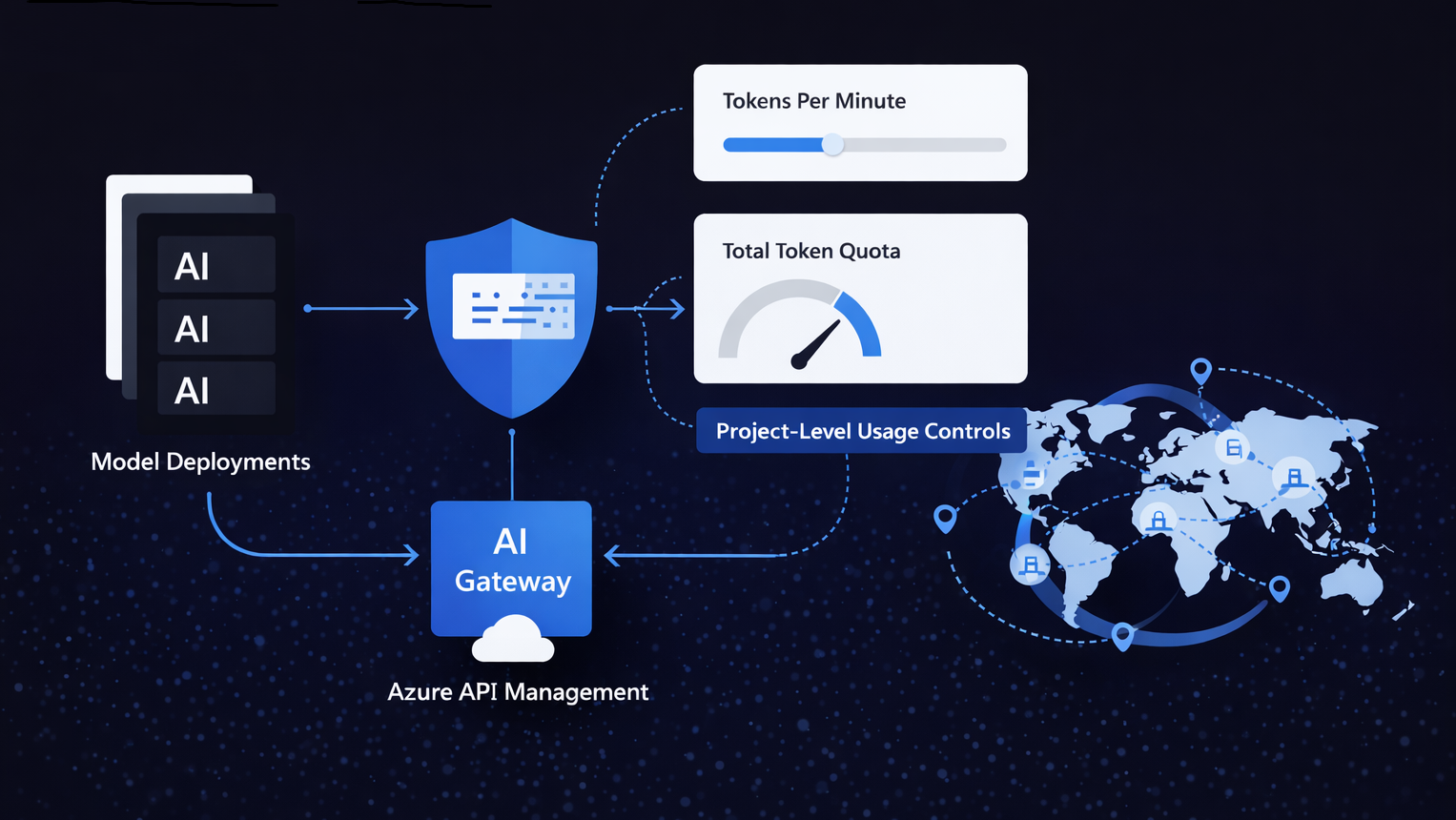
Exercise 2 builds on this foundation by introducing project‑level usage controls using the AI Gateway in Microsoft Foundry. Learners configure an AI Gateway backed by Azure API Management to enforce tokens‑per‑minute rate limits and total token quotas across model deployments within a project. This exercise demonstrates how gateway‑level enforcement complements underlying model and subscription limits, enabling organizations to prevent runaway usage, enforce governance boundaries between teams and projects, and establish predictable consumption patterns as AI solutions scale across regions and business scenarios.
Learners can find the full list of labs and launch each exercise directly by visiting Govern AI-ready Infrastructure GitHub repository, which serves as the single entry point for the course’s hands‑on activities.
Exercise 1: Configure quotas and limits for Microsoft Foundry models
Estimated duration
15 minutes
Background information
Quotas and limits in Microsoft Foundry are inherently tied to model deployments, so understanding deployment options is essential to identifying the most suitable approach to optimizing utilization and billing of Microsoft Foundry services. In particular, Microsoft Foundry offers the following deployment options depending on the type of models and resources you want to provision:
- Standard deployment in Microsoft Foundry resources
- Deployment to serverless API endpoints
- Deployment to managed computes
Standard deployment in Microsoft Foundry resources
Microsoft Foundry resources represent the preferred deployment option in Microsoft Foundry. It offers the widest range of capabilities, including regional, data zone, or global processing, and it offers standard and provisioned throughput (PTU) options. All flagship models in Microsoft Foundry support this deployment option. You can use it in combination with:
- Microsoft Foundry resources
- Azure OpenAI resources
- Azure AI hub, when connected to a Microsoft Foundry resource
As part of deployments, you set token utilization rate limits, up to a global limit determined by quotas. Quotas can be assigned to your subscription on a per-region, per-model basis in units of Tokens-per-Minute (TPM). When you onboard a subscription to Azure OpenAI, you receive default quota for most available models. Then, you assign TPM to each deployment as it is created, and the available quota for that model will be reduced by that amount. You can continue to create deployments and assign them TPM until you reach your quota limit. Once that happens, you can only create new deployments of that model by reducing the TPM assigned to other deployments of the same model (thus freeing TPM for use), or by requesting and being approved for a model quota increase in the desired region.
When a deployment is created, the assigned TPM will directly map to the tokens-per-minute rate limit enforced on its inferencing requests. A Requests-Per-Minute (RPM) rate limit will also be enforced.
Tokens per minute (TPM) and requests per minute (RPM) limits are defined per region, per subscription, and per model or deployment type, including standard, batch, and provisioned. The highest level of quota restrictions is scoped at the Azure subscription level.
Azure OpenAI quotas and limits
There are also default quotas and limits that apply to Azure OpenAI, which define, for example, maximum number of Azure OpenAI resources per subscription and per region, maximum standard deployments per resource, or maximum fine-tuned model deployments.
Serverless API endpoints
This deployment option is available only when using Azure AI hub resources. It allows you to create dedicated endpoints to host a model, accessible through an API. It's limited to a subset of Microsoft Foundry Models and it supports only regional deployments.
Managed computes
This deployment option is also available only when using Azure AI hub resources. It allows you to create a dedicated endpoint to host the model in a dedicated compute. You need to have sufficient compute quota in your subscription to host the model and you're billed per compute uptime. Managed compute deployment is required for model collections that include:
- Hugging Face
- NVIDIA inference microservices (NIMs)
- Industry models
- Databricks
- Custom models
Scenario
Your company plans to develop a global analytics platform that will integrate conversational agents and batch inference workflows for tasks such as financial forecasting and scientific research. The current focus is on exploring quotas, limits, and capacity allocation in Microsoft Foundry to understand how resources can be managed and scaled effectively. This exploration provides insights to guide decisions about platform structure, regional rollout, and cost management as the platform evolves toward broader adoption.
Prerequisites
- Azure subscription: If you don't have an Azure subscription, create a free account before you begin.
- Permissions: To create Azure AI Services resources, you should have the Owner role assigned at the Azure subscription or the target resource group level.
- Familiarity with Microsoft Foundry model deployment

Exercise 2: Enforce token limits with AI Gateway
Estimated duration
15 minutes
Background information
You can use AI Gateway in Microsoft Foundry to enforce tokens-per-minute (TPM) rate limits and total token quotas for model deployments at the project scope. This integration uses Azure API Management (APIM) and applies limits per project to prevent runaway token consumption and align usage with organizational guardrails for models deployments.
An AI Gateway sits between client applications and model deployments created in a Foundry project. All inference requests flow through the associated APIM instance once the gateway is enabled. Limits apply at the project level (each project can have its own TPM and quota settings) and can target specific model deployments. Supported features for this release are TPM rate limits and total token quotas only. No other APIM policy types are enforced.
As part of setting up this control layer, when you create a new AI Gateway, you need to decide whether to create a new APIM instance (isolated governance, predictable usage boundary), or reuse an existing APIM instance (centralized management, shared cost). You can use any existing APIM instance in the same Azure region as the Microsoft Foundry resource hosting your project.
If you choose to create a new instance from the Foundry portal flow, the APIM SKU defaults to Basic v2, which is required for gateway integration.
Once the gateway is in place, token limits are enforced through two complementary dimensions:
- Tokens per minute (TPM) rate limit: Evaluated on a rolling 60-second window. Each request’s token usage is aggregated, and once the rolling window total exceeds the configured TPM value, subsequent requests within that window receive 429 Too Many Requests responses until usage falls below the threshold.
- Total token quota: Aggregates tokens consumed across the defined quota window (for example, daily or monthly allocation). When cumulative usage reaches the configured quota, further requests receive 403 Forbidden until the window resets. The quota counter automatically resets at the start of the next window boundary.
In addition to these gateway-level controls, the limits are enforced alongside any underlying model or regional limits (such as per-deployment TPM or RPM quotas defined for Azure OpenAI models within a subscription and region).
Because enforcement is based on accumulated usage, adjusting a quota or TPM value mid-window affects only subsequent decisions; it doesn't retroactively clear already consumed tokens. To effectively "reset" a quota before the natural window boundary, you can temporarily increase the quota value or remove and recreate the limit.
The AI Gateway useful in many governance-focused scenarios, including:
- Multi-team token containment (prevent one project from monopolizing model capacity).
- Cost control by capping aggregate usage of deployed models.
- Compliance boundaries for regulated workloads (enforce predictable usage ceilings across projects and regions).
The AI Gateway in Microsoft Foundry is built on top of Azure API Management (APIM), which provides the underlying infrastructure for enforcing token limits and quotas, routing requests, and enabling project-level governance. It's worth noting that, while Foundry exposes a simplified interface for managing limits per project and deployment, the gateway itself applies APIM’s broader functionality, inheriting its scalability, security, and monitoring features.
At the APIM level, the AI Gateway provides a unified set of capabilities to manage, secure, scale, monitor, and govern AI endpoints across a wide range of deployments, including Microsoft Foundry and Azure OpenAI models, Azure AI Model Inference API deployments, remote MCP servers, OpenAI-compatible endpoints, and self-hosted models. It helps organizations authenticate and authorize access, load balance requests, monitor interactions, manage token usage and quotas across applications, and enable self-service for developer teams, providing the foundation for effective enterprise-scale AI governance.
Scenario
Your company is planning to develop a global customer engagement and knowledge automation platform that integrates virtual support agents and document analysis workflows to streamline operations such as customer service, compliance reviews, and internal knowledge discovery.
To prepare for this initiative, the company plans to use Microsoft Foundry to create a project, deploy a chat completion model, and configure an AI Gateway to explore how token limits, quotas, and capacity allocation can be applied at the project level. This evaluation helps understand how to control usage across different projects, prevent individual workloads from exhausting shared capacity, and guide decisions on governance, scaling, and regional deployment as the platform grows.
Prerequisites
- Azure subscription: If you don't have an Azure subscription, create a free account before you begin.
- Permissions: To create AI Gateway, you should have the Owner or Contributor role assigned at the Azure subscription level.
- Familiarity with Microsoft API Management