Control agent access and lifecycle
Controlling agent access extends beyond Conditional Access policies to include preventing unauthorized agent creation and monitoring agent lifecycle events. Contoso Financial Services needs ongoing visibility into which agents exist in their tenant and when new agents are created. Here, you explore three approaches to disabling agent access and implement monitoring to track agent lifecycle events through audit logs.
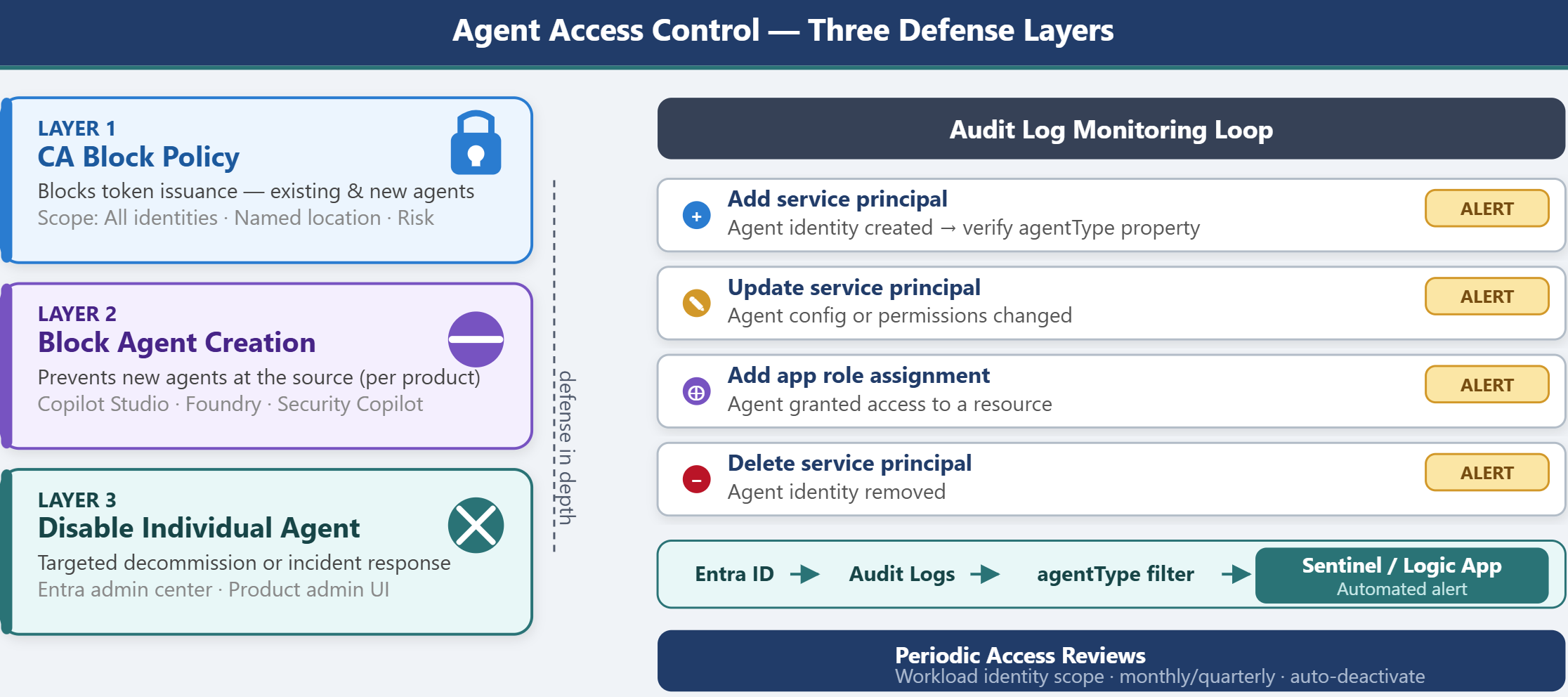
| Approach | Scope | When to Use |
|---|---|---|
| Conditional Access block | Blocks authentication for existing and new agents | Primary enforcement mechanism; prevents token issuance |
| Block agent creation per product | Prevents new agents from being created in specific products | Reduces sprawl; enforces approval workflows |
| Disable individual agents | Deactivates a specific agent identity | Targeted decommissioning or incident response |
Block agent authentication with Conditional Access
Conditional Access policies provide the frontline of defense against unauthorized agent access. As you configured in the previous unit, CA policies intercept authentication requests and block token issuance based on policy conditions. This approach works for both existing agents and newly created agents because the policy evaluates every authentication attempt regardless of when the agent was created.
Conditional Access block policies are effective when you need to enforce tenant-wide restrictions—for example, blocking all agent identities from authenticating unless explicitly allowed. This secure-by-default model prevents agents from operating without explicit security team approval. However, CA policies don't prevent the creation of agent identities; they only block authentication. This distinction matters because unauthorized agents can still appear in your tenant and consume directory quota, even if they can't authenticate.
For comprehensive control, combine CA block policies with product-level restrictions that prevent agent creation at the source.
Block agent creation per product
Individual Microsoft products that create agent identities provide their own configuration settings to restrict or prevent agent creation. Blocking creation at the product level reduces agent sprawl and enforces approval workflows before agents are deployed.
Microsoft Agent 365 (now generally available) provides the centralized control plane for agent governance across all products in your organization. In the Microsoft 365 admin center under Agents > Settings, you can configure which categories of agents are permitted (Allowed agent types), apply Security templates that bundle Conditional Access policies and custom security attributes as presets enforced on every new agent, and define User access controls that specify which users or groups can interact with agents. Agent management rules let you apply governance actions in bulk—for example, automatically reassigning ownership of agents whose creators left the organization. These controls apply across agent sources, making Agent 365 the recommended starting point before applying per-product restrictions.
For Copilot Studio, you can restrict agent creation through licensing, role-based access control, or data policies. The most effective approach combines licensing and RBAC: prevent users from signing up for Copilot Studio free trials and remove the Power Platform Administrator role from users who shouldn't create agents. Without the appropriate license and role, users can't create Copilot Studio environments or deploy agents.
Alternatively, apply data loss prevention (DLP) policies that prevent agents from being published. This approach doesn't block agent creation, but it prevents agents from becoming operational. Users can build agents in Copilot Studio but can't deploy them for actual use. This middle ground allows experimentation while maintaining control over production deployments.
For Azure AI Foundry, restrict agent creation by controlling Azure subscription creation and role assignments. Only users with the Billing Administrator or Account Administrator role can create subscriptions. Within a subscription, only users with the Azure AI Account Owner role can create Foundry projects. Within a project, users need the Azure AI User role to create agents. By not assigning these roles broadly, you limit who can create agents at each layer of the Azure hierarchy.
For Security Copilot, block agent creation by removing users from the Owner or Contributor role in Security Copilot workspaces. Microsoft-owned agents (such as the Microsoft Entra Conditional Access Optimization Agent) require Security Administrator or Identity Governance Administrator roles to enable. Request that users with these roles don't enable agents without approval. For complete blockage, delete all Security Compute Unit (SCU) capacity, which disables Security Copilot entirely—though this approach also blocks Security Copilot itself, not just agents.
Tip
Blocking agent creation at the product level works best when combined with approval workflows. For example, require users to submit a request through a ticketing system before being granted the roles needed to create agents.
Contoso Financial Services restricts Copilot Studio agent creation by removing the Power Platform Administrator role from most users and requiring users to request this role through an approval workflow managed by the IT operations team.
Disable individual agent identities
For targeted decommissioning or incident response, you can disable specific agent identities without affecting other agents. Each product provides an admin interface to disable agents, and you can also disable agents directly in the Microsoft Entra admin center.
To disable an agent identity in the Microsoft Entra admin center, sign in as at least an Agent ID Administrator and browse to Entra ID > Agents > Agent identities. Select the agent identity you want to disable, then select Disable. This action blocks token issuance for that specific agent without requiring a Conditional Access policy. To disable all agents derived from the same blueprint, browse to Entra ID > Agents > Agent blueprints and disable the parent blueprint.
Disabling an agent through the product-specific admin interface achieves the same result but can provide more context or warnings specific to that product. For example, disabling a Copilot Studio agent through the Power Platform admin center shows which workflows or connectors depend on that agent, helping you assess the issues before proceeding.
This approach is ideal for incident response scenarios where you need to immediately stop a compromised agent from authenticating. You can disable the agent, investigate the compromise, rotate credentials, and re-enable the agent after remediation.
Monitor agent lifecycle events in audit logs
Audit logs provide visibility into agent creation, modification, and deletion events, allowing you to detect unauthorized agents or configuration drift. Microsoft Entra ID logs agent lifecycle events under the ApplicationManagement category with specific activity types.
To monitor agent creation events, navigate to Microsoft Entra ID > Monitoring > Audit logs. Filter by Category = ApplicationManagement and Activity = Add service principal. Agent identities appear as service principals in the audit log, so you must verify whether the created service principal is an agent identity.
To confirm an audit event involves an agent identity, check the agentType property on the targetResources field of the audit log entry—a value other than notAgentic indicates agent involvement. You can also query Microsoft Graph using the object ID returned in the audit event to inspect the agentType property on the service principal object. This two-step process—filtering the audit log and verifying the object type—allows you to track agent creation in near real-time.
Key audit events to monitor:
- Add service principal: Agent identity created
- Update service principal: Agent configuration or permissions changed
- Delete service principal: Agent identity removed
- Add app role assignment to service principal: Agent granted access to a resource
Set up alerts or automated workflows to notify the security team when these events occur. For example, configure a Logic App or Microsoft Sentinel playbook to send an email notification whenever a new service principal tagged as an agent identity is created.
Note
Agent user account creation appears as a Create user audit event, not a service principal event. To monitor both agent identities and agent user accounts, filter for both Add service principal and Create user activities and verify the object type.
Implement access reviews for agent identities
Microsoft Entra access reviews can be applied to workload identities, including agent identities, to periodically validate which agents should remain active. Access reviews prompt designated reviewers to confirm whether each agent is still needed and deactivate agents that are no longer required.
To set up an access review for agent identities, navigate to Microsoft Entra ID > Identity Governance > Access reviews and create a new review. Under Review scope, select Workload identities and specify the service principals representing your agents. Configure the review frequency (for example, monthly or quarterly) and assign reviewers—typically the business owners or project managers responsible for each agent.
During each review cycle, reviewers receive a notification with the list of agents and their current status. Reviewers mark each agent as approved (keep active) or denied (deactivate). Agents marked as denied are automatically disabled or flagged for manual deactivation, depending on your configuration.
Contoso Financial Services sets up a monthly access review for all Copilot Studio agent service principals. The review is assigned to the compliance automation team lead, who confirms whether each agent is still supporting active compliance workflows. Agents not confirmed by the team leads are flagged for deactivation, and the security team disables them using a Conditional Access block policy or by disabling the agent identity directly.
This periodic review process ensures agents don't accumulate over time and provides a governance checkpoint for agent lifecycle management.