Implement role-based access control
Contoso's application uses a managed identity to read product data, while a separate integration uses the fallback key pattern from the previous unit. Your next task is to limit each identity to its required work. Authentication identifies the caller, but authorization determines its permitted operations. For the managed identity, you need a role assignment that allows product reads without allowing writes or access to unrelated containers.
Distinguish control-plane and data-plane permissions
Azure Cosmos DB uses two permission systems. Start by identifying which system governs a task, rather than choosing a role because its name sounds appropriate:
- Control-plane permissions govern resource management, including account configuration, throughput, access to account keys, and management of native data-plane role definitions and assignments.
- Data-plane permissions govern token-authenticated operations on data, including item reads and writes, queries, and change feed access. These permissions don't grant resource-provisioning rights.
For example, Contoso's deployment operator manages account settings, while the application reads products. Those responsibilities need different permissions. Azure portal Access control (IAM) manages control-plane access. Native Azure Cosmos DB data-plane role management isn't supported in the portal. To create native data-plane assignments, use a supported management tool, such as the Azure CLI.
This restriction concerns managing assignments, not using them. Data Explorer supports Microsoft Entra authentication for NoSQL data operations. For a role-permission test, open its Settings and set Enable Entra ID (RBAC) to True. The Automatic default uses keys when key-based authentication is enabled, so a successful read in that mode doesn't prove the signed-in identity's native data permissions. See Data Explorer authentication.
However, the separation doesn't mean that control-plane privileges never lead to data access. A sufficiently privileged management role can expose account keys or grant native data-plane roles. The broad Azure Contributor role can manage these native assignments because they use Cosmos DB resource-provider operations, not generic Azure Authorization role-assignment operations. Cosmos DB Operator excludes key and connection-string access and native role-definition and role-assignment write and delete operations. Don't choose it for an operator who needs to assign data-plane roles.
For least privilege, review both boundaries. Authentication with an account key doesn't enforce the caller's principal-scoped native data-plane roles. Restrict key access alongside role-management permissions. Also, retain the separate Key Vault boundary from the previous unit: a Cosmos DB data-plane role doesn't grant permission to retrieve a vault secret.
Choose a role and the narrowest scope
With the two planes clear, translate the application's operations into a data-plane role. A role definition describes allowed actions. It grants nothing by itself. A role assignment connects that definition to a security principal and a resource scope. For Contoso's application, use the managed identity's principal object ID, not its client ID.
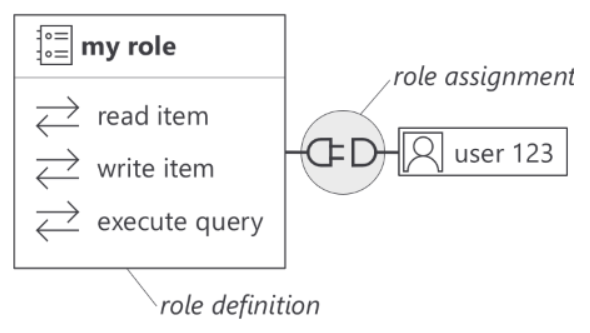
The built-in roles provide two starting points:
| Role name | Role definition ID | Allowed actions |
|---|---|---|
| Cosmos DB Built-in Data Reader | 00000000-0000-0000-0000-000000000001 |
Metadata reads, item reads, queries, and change feed reads |
| Cosmos DB Built-in Data Contributor | 00000000-0000-0000-0000-000000000002 |
Metadata reads, containers/*, and containers/items/* data actions |
Choose Cosmos DB Built-in Data Reader for the product read from the authentication unit. Contributor grants unnecessary write access for that workload. To understand Reader's permissions, examine its four actions:
Microsoft.DocumentDB/databaseAccounts/readMetadatasupports SDK metadata requests.Microsoft.DocumentDB/databaseAccounts/sqlDatabases/containers/items/readpermits item reads.Microsoft.DocumentDB/databaseAccounts/sqlDatabases/containers/executeQuerypermits query execution.Microsoft.DocumentDB/databaseAccounts/sqlDatabases/containers/readChangeFeedpermits change feed reads and is also required for SDK queries.
SDK queries need both executeQuery and readChangeFeed. The SDK also needs readMetadata at the appropriate scope, which can be the container scope. Don't assume that metadata access always requires an account-wide assignment. If a built-in role grants more actions than a workload needs, consider a custom role with only the required actions. Native data-plane RBAC doesn't support notDataActions for subtracting permissions.
Apply the same precision to scope. The relative scope / covers the account, /dbs/cosmicworks covers that database, and /dbs/cosmicworks/colls/product covers the product container. Choose the container for this application. Native role assignments don't offer individual-item or partition scopes. Review existing assignments too: adding a narrow Reader assignment doesn't cancel a broader Contributor assignment.
Learn more about native data-plane roles and supported actions.
Assign the role to the managed identity
Now, separate the operator's authority from the application's permissions. The operator creating the assignment needs these control-plane actions under Microsoft.DocumentDB/databaseAccounts/:
sqlRoleDefinitions/readsqlRoleAssignments/readsqlRoleAssignments/write
To read products, the application doesn't need these management permissions. Give them to the authorized deployment identity at the appropriate management scope, not to the runtime identity merely to make setup convenient.
The following shared PowerShell example assumes an existing account, managed identity, cosmicworks database, and product container. In an Azure CLI session signed in as the authorized operator, replace the placeholders with your resource group, account name, and managed identity's principal object ID. The command assigns Reader only to that container:
az cosmosdb sql role assignment create `
    --resource-group '<resource-group>' `
    --account-name '<account-name>' `
    --role-definition-id '00000000-0000-0000-0000-000000000001' `
    --principal-id '<managed-identity-principal-object-id>' `
    --scope '/dbs/cosmicworks/colls/product'
To check the principal, role definition, and scope, list the account's native assignments, including any broader assignment that applies to the same identity:
az cosmosdb sql role assignment list `
    --resource-group '<resource-group>' `
    --account-name '<account-name>'
This operation changes authorization, not the application's credential selection. Keep the explicit managed identity configuration from the authentication unit. A successful management command proves that an assignment exists, not that the intended application identity successfully accesses data.
Verify permitted and denied operations
Turn the assignment into release evidence by testing with the intended identity. Use a nonproduction environment with equivalent role and scope boundaries for negative tests. Don't test writes against production products merely to confirm that a read-only role rejects them.
- Confirm the credential and target. Check the actual principal, account endpoint, database, and container. Ensure the application uses its managed identity rather than a developer credential or account key.
- Test allowed operations. Reuse the earlier unit's read with an existing product's item ID and partition key. If the workload queries products, test that query path too.
- Test a denied write. Attempt a write against disposable test data in the authorized container. Reader should reject it. If it succeeds, inspect credential selection and all applicable assignments before accepting the configuration.
- Investigate failures before broadening access. Assignment changes can take time to propagate. Recheck the assignment and retry without assuming a fixed delay. Network restrictions or an incorrect data address also cause failures, so use exception details to identify the boundary.
For Contoso's review, record the principal, role, scope, environment, and allowed and denied results without tokens or product contents. Security reviewers get evidence of the access boundary, and operations gets a repeatable check. Role assignments control what an identity does. To restrict where requests originate, the next unit adds network controls.