Configure network security
Contoso's application has an identity and a role scoped to product reads. Your next task is to restrict where those requests originate. A valid token or account key doesn't bypass network restrictions, and an allowed network doesn't grant data permissions. Building on the previous unit, you keep identity and roles unchanged while configuring and testing the application's network boundary.
Choose a control for the required network path
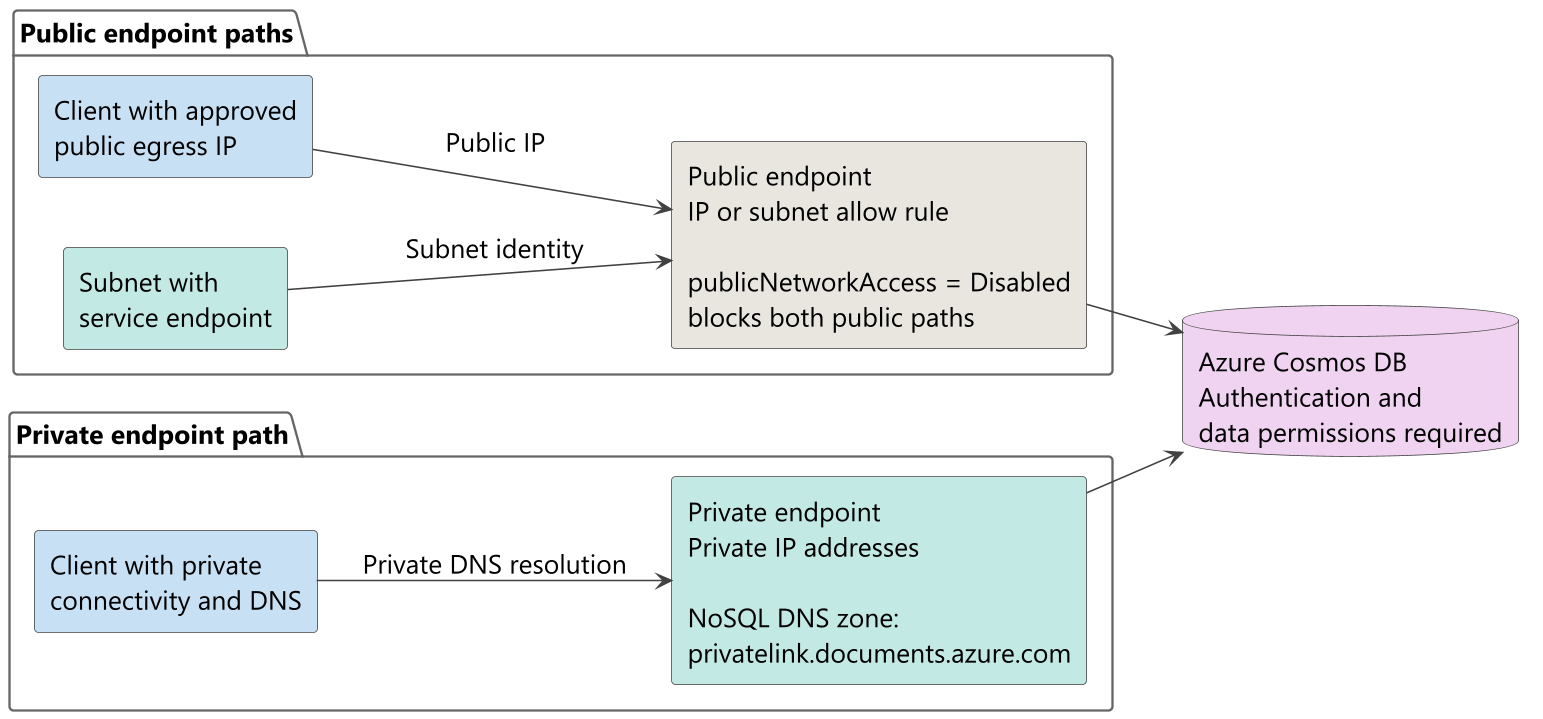
Start with the application's hosting environment and Contoso's isolation requirement. Does the workload require private addressing, access from specific subnets, or access from known public addresses? These requirements lead to different controls:
| Control | Allowed source or path | Choose when |
|---|---|---|
| Private endpoint | Private IP addresses in your virtual network through Azure Private Link | The workload requires private connectivity |
| Virtual network service endpoint | An allowed subnet identified at the public service endpoint | Subnet-based restrictions meet the requirement |
| IP firewall | Approved public IP addresses or address ranges | Clients use known public outbound addresses |
With a private endpoint, Azure Cosmos DB remains a managed service outside your virtual network. The endpoint provides private connectivity to the account, not an account deployment inside the subnet. In contrast, a service endpoint still uses the public service endpoint. Don't equate subnet-based access with private addressing.
Configure allowed public sources
When public access meets the requirement, choose explicit sources. IP and virtual network rules are additive: either allowed source permits a request through the network boundary. A request doesn't need to match both rule types. Authentication and authorization still apply.
Restrict public IP addresses
In the account's Networking settings, set Allow access from to Selected networks, specify approved public IP addresses or Classless Inter-domain Routing (CIDR) ranges, and select Save. A CIDR range describes an address block. Add your current IP adds the detected public address, not necessarily the address your deployed application uses. Network address translation or a VPN can change the outbound address. Verify the actual public egress address, and don't enter private addresses in the allowlist.
Unlisted sources receive a forbidden response, HTTP 403. Avoid the convenience option Accept connections from within Azure datacenters for production isolation. It adds the special 0.0.0.0 marker, allowing requests from Azure datacenters across all customers' subscriptions. This exception isn't tenant-restricted, but it doesn't mean unrestricted access from the entire internet either.
Learn more about IP firewall configuration.
Allow a subnet through a service endpoint
A service endpoint requires two configurations: enable Microsoft.AzureCosmosDB on the application subnet, and add that subnet to the account's virtual network allow rules. The account and virtual network must belong to the same Microsoft Entra tenant. Peered subnets don't inherit the allowed subnet's access.
Coordinate both configurations before switching production traffic. Service endpoint traffic carries the subnet's identity and no longer matches its previous public IP allowlist entry. Enabling the endpoint affects traffic to all Azure Cosmos DB accounts from that subnet, so account owners need to coordinate the change. Setting publicNetworkAccess to Disabled blocks service endpoint access too.
Learn more about virtual network service endpoint configuration.
Establish private connectivity and control public access
For Contoso's private-address requirement, create a private endpoint in the chosen virtual network and subnet. Associate it with the Azure Cosmos DB account and select the NoSQL target subresource, whose group ID is Sql. Confirm that the private endpoint connection is approved. An endpoint definition without approval and working connectivity doesn't establish application access.
Integrate private DNS
Keep the account's normal hostname in application configuration. Private DNS integration uses privatelink.documents.azure.com so clients resolve that hostname to the private endpoint addresses. Link the private DNS zone to the client virtual network, or configure the client's DNS resolver to resolve those records. An on-premises client also needs connectivity through a VPN or ExpressRoute private peering and working DNS resolution.
The private endpoint uses one IP address for the global endpoint and another for each account region. To maintain records automatically as regions change, use a private DNS zone group. Don't hard-code one private IP as the account's permanent destination.
Check the SDK connection mode when configuring outbound rules. The earlier C# example uses the .NET default, direct mode; Python uses gateway mode. Gateway needs HTTPS port 443. Direct mode also needs TCP ports 10,000 through 20,000 for public or service endpoints, or 0 through 65,535 for private endpoints. Scope rules to the required destination addresses, not unrestricted internet access. See SDK connectivity modes for the requirements.
Explicitly disable public access
Creating a private endpoint alone isn't a durable prohibition on public access. Existing IP and service endpoint rules can coexist with private connectivity. Deleting the last private endpoint can reopen public access when no explicit restriction remains.
For a private-only account, set publicNetworkAccess to Disabled after you verify private access for the existing application. This setting overrides IP and virtual network service endpoint allow rules. Public DNS can still resolve the account hostname, so hostname resolution alone doesn't prove either public access or isolation.
Learn more about private endpoints and DNS configuration.
Stage changes and verify the boundary
Treat the change as an application rollout, not only a saved account setting. Firewall updates can take up to 15 minutes to propagate and can behave inconsistently during that interval. Stage changes and retest observed behavior instead of relying on a fixed sleep or assuming zero downtime.
- Record a baseline. Identify the application principal, role scope, account hostname, source network, and a successful read of an existing product using its actual item ID and partition key.
- Prepare the intended path. Configure the selected endpoint, rules, and DNS as applicable. Verify access from the application environment before removing an existing path or disabling public access.
- Apply the final restriction. Remove unnecessary public exceptions, or disable public access for the private-only design. Retest after the configuration propagates.
- Compare allowed and denied reads. Use the same authorized identity, permissions, and item address from approved and unapproved network paths. Confirm an actual read succeeds inside the boundary and fails outside it. Keep credentials protected, and inspect error details to distinguish network rejection from authentication or permission failures.
Include operational clients in these checks. NoSQL Data Explorer needs an allowed client path, including the browser's public IP when public rules apply. For private-only access, use a host with private connectivity and DNS instead of loosening policy for the portal. Azure Cloud Shell doesn't automatically have virtual network access.
Record the source, principal, request result, and validation time without credentials or product contents. This evidence supports operational acceptance and security review. With identity, permissions, and allowed sources established, the next unit examines masking sensitive customer fields.