Manage tenant security
Tenant-level security settings establish the governance floor for your entire Power Platform estate. These controls restrict who can perform high-impact actions such as creating environments, allocating capacity, and accessing administrative views before environment-specific security even applies.
Restrict environment creation
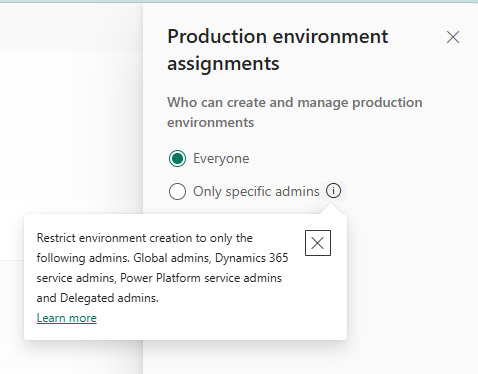
By default, any licensed user can create environments in your tenant. For enterprise governance, restrict creation to administrators:
- Sign in to the Power Platform admin center.
- Go to Manage > Tenant settings.
- Search for Environment creation and configure each environment type:
- Production environment assignments - Restrict to admins only to prevent uncontrolled environment sprawl.
- Developer environment assignments - Decide based on your governance posture. Restricting developer environments limits experimentation; allowing them enables controlled personal-development spaces.
- Trial environment assignments - Consider allowing for evaluation purposes while restricting production creation.
When restricted, only Global Administrators, Power Platform Administrators, and Dynamics 365 Service Administrators can create new environments. Environment creation restrictions aren't retroactive, meaning the new settings don't affect previously created environments.
Tip
Rather than restricting all environment creation, use environment routing to automatically direct makers into their own personal developer environments. This approach provides makers a safe workspace without creating unmanaged environments scattered across your tenant.
Control capacity allocation
Capacity management prevents unauthorized resource consumption:
- Add-on capacity assignments - Controls who can allocate add-on capacity (database, file, log) to environments. Restrict to administrators to prevent environments from consuming more capacity than budgeted.
- Tenant capacity summary view - Determine whether environment admins can see the overall tenant capacity picture, or restrict visibility to tenant-level administrators only.
Configure sharing governance
Unrestricted sharing is one of the most common security risks in Power Platform. A single misconfigured share can expose sensitive data to the entire organization.
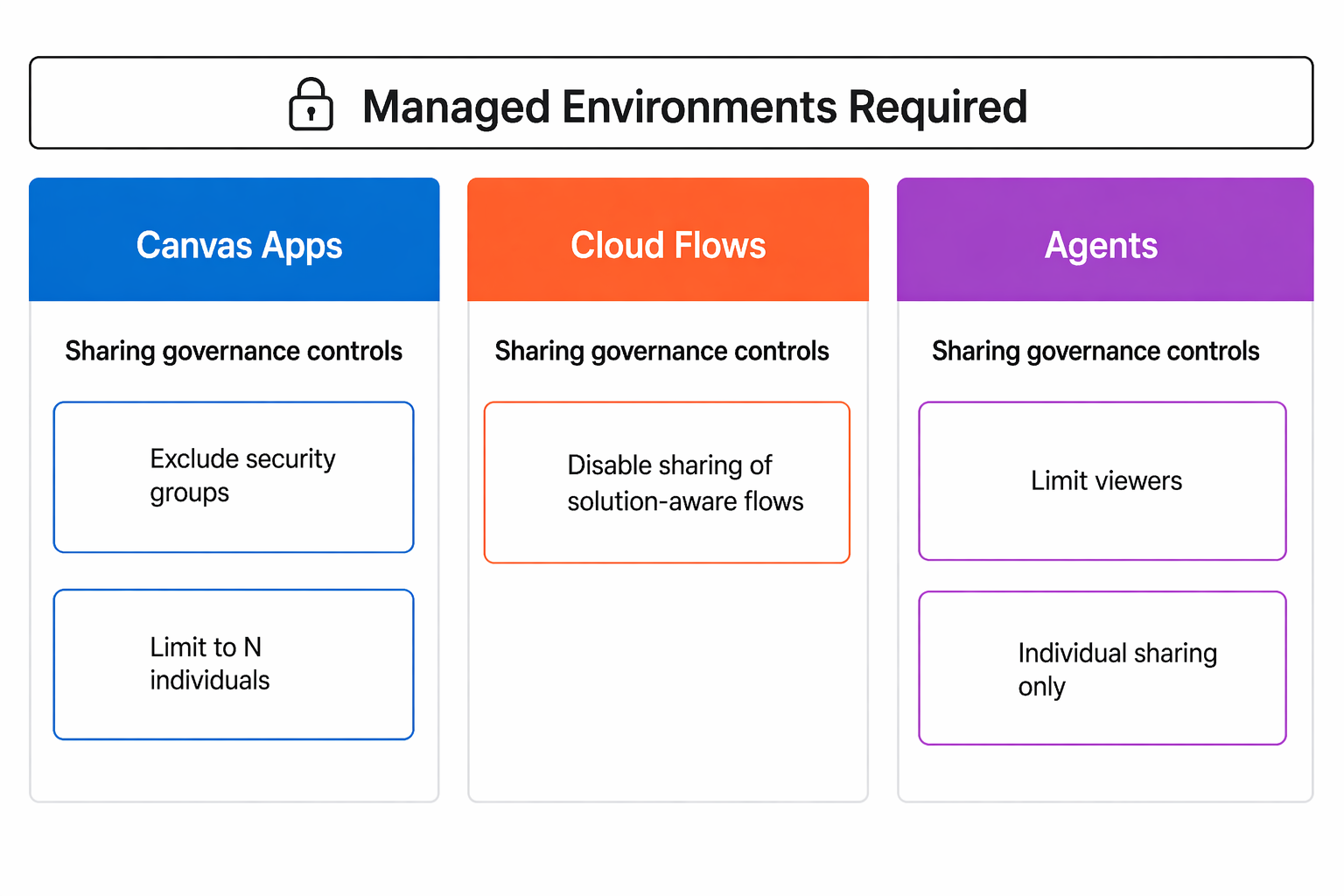
Canvas app sharing limits (Managed Environments):
- Exclude sharing with security groups - Prevents makers from sharing apps with broad security groups (which could include thousands of users).
- Limit total individuals - Set a maximum number of people a maker can share an app with (for example, 20 individuals). Makers who need broader sharing must request admin assistance.
Tip
This share limit generally applies only to makers who build personal productivity apps. Enterprise-level solutions aren't affected.
Cloud flow sharing limits (Managed Environments):
- Disable sharing of solution-aware cloud flows entirely, preventing makers from granting others access to automated processes that handle sensitive data.
Agent sharing limits (Managed Environments):
- Control whether makers can share agents with security groups or only with individuals.
- Set maximum viewer counts per agent.
- Differentiate between Editor and Viewer permissions.
Important
Sharing limits are enforced going forward - they don't retroactively revoke existing shares. However, non-compliant resources can't be reshared until they meet the new limits. Plan communication to makers before enabling restrictive sharing policies.
Enable Customer Lockbox
Customer Lockbox provides an extra approval layer when Microsoft support engineers need to access your environment data during a support case:
- When you enable it, Microsoft engineers must get your explicit approval before accessing environment data.
- You review the request, approve or deny it, and set an access window.
- All access is logged and auditable.
Enable Customer Lockbox in Tenant settings for Managed Environments handling sensitive data. At Zava, the admin team enables Lockbox for all Red zone environments containing financial data - ensuring no one (including Microsoft support) accesses Zava Pay data without explicit authorization.
Note
Customer Lockbox requires Managed Environments. Enable it for production environments in regulated zones where compliance mandates explicit access approval for all personnel, including the platform provider.
Manage tenant isolation
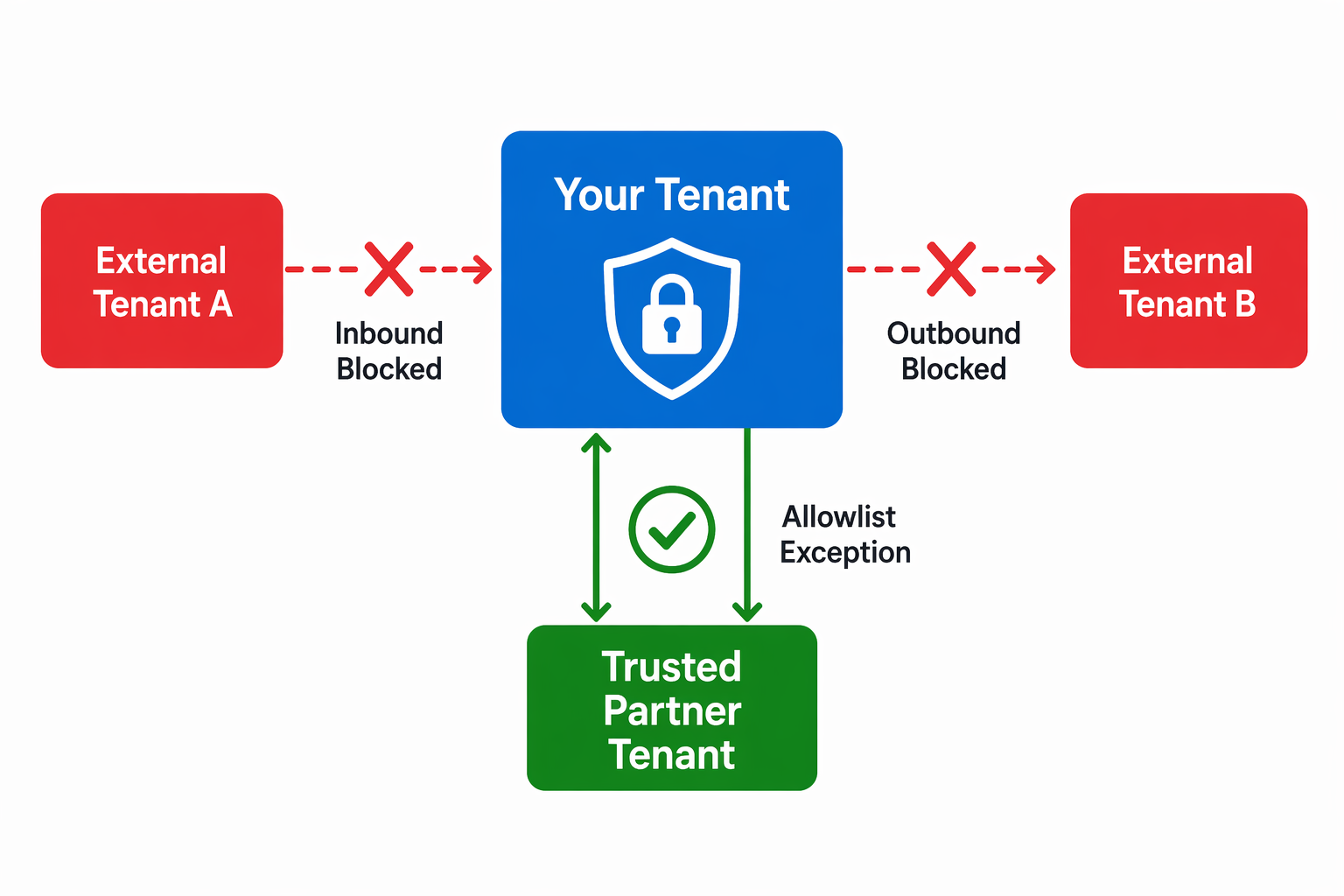
Tenant isolation controls whether your Power Platform tenant can establish connections to other tenants through connectors. By default, cross-tenant connections are allowed, meaning a maker in your tenant can build a flow that connects to another organization's SharePoint or Dataverse.
For organizations such as Zava with strict data boundaries:
- Inbound isolation - Block other tenants from connecting into your environments.
- Outbound isolation - Block your users from connecting to resources in other tenants.
- Allowlist exceptions - Permit specific trusted partner tenants while blocking all others.
Configure tenant isolation through Power Platform admin center or PowerShell when your organization requires strict data boundary controls.
Apply conditional access policies
Microsoft Entra ID conditional access policies extend identity-based security to Power Platform access. While you configure these policies in the Microsoft Entra admin center (not PPAC), they directly affect who can access Power Platform:
- Location-based access - Require users to be on corporate networks or approved IP ranges before accessing Power Platform services.
- Device compliance - Require managed, compliant devices for access.
- MFA requirements - Enforce multifactor authentication for all Power Platform access or for specific risk levels.
- Session controls - Limit session duration or enforce continuous access evaluation.
Coordinate with your identity team to create conditional access policies that align with your governance zones. Red zone environments might require compliant devices and approved locations, while Green zone environments allow broader access patterns.
Tip
Conditional access policies apply at the service level (Power Apps, Power Automate, Dataverse). They can't target specific environments directly. Use them as a broad security baseline, then layer environment-specific controls (IP firewall, security groups) on top.