Manage Microsoft Entra ID security groups
Microsoft Entra ID security groups are the primary mechanism for controlling which users can access specific Power Platform environments. Proper security group management ensures that only authorized, licensed users can enter each environment and that access is automatically revoked when users leave their assigned groups.
Understand how security groups protect environments
When you associate a security group with an environment, two conditions must be met for a user to access it:
- Group membership - The user must be a member of the associated security group.
- Valid license - The user must have a Dataverse license that grants usage rights.
Users who meet both conditions are automatically provisioned in the environment. Users removed from the security group are automatically disabled. Their account remains but they can no longer access the environment or its data.
Key behaviors to understand:
- Admin bypass - Power Platform Administrators, Global Administrators, and Dynamics 365 Service Administrators can access any environment regardless of security group membership.
- Application users - Service principals and application users can access any environment without security group membership. Govern these through IP firewall and connector restrictions instead.
- Default environment - The default environment can't be associated with a security group. It's accessible to all licensed users in the tenant. Never store sensitive data in the default environment.
Design a security group strategy
Map your security groups to your governance zones and environment topology:
| Environment type | Security group approach | Example |
|---|---|---|
| Default | No group (open to all) | All licensed users |
| Green zone (developer) | Per-user developer environments | Individual user or small team groups |
| Yellow zone (team) | Department or project groups | SG-PP-Marketing, SG-PP-HR |
| Red zone (production) | Tightly controlled groups | SG-PP-ZavaPay-Production-Users with strict membership review |
Naming conventions help administrators identify which groups apply to Power Platform environments versus other resources. At Zava, the admin team uses the prefix SG-PP- for all Power Platform security groups.
Associate a security group with an environment
To assign a security group during environment creation or after:
- In the Power Platform admin center, select Environments and then the target environment.
- Select Edit on the environment details.
- Under Security group, search for and select the appropriate Entra ID security group.
- Select Save.
After association:
- Existing users not in the group are disabled in the environment (not deleted - their data associations remain).
- New users added to the group are automatically provisioned on their next access attempt.
- Changes propagate within minutes for most tenants.
Important
Changing a security group on an active production environment can disrupt users. Plan group transitions carefully - add users to the new group before removing the old one to prevent access gaps.
Use nested security groups
For complex organizational structures, use nested groups to simplify management:
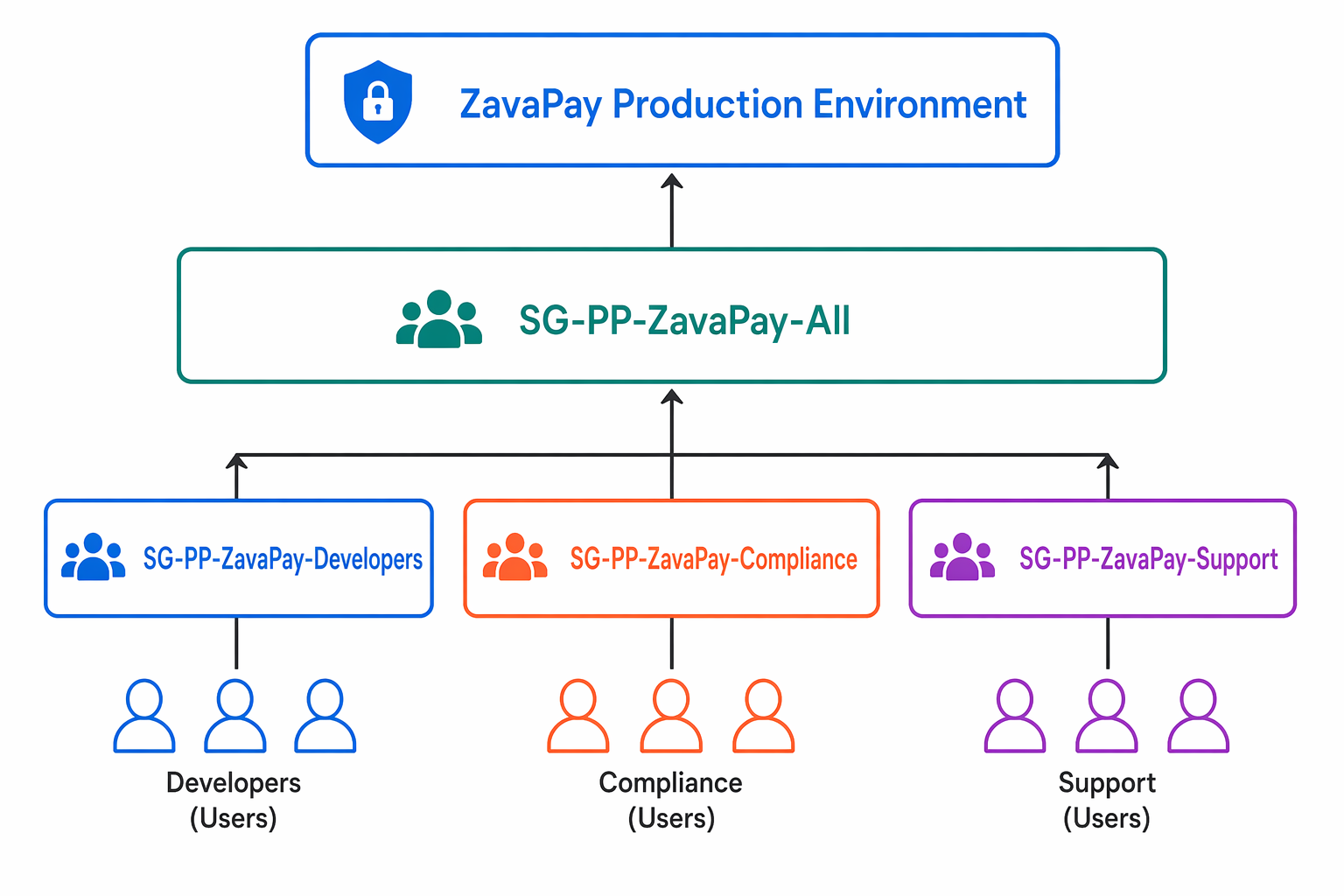
- Parent group - Associated with the environment. Controls who can access it.
- Child groups - Represent teams, departments, or roles. Members of child groups inherit access through the parent.
Example at Zava:
SG-PP-ZavaPay-All(parent, associated with environment)SG-PP-ZavaPay-Developers(child - development team)SG-PP-ZavaPay-Compliance(child - compliance officers)SG-PP-ZavaPay-Support(child - support staff)
Nested group members are resolved at runtime when they first access the environment. This means there's a slight delay on first access as group membership is evaluated.
Note
Nested security groups work with Dataverse group teams. Members are added to the environment when they first access it, not when they're added to the nested group. Plan for this just-in-time provisioning in your onboarding processes.
Manage group membership lifecycle
Security group governance requires ongoing management, not just initial setup:
Onboarding - When a new team member needs environment access:
- Add them to the appropriate Entra ID security group.
- Assign them a Dataverse license (if not already assigned).
- They're automatically provisioned on first access.
- An administrator assigns appropriate security roles (access without a role results in "data access denied").
Offboarding - When someone leaves a role or the organization:
- Remove them from the security group (or disable their Entra ID account).
- They're automatically disabled in the environment.
- Their data ownership and assignments remain for audit and reassignment purposes.
Periodic review - Schedule quarterly access reviews for Red zone environments:
- Export current security group membership.
- Compare against expected users based on role and business need.
- Remove users who no longer require access.
- Document review completion for compliance evidence.
Tip
Use Entra ID access reviews (part of Microsoft Entra ID Governance) to automate periodic group membership reviews. Configure reviewers, set review frequency, and automatically remove users who aren't re-approved.
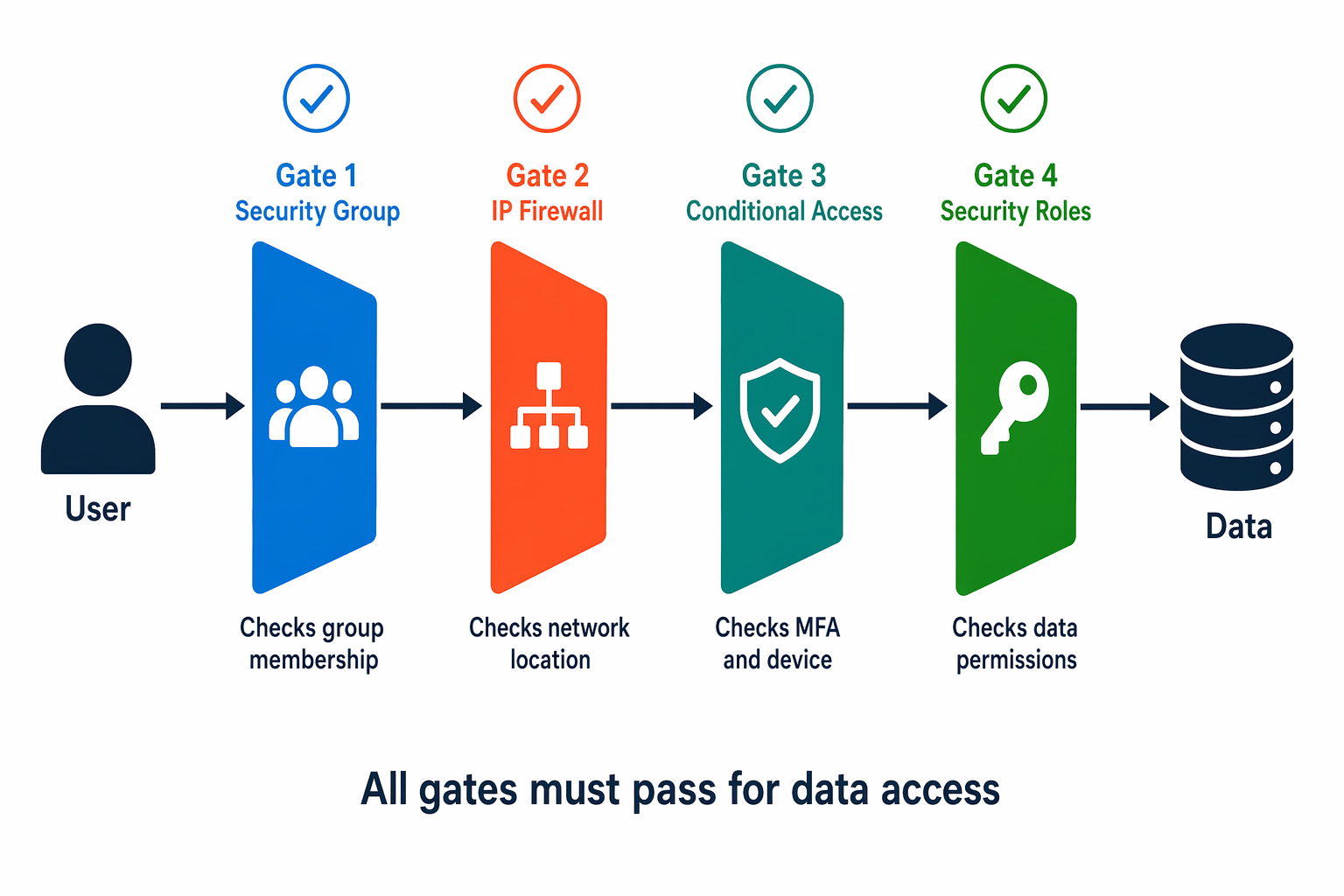
Combine security groups with other controls
Security groups work alongside other security mechanisms for comprehensive access governance:
- Security groups + IP firewall: Users must be in the correct group AND connect from an approved network. Satisfies both identity and network security requirements.
- Security groups + conditional access: Users must pass Entra ID conditional access policies (MFA, device compliance) before their group membership grants environment access.
- Security groups + security roles: Group membership gets users into the environment; security roles determine what data and features they can access inside it (covered in the next module).
This layered approach means that even if an attacker compromises a user's credentials, they still face network restrictions (IP firewall), device requirements (conditional access), and least-privilege data access (security roles) before reaching sensitive data.