Turn on and configure unannounced returns in Warehouse management only mode
Before you can turn on and configure unannounced returns in Warehouse management only mode, you must be running Supply Chain Management version 10.0.41 or later.
Set up source systems
To use Warehouse management only mode, you must have at least one source system. Each source system record configures the way that a specific external system integrates with Supply Chain Management in Warehouse management only mode. Go to Warehouse management > Setup > Warehouse management integration > Source systems.
To set up the source system, follow these steps:
- Select the source system that you want to configure or create a new one by selecting New in the Action Pane.
- Expand the Outbound shipments FastTab.
- In the Outbound shipment processing policy field, select the policy that the Enforce shipment to order matching option is set to Yes.
- Set the Enable return details creation option to Yes if your organization takes advantage of the use return details receiving feature.
- Expand the Inbound shipment orders FastTab.
- Set the Enable returns process toggle to Yes and then select the Number sequence code that the system should use to generate an order number for inbound shipment orders.
- Enter the name that identifies the document type for return orders in the source systems in the Return order type field.
Configure return item receiving policies
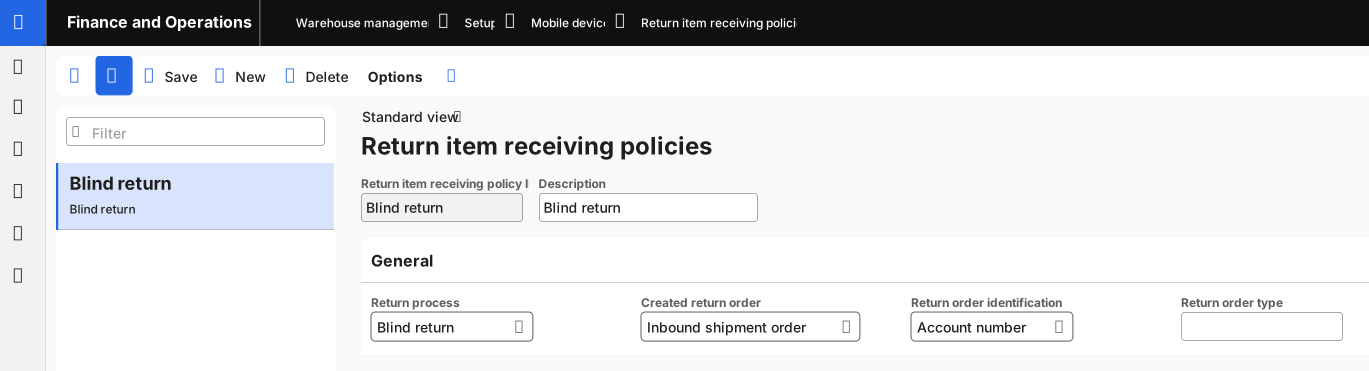
Return item receiving policies allow each menu item to process the return correctly. You can set up these policies by going to Warehouse management > Setup > Mobile device > Return item receiving policies and then following these steps:
Select New in the Action Pane.
Enter a Return item receiving policy ID and Description.
In the Return process field, select Blind return or Return details.
In the Created return order, select Inbound shipment order.
If you previously selected Blind return in the Return process field, the Return order identification field appears. Select Account number or None.
By selecting Account number, when the system registers a return with your external systems and Supply Chain Management, it returns an account number to help identify the return order. Also, if you selected Account number, the Return order type field appears. The system returns the value in this field to the source system when a return is registered with your external system.
By selecting None, the system doesn't return extra identifying information.