Verify whether a Microsoft tenant exists
To access either Surface Management Portal or Surface Support Portal, you must validate your organization's Microsoft tenant. A Microsoft tenant is your organization's private space in Microsoft's cloud. It gives your organization access to Microsoft services like:
- Microsoft 365 (Outlook, Teams, SharePoint, etc.)
- Entra ID
- Surface Management and Support Portals
Your organization's tenant is identified by its domain name. It's where users, devices, and data are managed securely. Before creating a new tenant, you must verify that one doesn't already exist. Do the following before creating a new tenant:
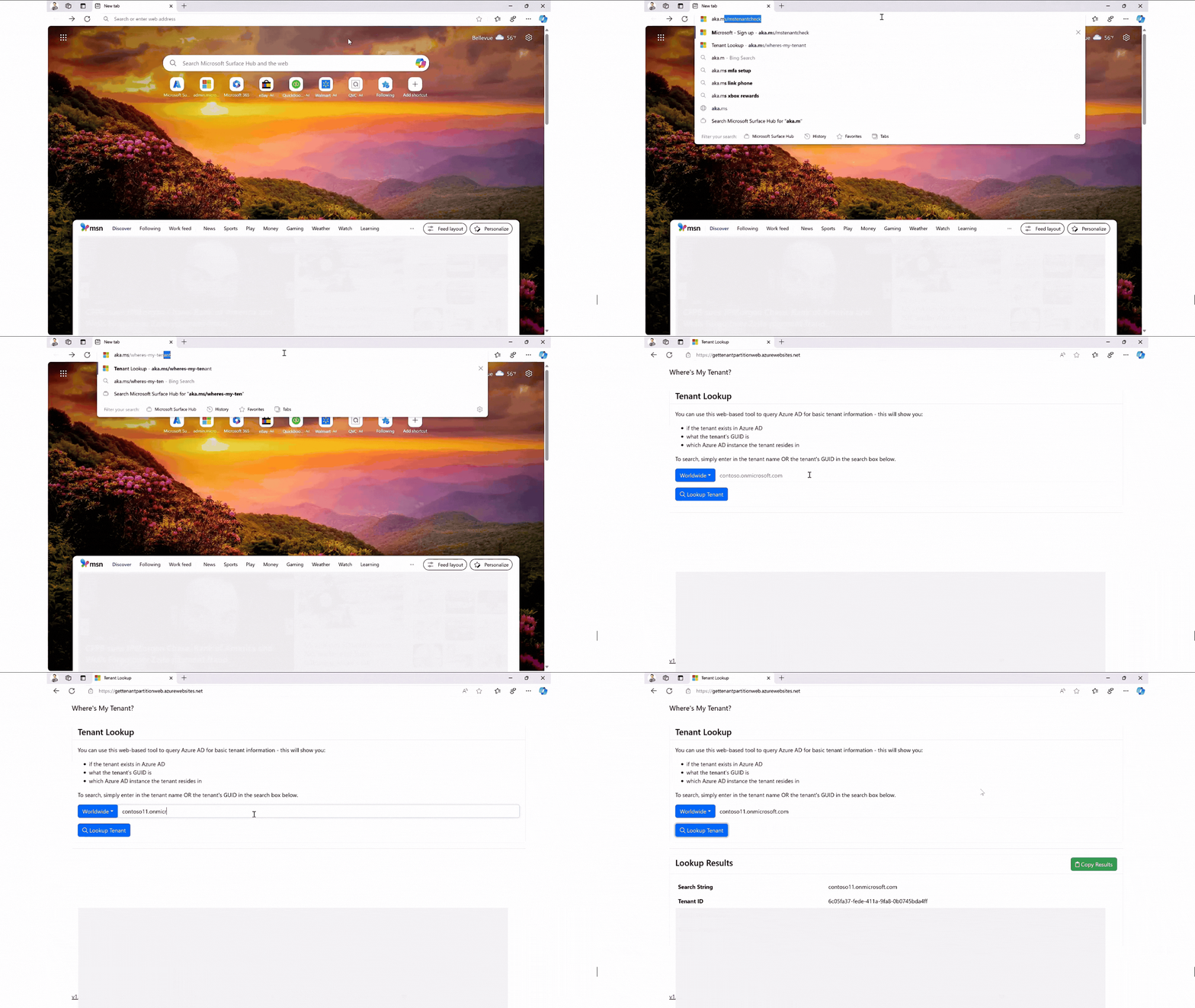
- Check if your organization has an existing tenant by visiting the tenant validation page.
- Enter your organization's domain name to check if a tenant already exists.
- Review the result.
Important
If a tenant exists, don't create a new one. Reach out to your IT team to get access to the Surface Management and Support Portal's onboarding process.
If, upon using the tenant validation page, you discover that your organization already has a valid tenant, don't create a new tenant. Identify the Global Administrator and ask them to sign in and create a user account and assign the appropriate roles.
Note
While validating through the Global Administrator is the recommended practice, creating a new tenant via Surface Support Portal is still an available option if needed.