Exercise - Create social and governance facts
Creating social and governance (S&G) facts in Microsoft Sustainability Manager is foundational for ESG (Environmental, Social, and Governance) reporting. You can systematically capture, organize, and quantify key metrics. For example, employee participation in performance reviews and career development across relevant dimensions like gender and reporting period.
You learn how to select relevant concept group and concept, create multiple associated facts for the concept and input key metrics, and ensure your data is structured for accurate ESG reporting and analysis.
In this exercise, you use the following existing concepts to generate multiple associated facts.
Number of employees who participated in regular performance and career development reviews by genderNumber of employees by gender
Generate social data
In the left navigation pane, select Social data.
On the Concept groups tab, select Training and skills development group.
In the Concepts section, in the Description column, select the
Number of employees who participated in regular performance and career development reviews by gender(esrs_social:NumberOfEmployeesWhoParticipatedInRegularPerformanceAndCareerDevelopmentReviewsByGender).Review the details of the concept and note that the dimension for this concept is gender.
Select the Associated Facts tab and then select Create multiple facts.
Specify the Reporting period as 2024.
Select Create facts.
Select the View fact creation job to review the progress.
Once the fact creation job is successfully completed, select each fact and specify the following metrics:
Numeric: Enter the number of employees (for example, 1,123,500) who participated by gender.
Decimal: Enter the value as 1.
Unit: Select Each.
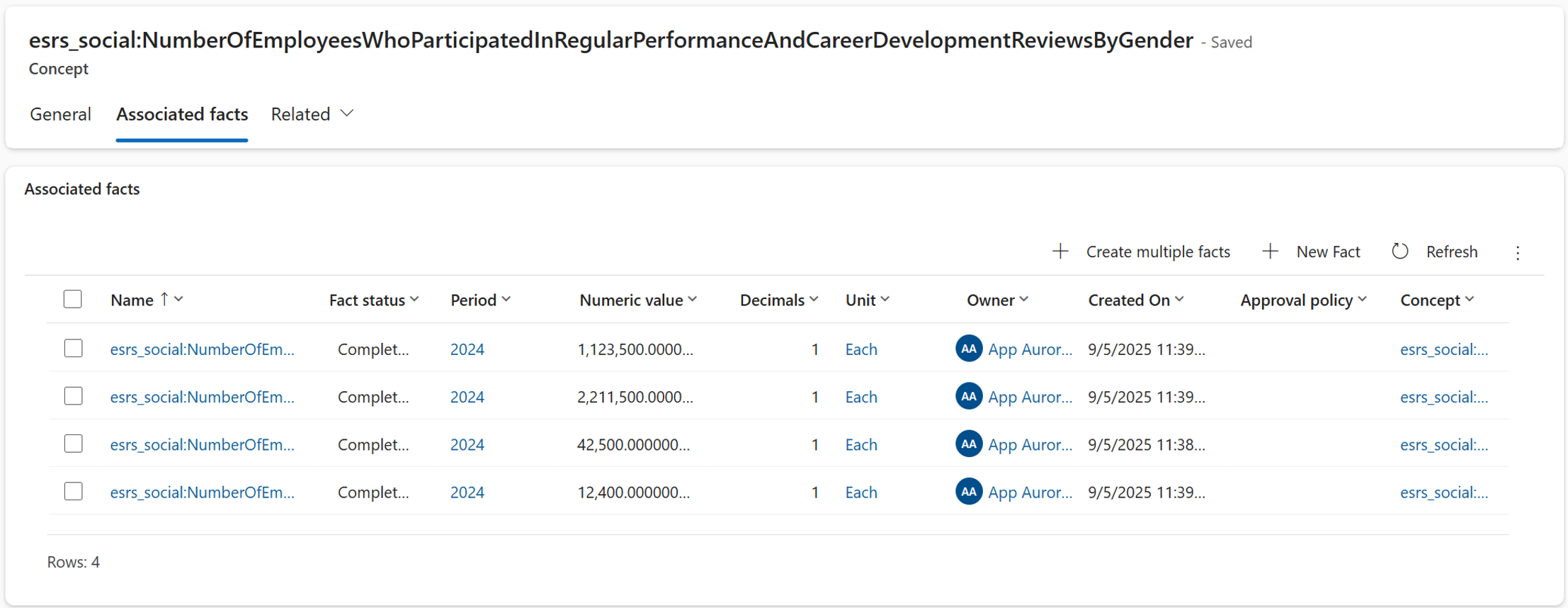
Select Save and Close. Repeat these steps for all the facts.
Repeat steps 1 to 10 to create facts for the following concept:
Concept groups: Characteristics of employees
Concept:
Number of employees by gender(esrs_social:CharacteristicsOfUndertakingsEmployeesNumberOfEmployeesByGenderTable)
