Perform data synchronization by using change tracking
Recall from the previous unit that Contoso's procurement and reporting systems need to know what changed in the Request and Device tables since their last check. They need this without re-reading every record. This unit shows you how change tracking makes that possible, and what to watch for when you rely on it.
Weigh change tracking against pulling everything
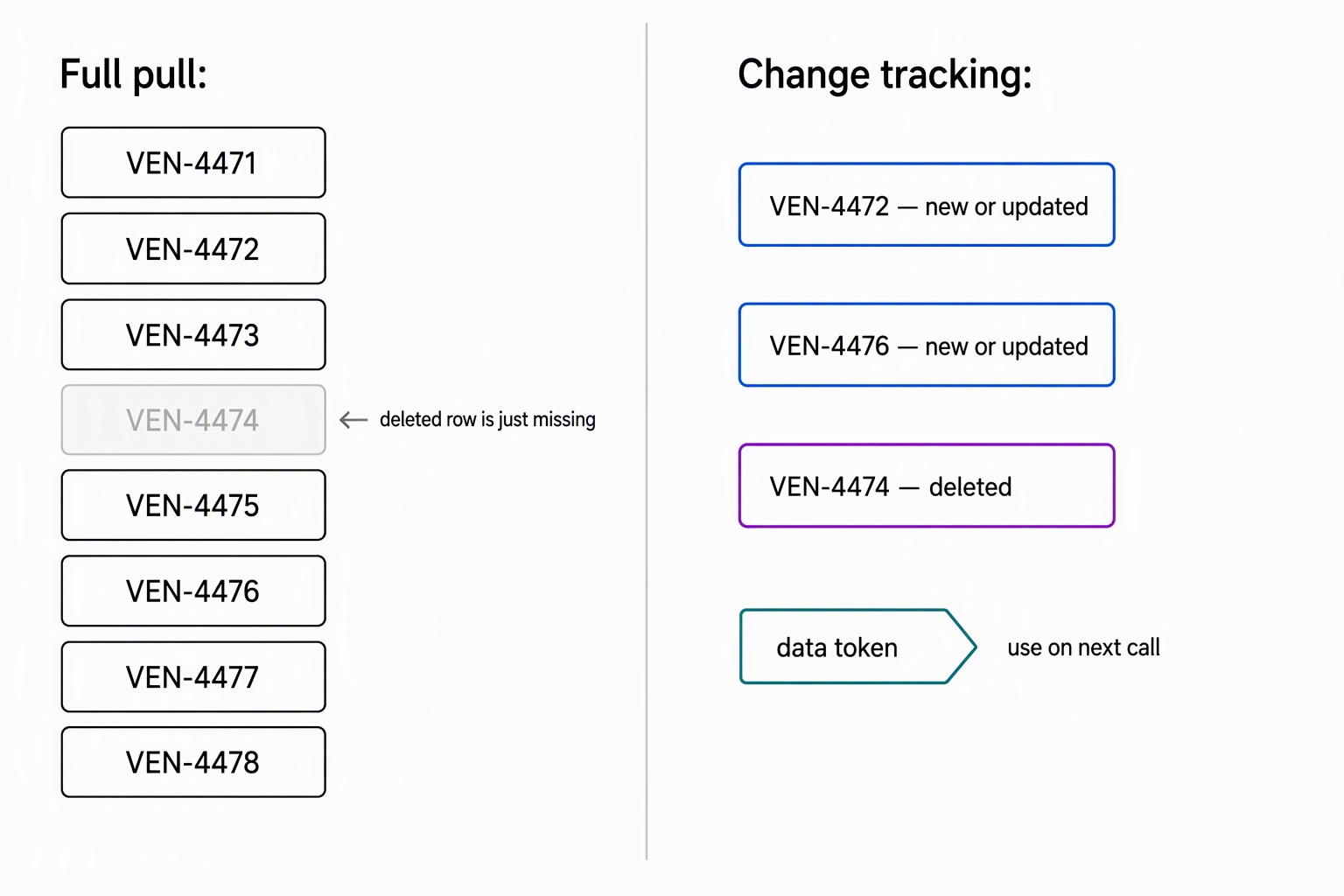
Picture the procurement system polling Dataverse every hour to update its budget forecast. The naive approach pulls every Request and Device row each time, then diffs the result against what it already has. That works at small scale, but the cost grows with the table, not with the number of changes. A table with 100,000 devices and 10 updates an hour still forces a 100,000-row read every time.
A full pull has a second problem that's easy to miss: it only shows you what currently exists. If someone deletes a device record between polls, a fresh extract doesn't contain it. The procurement system then has no way to tell whether someone deleted the record or it never existed at all.
Change tracking solves both problems. It returns only the rows that changed since a known point, and it reports deletions as distinct events. A downstream system can then remove its own copy instead of silently holding onto stale data.
This shift is the mental model to carry forward: change tracking isn't a faster query, it's a different question. Instead of asking Dataverse "what does this table look like right now?", the procurement system asks "what changed since I last checked?"
Turn on change tracking deliberately
Change tracking is a per-table setting, not something you request at query time. In the maker portal, you enable it from the table's Advanced options as the Track changes property. Programmatically, you set EntityMetadata.ChangeTrackingEnabled to true. Not every table qualifies; before you enable it, you can confirm eligibility by checking EntityMetadata.CanChangeTrackingBeEnabled, since some system tables don't support the feature.
Important
Once you enable change tracking for a table, you can't disable it. Treat this as a deliberate, permanent decision for each table in your schema, not a setting you toggle while testing.
For the Contoso scenario, you enable change tracking on the Request and Device tables specifically. Those are the tables the procurement and reporting systems depend on. Enabling it elsewhere in the schema adds no value and commits you to a setting you can't walk back.
Request changes through the Web API
With change tracking enabled, the Web API approach adds a Prefer: odata.track-changes header to a normal query. The response includes an @odata.deltaLink, an opaque, service-generated URL. This delta link encodes the original query (which table, which columns) along with a starting point for future changes. You don't construct this link yourself; you store whatever Dataverse returns and pass it back on the next request.
GET [Organization URI]/api/data/v9.2/devices?$select=name,devicestatus HTTP/1.1
Prefer: odata.track-changes
The first response returns the current rows that match the query, plus a delta link. The procurement system stores that link and queries it again at the next sync interval. That second request returns only what changed: new or updated devices, plus deleted devices reported with a distinct reason: deleted marker rather than being absent.
One constraint catches developers off guard the first time: a request that uses Prefer: odata.track-changes doesn't support these query options:
$filter$orderby$expand$top
You define the scope of what you're tracking in the original query's $select, not through filtering logic layered on top later.
Request changes through the SDK
The .NET SDK equivalent uses RetrieveEntityChangesRequest. The pattern mirrors the Web API's delta link, with its own vocabulary. You call it the first time with no version or token, and it returns every current record for the table, functioning as a full extract. Alongside that extract, the response carries a data token, something you store and send back on the next call to receive only what changed since.
var request = new RetrieveEntityChangesRequest
{
    EntityName = "contoso_device",
    Columns = new ColumnSet("contoso_name", "contoso_devicestatus"),
    PageInfo = new PagingInfo { Count = 5000, PageNumber = 1 }
};

var response = (RetrieveEntityChangesResponse)service.Execute(request);
// response.EntityChanges.DataToken holds the value to send with the next call.
foreach (var change in response.EntityChanges.Changes)
{
    if (change.Type == ChangeType.NewOrUpdated)
    {
        var item = (NewOrUpdatedItem)change;
        Entity device = item.NewOrUpdatedEntity;
        // Apply the current field values to your copy of the record.
    }
    else if (change.Type == ChangeType.RemoveOrDeleted)
    {
        var item = (RemovedOrDeletedItem)change;
        EntityReference deletedDevice = item.RemovedItem;
        // Remove this record from your copy using its EntityReference.
    }
}
This mirrors the Web API's reason: deleted marker: the SDK surfaces each deletion as a distinct RemovedOrDeletedItem instead of leaving you to infer it from a missing row.
For large tables, a single response can exceed the page size. You page through results using PagingInfo and the paging cookie Dataverse returns, the same way you page through any large SDK query. Before the next sync, capture the final data token.
Change-tracking constraints
Change tracking removes the cost of pulling everything, but it comes with rules that shape how you design the integration around it.
| Constraint | What it means for your design |
|---|---|
| One table per request | You call change tracking separately for Request and Device; there's no combined, cross-table delta link. |
| Changes expire after a configured window | The Organization table's ExpireChangeTrackingInDays column sets the window. A client that doesn't check in within it loses its token and has to re-sync from scratch. |
| Deletions arrive as their own entries | A deleted record arrives as a distinct entry, so the procurement system can remove its own copy instead of guessing why a row vanished. |
| Organization-level read access required | The calling user needs read access to the table at the organization level; limited access throws a privilege error rather than returning a partial result. |
Learn more about change tracking behavior and constraints.
The expiration window deserves particular attention when you design a sync schedule. A nightly batch job that occasionally slips to a gap longer than the configured window doesn't fail gracefully, it forces a full resynchronization the next time it runs. Build in monitoring for how long a token has gone unused, not just whether the last sync succeeded.
Guiding question: If the procurement system's sync job pauses for maintenance over a holiday weekend, what happens to its stored data token? What does the system need to do differently on its next run?
So far, this unit covers what happens when data flows out of Dataverse toward the procurement and reporting systems. The next units turn to the opposite direction: the vendor's inventory feed reports device availability into Dataverse. It identifies devices by its own vendor device code, not a Dataverse GUID. Matching an inbound record to the correct Dataverse row without exposing GUIDs to an external system calls for a different mechanism. The next unit introduces that mechanism.