Develop code that uses alternate keys
The previous unit tracks data flowing out of Dataverse toward Contoso's procurement and reporting systems. The vendor's inventory feed runs in the opposite direction: it reports device availability into Dataverse. But it only knows its own vendor device code, not the GUID that identifies a Device record internally.
This unit shows you how to define and use an alternate key. With it, your code looks up a Device record by the value the vendor already sends, instead of first translating that value into a GUID.
Replace a GUID lookup with a business identifier
An alternate key is a column, or a combination of columns, that uniquely identifies a row besides the primary key GUID. Think of it as giving Dataverse a second, business-meaningful way to find the same record. For the vendor integration, the obvious candidate is the device's vendor code. If the vendor always assigns a unique code per device, a single-column key on that value is enough.
Not every integration is that tidy. Suppose the vendor reuses device codes across its regional warehouses, so VEN-4471 exists once per warehouse rather than once globally. A single-column key on the vendor code alone would reject the second warehouse's device as a duplicate.
The fix is a composite key: combine the vendor device code with a warehouse code column. Together, the pair, not either column alone, guarantees uniqueness. The decision rule: a key only needs to cover exactly the columns that, taken together, the external system guarantees are unique.
Guiding question: Does the vendor's device code stay unique across every warehouse and region Contoso sources from, or only within one? Your answer decides whether the Device table needs a single-column or composite alternate key.
Define the key and know its constraints
You define an alternate key through the customization UI, or programmatically. The programmatic route builds an EntityKeyMetadata object (SDK) or the equivalent EntityKeyMetadata entity type (Web API) with the key columns. It then submits the object with the CreateEntityKey message. Either path creates the same underlying key; the programmatic route lets you script the definition alongside the rest of your solution.
A handful of constraints shape what a valid key looks like:
| Constraint | Why it matters here |
|---|---|
| Only certain column types qualify (whole number, decimal, single line of text, date/time, lookup, option set) | Your vendor device code column needs to be one of these types, typically single line of text |
| Key columns can't have field-level security applied | Securing a column later would silently break lookups that rely on the key |
| Total key size stays under SQL index limits (900 bytes, 16 columns) | Composite keys with long text columns can hit this ceiling faster than you'd expect |
| Up to 10 alternate keys per table | Plan which identifiers genuinely need a key rather than defining one for every candidate column |
| Not supported on virtual tables | The Device table itself works fine, since it isn't virtual |
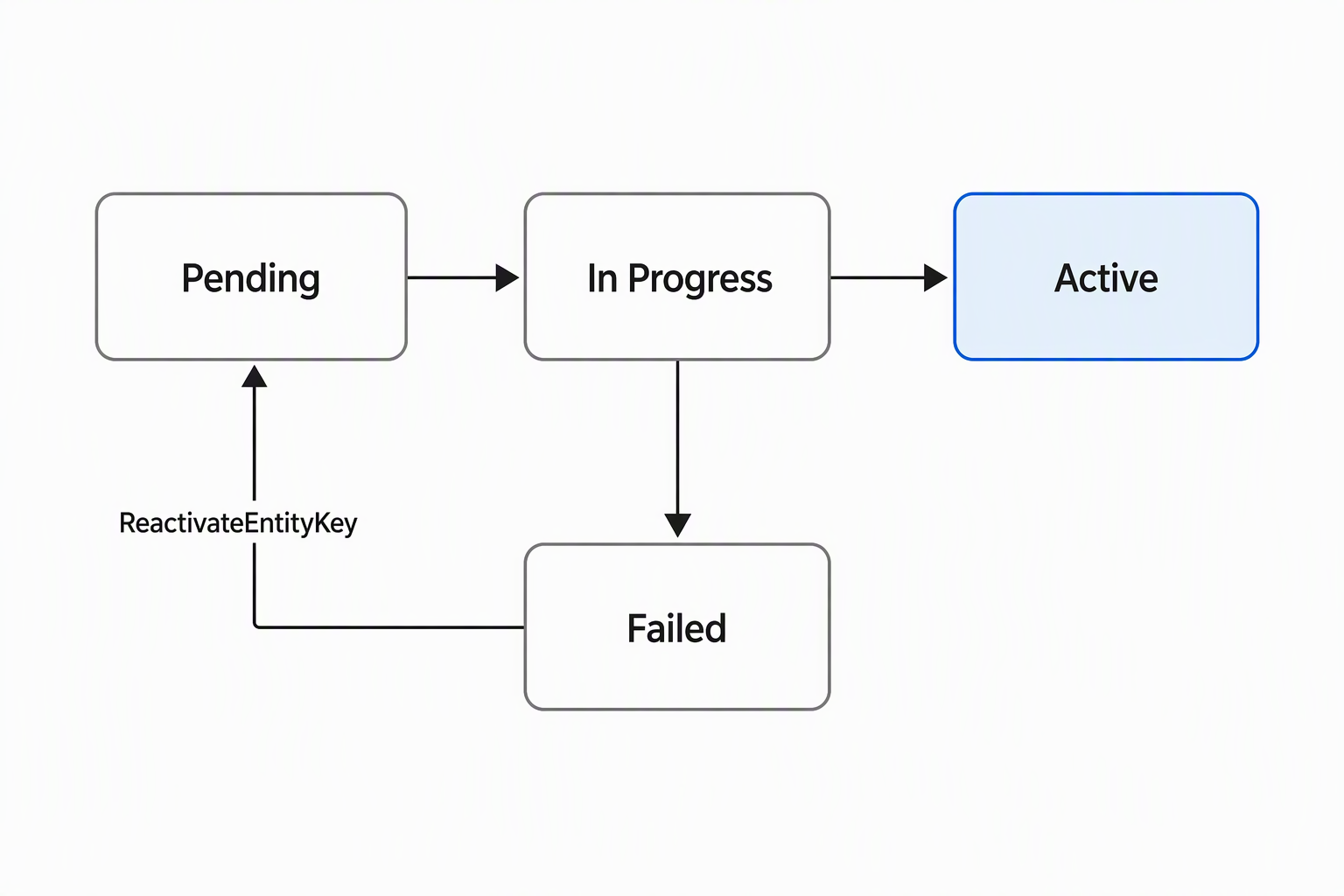
Creating the key also creates a database index to enforce it. On a table with many existing rows, that index build runs as a background job rather than blocking you. The job's status moves from Pending to In Progress to Active, or to Failed if something conflicts with existing data. A failed job doesn't require starting over: you fix the underlying data issue, then retry the same key definition with ReactivateEntityKey.
Learn more about defining alternate keys and index creation.
Reference a record through the Web API
Once the key is active, you reference the Device record in a URL using the key name and value instead of the GUID:
GET [Organization URI]/api/data/v9.2/contoso_devices(contoso_vendordevicecode='VEN-4471')
A composite key follows the same pattern with comma-separated key-value pairs:
GET [Organization URI]/api/data/v9.2/contoso_devices(contoso_vendordevicecode='VEN-4471',contoso_warehousecode='WH-12')
This behavior is exactly what lets the inventory feed's inbound call carry the vendor's own identifiers end to end, with no separate lookup step first.
Important
Key values that contain / < > * % & : \ ? + break a direct URL reference like the ones above, because those characters are structurally significant in a URL path segment. If a vendor code ever contains one of them, query with $filter instead: GET .../contoso_devices?$filter=contoso_vendordevicecode eq 'VEN-44/71'. Take the single matching record from the returned collection rather than addressing it directly by key.
Reference a record through the SDK
The .NET SDK gives the Entity class a constructor overload that takes a key name and value instead of a GUID. It also provides an overload that takes a KeyAttributeCollection for composite keys:
KeyAttributeCollection keys = new KeyAttributeCollection
{
    { "contoso_vendordevicecode", "VEN-4471" },
    { "contoso_warehousecode", "WH-12" }
};

Entity device = new Entity("contoso_device", keys);
device["contoso_devicestatus"] = new OptionSetValue(1); // Available
A common mistake shows up here: the constructor populates Entity.KeyAttributes, not Entity.Attributes. KeyAttributes identifies which record you mean; Attributes carries the data you're setting on it. Mixing the two up, for example by trying to read the vendor code back from Attributes, returns nothing, because the key value never lands there.
EntityReference follows the identical pattern. It matters whenever you point at a record without retrieving it first. That includes setting a lookup column on another record, or supplying the target for a message like DeleteRequest.
EntityReference deviceRef = new EntityReference(
    "contoso_device", "contoso_vendordevicecode", "VEN-4471");

service.Execute(new DeleteRequest { Target = deviceRef });
With the key defined, your code can find a Device record using nothing but the vendor's own code. You've closed the gap that opened this unit: no more translating an external identifier into a GUID before anything else can happen.
The next unit builds directly on this. It introduces the UpsertRequest message, which pairs the alternate key you just defined with a single call. That call creates a Device record if the vendor code is new, or updates it if the record already exists.