Normalize event log data
By transforming the event log data, you can make it easier to use during the process mining analysis effort. If your event log data is less than 1-2 GB of data, using Power Query is a good option. However, if you're working on larger log data files, performing the transformations outside of process mining can be more efficient.
The following sections review some common transformations that you can make before ingesting data into process mining.
Rename columns
The system maps columns from the event log data into process mining, but the names of the columns pass through and then the system uses them during the process analysis efforts. Talk with your team to agree on naming conventions in advance and then implement those names as part of the transformation. For example, you could use "c_" as the prefix for all case-level attributes. This approach can help you quickly recognize case-level data. Typically, we recommend that you use camel case and avoid the use of underscores (_) in the names, for example, ResourceHourlyRate instead of resource_hourly_rate.
Additionally, make sure that the name of the column clarifies its contents. For example, naming a column as Timestamp1 and Timestamp2 wouldn't be as clear as renaming them to StartTimestamp and EndTimestamp.
From Power Query, you can implement your new naming scheme by double-clicking the header and changing the column name.
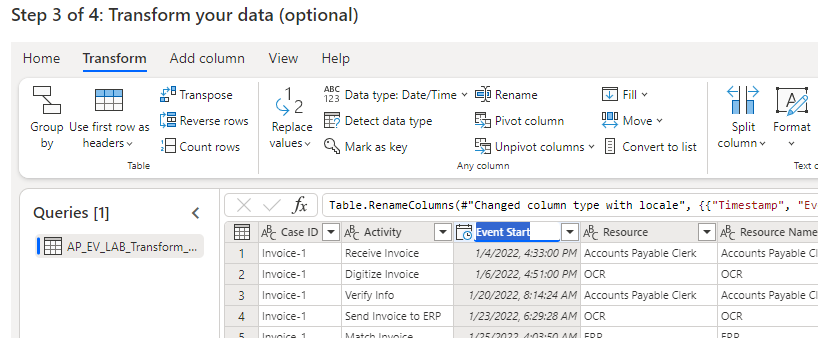
When you implement clear and consistent column names, the use of the data is more efficient in the analysis phase of the data.
Change column type
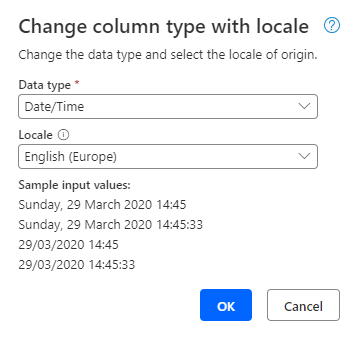
Make sure that you review the data type and locale for each column in the event log to ensure that it's correct. Often, the event log infers data type and doesn’t represent it properly. You can change the data type, and if appropriate, you can indicate its locale.
Replace values
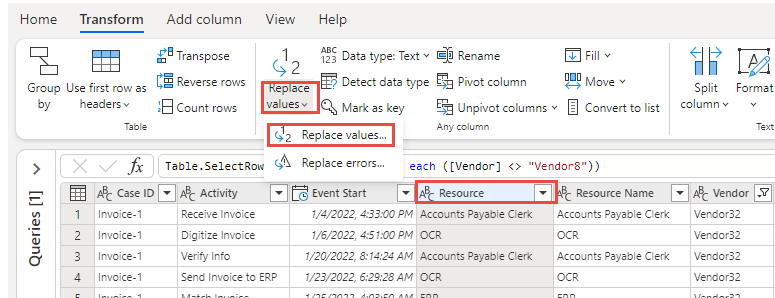
The extracted data from the system of record might include code fields that, while efficient for storage, aren't efficient for humans to use in analyzing a process. For example, an order status column might have a value of 2277333, which the system knows as Shipped. By using the Replace values feature of Power Query, you can update these columns to have meaningful data.
Other common transformations
Power Query is a powerful transformation engine that you can use to handle many challenges that you encounter with event log data. For more information, see the reference on Power Query, which describes the available operations for data transformation.
Other common event log transformations that you might perform include:
Split data into multiple columns. For example, if you have an account number that contains the office and a unique identifier, you might want to split the office ID.
Combine data from multiple columns. For example, you might want to combine the activity name with the source system name.
Use the Fill values capability to fill a column that has some null values and then apply a default value to those rows.
Transforming the event log data is an important step in getting the cleanest data possible for ingestion into process mining. Having a properly prepared event log can speed up the process of analyzing the data.