Interpret and scope replication failures
Troubleshooting starts with understanding what your environment looks like when it's healthy. Without a definition of healthy behavior, normal schedule latency, an intentionally offline DC, or a partition that isn't hosted on a partner can look like failure.
Establish the expected state
AD DS uses multi-master replication. A writable DC can originate a change. Other DCs receive that change through inbound replication.
Repadmin reports partner state from the destination's perspective:
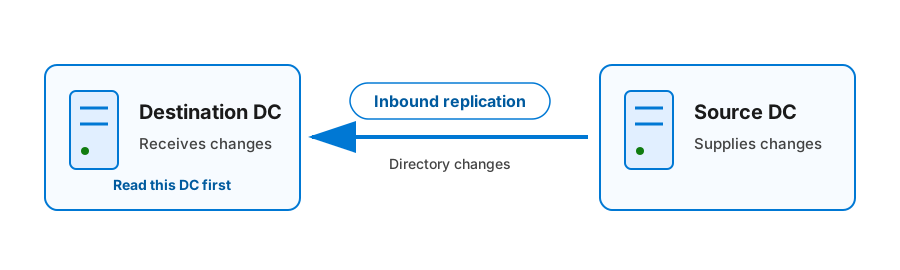
The destination requests changes. Read the destination first, then the source, directory partition, last success, last attempt, failure count, and status.
Repadmin uses Directory System Agent (DSA) in headings and column names. In this context, a DSA is a DC. The output also reports a globally unique identifier (GUID) for each DSA.
Identify the directory partition
Every replication result applies to one directory partition, also called a naming context.
| Directory partition | Expected replica scope |
|---|---|
Domain, such as DC=contoso,DC=com |
All DCs in that domain: writable full replicas on writable DCs and read-only replicas on RODCs; global catalogs also hold partial read-only replicas of other domains |
| Configuration | Every DC in the forest |
| Schema | Every DC in the forest |
DomainDnsZones |
DCs running DNS Server and enlisted in the domain DNS application partition |
ForestDnsZones |
DCs running DNS Server and enlisted in the forest DNS application partition |
A missing relationship is a fault only when the destination should hold that partition and the source is a valid partner for it.
When defining a healthy baseline, you should also record:
- The expected intrasite or intersite schedule.
- The site link and network path.
- Planned maintenance or staged offline DCs.
- Recent promotion, demotion, address, DNS, firewall, site, subnet, or time changes.
Build a baseline for assessing AD DS replication health
Collect broad status before restarting services, forcing replication, or changing configuration. Use an elevated shell on a DC or an administrative workstation with the required Remote Server Administration Tools.
| Command | Access and effect | Use |
|---|---|---|
repadmin /replsummary |
Read-only diagnostic. Use an account that can query every included DC. | Compare source and destination failures, failure percentages, and largest deltas. |
repadmin /showrepl * /csv |
Read-only diagnostic. Redirection writes a local comma-separated values (CSV) file. Forest-wide procedures commonly require Enterprise Admins or equivalent access. | Filter every inbound relationship by destination, source, partition, last success, and status. |
repadmin /showrepl <DCName> /all /verbose |
Read-only diagnostic. Use an account that can query the named DC. | Inspect one destination in detail. |
Get-ADReplicationFailure |
Read-only diagnostic. Requires Active Directory Web Services (ADWS) and directory read access. | Return structured failure data by server, site, domain, or forest. |
Get-ADReplicationPartnerMetadata |
Read-only diagnostic. Requires ADWS and directory read access. | Return structured inbound partner and last-attempt data for each requested partition. |
dcdiag /test:replications /e /v |
Read-only diagnostic. Run elevated with an account permitted to test all targeted DCs. | Correlate replication failures with DC diagnostics. |
dcdiag /test:dns /e /v |
Low-impact operational change. Run elevated with Enterprise Admin credentials or equivalent authorization for every targeted DC. /e targets all forest DCs and can be slow. |
/test:dns defaults to /DnsAll. Its dynamic-update test creates and automatically removes _dcdiag_test_record; use it to identify DNS client, zone, delegation, registration, or resolution faults. |
When the full DNS suite isn't required, use the narrower /DnsBasic or /DnsRecordRegistration subtest that answers the diagnostic question.
Save forest-wide partner state:
repadmin /showrepl * /csv > .\showrepl-before.csv
PowerShell can provide structured views:
Get-ADReplicationFailure -Target "contoso.com" -Scope Forest
Get-ADReplicationPartnerMetadata `
  -Target BNE-DC-01 `
  -Scope Server `
  -Partition * `
  -PartnerType Inbound
ADWS is the management channel for these cmdlets. A cmdlet failure can indicate unavailable ADWS or blocked management traffic rather than failed directory replication. Confirm with Repadmin and event data.
Read the scenario baseline
The 07:15 baseline is later than the 07:00 actionable deadline and includes the stated 15-minute monitoring tolerance for the 60-minute SEA-BNE replication window.
The administrator runs repadmin /replsummary. The abridged output is:
Replication Summary Start Time: 2026-07-20 07:15:00

Source DSA          largest delta    fails/total  %%   error
SEA-DC-01              01h:18m          5 / 5    100  (1722) The RPC server is unavailable.

Destination DSA     largest delta    fails/total  %%   error
BNE-DC-01              01h:18m          5 / 5    100  (1722) The RPC server is unavailable.
This output provides three useful facts:
- All five summarized replica links fail from one source to one destination. This aggregate output doesn't name the partitions.
- The
replsummarylargest delta is the longest time since the last successful replication among a DSA's partners, a per-server worst-case reported for every DC in the forest. It's useful for broad scope, but it isn't the timing of this oneSEA-BNElink. Judge the detailed partner/link timing from/showreplor partner metadata against the 60-minute link schedule and the stated outage/tolerance. - Error 1722 points to Remote Procedure Call (RPC) connectivity, but it doesn't yet prove whether the cause is DNS, routing, firewall policy, or service state.
Filtered rows from the saved /showrepl CSV identify the five hosted naming contexts:
"Destination DSA","Source DSA","Naming Context","Last Success Time","Last Failure Time","Number of Failures","Last Failure Status"
"BNE-DC-01","SEA-DC-01","DC=contoso,DC=com","2026-07-20 05:56:14","2026-07-20 07:11:32","5","1256"
"BNE-DC-01","SEA-DC-01","CN=Configuration,DC=contoso,DC=com","2026-07-20 05:56:15","2026-07-20 07:11:32","5","1722"
"BNE-DC-01","SEA-DC-01","CN=Schema,CN=Configuration,DC=contoso,DC=com","2026-07-20 05:56:16","2026-07-20 07:11:32","5","1722"
"BNE-DC-01","SEA-DC-01","DC=DomainDnsZones,DC=contoso,DC=com","2026-07-20 05:56:18","2026-07-20 07:11:32","5","1256"
"BNE-DC-01","SEA-DC-01","DC=ForestDnsZones,DC=contoso,DC=com","2026-07-20 05:56:19","2026-07-20 07:11:32","5","1256"
The higher-priority Configuration and Schema naming contexts carry the actual 1722 RPC bind error. The destination then cancels the remaining queued work for the Domain, DomainDnsZones, and ForestDnsZones naming contexts, which report the secondary status 1256. The Configuration and Schema 1722 rows are therefore the diagnostic lead. The named rows, together with the scenario's replica-placement facts, establish that all five partitions hosted by both DCs are affected.
repadmin /showrepl BNE-DC-01 /all /verbose preserves the detailed domain-partition evidence used later in the scenario:
Brisbane\BNE-DC-01

==== INBOUND NEIGHBORS ======================================

DC=contoso,DC=com
    Seattle\SEA-DC-01 via RPC
        DSA object GUID: 3f7d6a19-2d85-4b30-93f2-1167f4955b84
        Last attempt @ 2026-07-20 07:11:32 failed, result 1256 (0x4e8):
            The remote system is not available. For information about network
            troubleshooting, see Windows Help.
        5 consecutive failure(s).
        Last success @ 2026-07-20 05:56:14.
Interpret the output literally:
| Field | Scenario value | Meaning |
|---|---|---|
| Destination | BNE-DC-01 |
This DC attempted inbound replication. |
| Source | SEA-DC-01 |
This partner should supply changes. |
| Partition | DC=contoso,DC=com |
This detailed secondary cancellation applies to the domain partition. |
| Last success | 05:56 | The relationship worked before the recent failure window. |
| Consecutive failures | 5 | The failure persists across several attempts. |
| Status | 1256 | This is secondary; use the Configuration and Schema 1722 rows as the diagnostic lead and test the shared RPC dependency chain. |
The same relationship appears in structured PowerShell output. The selected fields are shortened for readability; the server is BNE-DC-01, the partner is SEA-DC-01, and every row has PartnerType set to Inbound.
| Partition | Last success (+10:00) | Last attempt (+10:00) | Result |
|---|---|---|---|
DC=contoso,DC=com |
2026-07-20 05:56:14 | 2026-07-20 07:11:32 | 1256 |
CN=Configuration,DC=contoso,DC=com |
2026-07-20 05:56:15 | 2026-07-20 07:11:32 | 1722 |
CN=Schema,CN=Configuration,DC=contoso,DC=com |
2026-07-20 05:56:16 | 2026-07-20 07:11:32 | 1722 |
DC=DomainDnsZones,DC=contoso,DC=com |
2026-07-20 05:56:18 | 2026-07-20 07:11:32 | 1256 |
DC=ForestDnsZones,DC=contoso,DC=com |
2026-07-20 05:56:19 | 2026-07-20 07:11:32 | 1256 |
A targeted DCDiag replication test records the secondary domain-partition cancellation:
Testing server: Brisbane\BNE-DC-01
Starting test: Replications
   [Replications Check,BNE-DC-01] A recent replication attempt failed:
      From SEA-DC-01 to BNE-DC-01
      Naming Context: DC=contoso,DC=com
      The replication generated an error (1256):
         The remote system is not available. For information about network
         troubleshooting, see Windows Help.
      The failure occurred at 2026-07-20 07:11:32.
      The last success occurred at 2026-07-20 05:56:14.
   Warning: Latency information for one retired invocation ID was ignored.
   ......................... BNE-DC-01 failed test Replications
This detailed domain-partition result maintains the scenario correlation, but it isn't the primary bind failure. The Configuration and Schema rows reporting 1722 remain the diagnostic lead.
The retired-invocation-ID warning doesn't name SEA-DC-01, the affected naming context, or the incident time range. Record it for separate review, but exclude it from the causal evidence for this relationship.
The destination-logged event packet aligns with the same attempt:
Log Name:      Directory Service
Provider:      Microsoft-Windows-ActiveDirectory_DomainService
Event ID:      1925
Level:         Warning
TimeCreated:   2026-07-20T07:11:32+10:00
Computer:      BNE-DC-01.contoso.com

Directory partition:
DC=contoso,DC=com

Source directory service:
CN=NTDS Settings,CN=SEA-DC-01,CN=Servers,CN=Seattle,CN=Sites,CN=Configuration,DC=contoso,DC=com

Source domain controller address:
3f7d6a19-2d85-4b30-93f2-1167f4955b84._msdcs.contoso.com

Additional Data
Error value:
1256 The remote system is not available. For information about network
troubleshooting, see Windows Help.
Corroborate the DNS hypothesis with the direct, server-directed CNAME and A-record queries in the next unit and with inspection of the writable authoritative A record. A DNS Server Analytical Event 257 can provide additional timing evidence, but its raw event fields don't by themselves establish a decoded A-record address. When retained for investigation, preserve the raw PacketData and decode it with a documented method before relying on its RDATA.
The Directory Service event is logged on the destination and identifies the source DSA, source address label, naming context, time, and status. Here it records the secondary 1256 cancellation for the domain partition; correlate it with the Configuration and Schema 1722 results at the same attempt time, which are the diagnostic lead. The direct DNS query and authoritative-record inspection corroborate the stale address. No matching source-side failure is expected for this stale-DNS pull attempt because the destination doesn't contact SEA-DC-01.
Find the first actionable error
One cause can generate many later statuses. Diagnose the earliest error that explains the rest.
| Evidence | Interpretation |
|---|---|
| Status 8477, replication request posted; waiting for reply | An isolated result means replication is in progress. Recheck it; if it persists or repeats beyond the expected schedule or operational window, investigate the destination queue and implicated resource or network conditions. |
| Error 1256 after another error from the same source | The destination canceled later partition work after an earlier bind failure. Investigate the first non-1256 status. |
| Error 8452 after a topology or partition change | The initiator and destination can temporarily disagree about valid partners or partition placement. Check convergence before repair. |
| Large delta with no errors | Compare the delta with the site-link schedule and intentional outages. Delta alone isn't proof of failure. |
Scope before testing
The distribution of failures suggests the next test.
| Failure pattern | Likely scope |
|---|---|
| One partition between otherwise healthy partners | Partition placement, topology knowledge, or partition-specific data |
| Every partition from one source to one destination | DNS, network, RPC, authentication, or source service |
| Every partner of one destination | Destination DNS client, network path, local service, storage, or disabled inbound replication |
| Most DCs in one site | Site mapping, site link, routing, firewall, or shared DNS |
| Many sites or the forest | Shared DNS, time, security policy, topology, or widespread service change |
The Contoso failure affects all five hosted partitions from SEA-DC-01 to BNE-DC-01. The next unit tests the shared dependency chain from the destination toward the source.