Understand the local Active Directory Domain Services database
AD DS presents one logical directory. Each domain controller stores only the replicas assigned to that server in a local ESE database. Administrators manage directory objects through supported interfaces. They don't open NTDS.dit, infer forest state from its file size, or move database and log files while AD DS is running.
Important
NTDS.dit, ESE logs, system-state backups, and Directory Services Restore Mode credentials contain or protect sensitive directory data. SYSVOL is broadly readable by authenticated domain users. Never place passwords, private keys, or other secrets in policy files or scripts.
When you perform Active Directory administrative tasks using an LDAP client, an administrative console, or an application, a directory request is sent to the Directory System Agent (DSA). The DSA:
- Authenticates the request.
- Evaluates access against the object's security descriptor.
- Applies schema, naming, and referential constraints.
- Reads or changes logical directory objects.
- Uses ESE to persist local state.
The ESE is the database engine that Active Directory Domain Services uses to store and manage its data. ESE supplies page management, indexes, caching, transactions, logging, and crash recovery. These mechanisms are implementation details beneath the directory service. Supported tools address objects and attributes through the DSA rather than ESE tables.
The Active Directory model includes:
| Element | Operational purpose |
|---|---|
| Object | An instance such as a user, computer, group, site, or policy container |
| Attribute | A typed value or set of values on an object |
| Class | The schema definition that identifies allowed and required attributes |
| Distinguished name | The object's current location in the directory hierarchy |
| Object globally unique identifier | A stable identity that survives a rename or move within the domain |
| Security descriptor | The owner, auditing policy, and access-control rules applied to the object |
| Schema | Forest-wide definitions for object classes, attributes, syntax, indexing, and global catalog inclusion |
ESE maps these logical structures to pages, records, long values, and indexes within the Active Directory database. Administrators normally don't need the table layout, distinguished-name tags, long-value identifiers, or internal index catalog.
A directory partition also called a naming context, is an independently replicated directory tree. A domain controller can host several replica types in the same NTDS.dit database file.
| Partition or replica | Data | Typical replica scope | Read-only domain controller consideration |
|---|---|---|---|
| Domain partition | Users, computers, groups, organizational units, GPO containers, and other domain objects | Full replica on domain controllers for that domain | Read-only replica; ordinary writes originate on a writable domain controller |
| Configuration partition | Sites, services, partitions, display specifiers, and forest-wide service configuration | Replica on every domain controller in the forest | Read-only replica |
| Schema partition | Class and attribute definitions | Replica on every domain controller in the forest | Read-only replica |
| Application directory partition | Application-defined data with an explicit replica set | Only enlisted domain controllers | Read-only when the server is enlisted |
DomainDnsZones |
Domain-wide Active Directory-integrated DNS data | Domain controllers enlisted for that application partition | Read-only when hosted |
ForestDnsZones |
Forest-wide Active Directory-integrated DNS data | Domain controllers enlisted for that application partition | Read-only when hosted |
| Global catalog partial replica | A forest-searchable subset of attributes from objects in other domains | Global catalog servers | Partial replicas remain read-only; filtered attributes and password caching require separate controls |
The global catalog doesn't contain a full copy of every domain:
- It contains the server's normal full domain replica.
- It contains partial, read-only replicas of the other domain partitions in the forest.
- The schema's partial attribute set determines which attributes appear in those partial replicas.
A read-only domain controller (RODC) stores read-only replicas for the partitions assigned to it. It normally receives directory changes inbound and doesn't originate ordinary updates. The RODC filtered attribute set blocks selected sensitive attributes from replicating to an RODC. The Password Replication Policy governs password caching.
Note
An RODC database can still contain cached credentials and other sensitive data. Treat it with the same storage and backup protections as a writable domain controller.
NTDS.dit therefore is this domain controller's hosted replicas, not every writable object in the forest.
Default paths are commonly:
- Database:
C:\Windows\NTDS\ntds.dit - Transaction logs and checkpoint:
C:\Windows\NTDS - SYSVOL hierarchy:
C:\Windows\SYSVOL
Database, log, and SYSVOL paths can be changed during domain-controller promotion. When investigating, don't assume a default configuration, and instead check to see if a nonstandard deployment has been configured.
You can run the following command locally on a domain controller to determine the configured database and log paths by examining the registry:
Get-ItemProperty `
    -Path 'HKLM:\SYSTEM\CurrentControlSet\Services\NTDS\Parameters' |
    Select-Object 'DSA Database file', 'Database log files path'
This query only reports the paths configured on the local domain controller. This command doesn't open the database or alter configuration.
If you use the Directory Service event log as supporting evidence, review the log locally on the relevant domain controller. Reading the log requires permission in that log's access control list, commonly through Event Log Readers or an explicit log ACL. Running an elevated shell is a separate consideration and doesn't by itself grant permission to every log.
When you examine the database files, there are three ESE important file categories to take into account:
| File | Purpose |
|---|---|
NTDS.dit |
Database pages that hold the local directory replicas |
edb.log and numbered log generations |
Write-ahead transaction records used for durability and recovery |
edb.chk |
Checkpoint information that identifies the oldest log position still required for recovery |
Trace a committed write
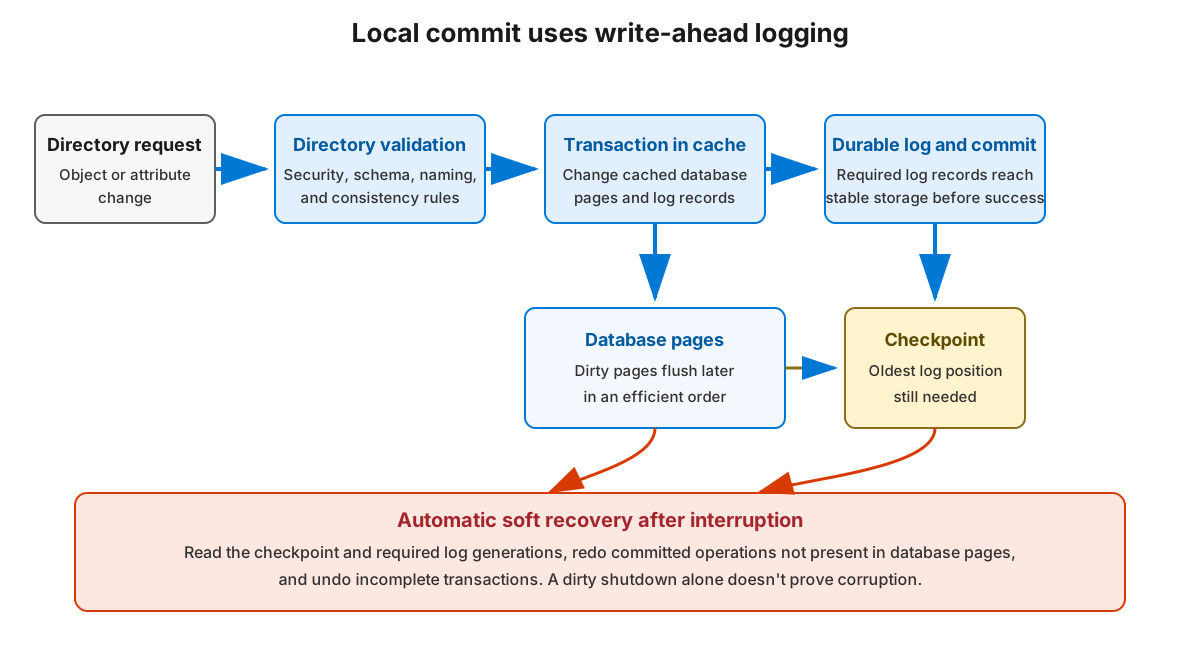
The following happens during an Active Directory security group-membership change:
- The DSA validates the object, attribute, security, and schema requirements.
- ESE starts a local transaction and changes cached database pages.
- ESE writes the transaction records to the current log generation before the related database pages must reach disk.
- The operation is committed after the required log records are durable.
- Dirty database pages can be flushed later in an efficient order.
- The checkpoint advances as older log records are no longer required to recover unflushed pages.
This is write-ahead logging. A committed change can survive an interruption even when the final database-page write hadn't completed.
The ESE transaction log isn't an AD DS replication log. Replication reads logical directory changes and metadata through the directory service. It doesn't send edb.log, numbered log files, or changed NTDS.dit pages to a partner.
AD DS uses engine-managed circular logging semantics. ESE reuses or removes generations only after they're no longer required for recovery. As an administrator, you shouldn't delete log files to reclaim space. A log that appears old can still be required by the checkpoint and current database state.
Recover after an interrupted shutdown
During a normal service stop, ESE closes the database so that it retains consistency. A power loss, storage interruption, or abrupt process termination can leave the database marked as a dirty shutdown. If this occurs, at the next supported start, ESE performs soft recovery by working through the following phases:
- Read the checkpoint.
- Locate the required log generations.
- Redo committed operations that aren't reflected in database pages.
- Undo incomplete transactions.
- Bring the database to a consistent transactional state.
Soft recovery is automatic when the database and required logs are available. Avoid renaming, moving, or deleting files to make a startup error disappear.
The table lists different ESE database states:
| State | Meaning | Initial response |
|---|---|---|
| Clean shutdown | ESE closed the database consistently | Start normally |
| Dirty shutdown | ESE didn't complete a clean close | Preserve files and allow supported soft recovery |
| Logical inconsistency | Directory relationships or data violate expected logical state | Preserve evidence and use supported diagnostic or recovery guidance |
| Physical corruption | Pages, checksums, or storage structures are damaged | Stop improvised repair and escalate |
A dirty shutdown isn't proof of corruption and physical corruption shouldn't lead you to run a destructive ESE repair operation against a domain controller. Repair and recovery decisions require current backups, replica-state knowledge, and supported guidance.
Understand online maintenance and disk use
AD DS performs scheduled online maintenance. By default, garbage collection runs every 12 hours and includes online defragmentation.
Online maintenance:
- Removes directory data that's reached its supported removal point.
- Reorganizes pages so free space can be reused inside the database.
- Improves internal space use without taking AD DS offline.
Scheduled maintenance doesn't normally reduce the size of NTDS.dit on the volume and deleting many objects can create reusable space inside the file while the file's external size remains unchanged. Physically shrinking the file requires offline compaction.
To perform an offline compaction:
Back up System State, then either stop AD DS or start in Directory Services Restore Mode.
Open an elevated command prompt and run the following commands:
 ntdsutil
 activate instance ntds
 files
 compact to C:\CompactNTDS
 quit
 quit
Protect directory assets
Treat the following file assets as highly sensitive:
NTDS.dit- ESE transaction logs
- System-state backups
- DSRM credentials
Access to these files, either online or offline, can expose credential material, trust secrets, security descriptors, and configuration. Use encryption, restricted administrative access, monitoring, and tested retention controls.
Never perform the following actions:
- Directly copy or open a live
NTDS.ditfor inspection. - Edit database pages or ESE tables.
- Delete transaction logs to free disk space.
- Restore a copied database file over a running or newly promoted domain controller.
- Treat a generic disk copy as an application-consistent AD DS backup.
Query directory state through AD DS, query configured paths without modifying them, and escalate database-state errors before taking destructive action.
For current technical reference, see: