Understand the system volume and Distributed File System Replication
The system volume (SYSVOL) is a domain-scoped file hierarchy hosted by every domain controller (DC) in that domain. It stores Group Policy template files, logon scripts, and related policy file content. SYSVOL isn't stored inside NTDS.dit, and normal SYSVOL replication doesn't copy Active Directory Domain Services (AD DS) database pages or transaction logs.
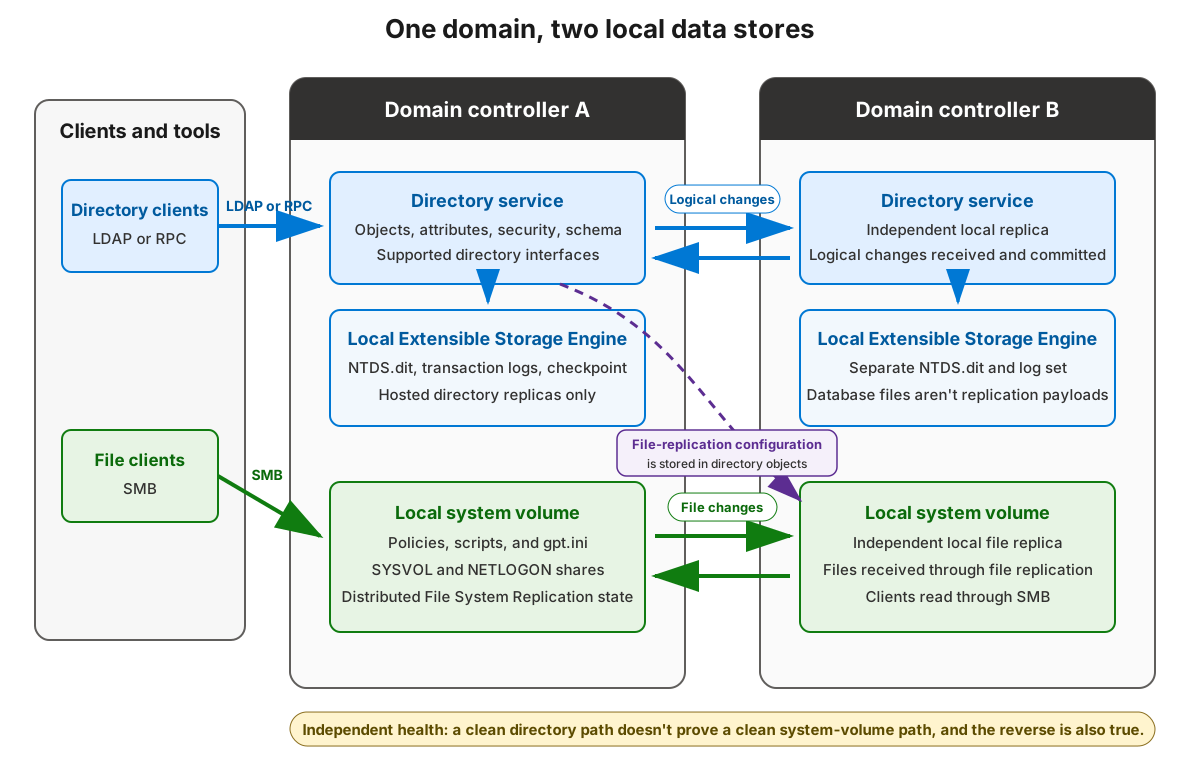
The same DC therefore exposes two different stores: a local AD DS database replica and a local copy of the domain SYSVOL hierarchy. They support the same domain, but they use different data models, access paths, and replication engines.
Name the folder, shares, and paths
SYSVOL is a hierarchy, not a drive letter. The Windows system volume is the volume that hosts Windows, commonly C:. The SYSVOL hierarchy is usually under %SystemRoot%\SYSVOL, but promotion can use a different location.
| Term | Meaning |
|---|---|
| SYSVOL folder hierarchy | The local replicated files for the domain, commonly under C:\Windows\SYSVOL\domain with junctions used for the shared namespace. |
SYSVOL share |
A Server Message Block (SMB) share that exposes the domain SYSVOL namespace from a DC. |
NETLOGON share |
An SMB share that exposes the domain scripts path used by logon scripts. |
| Windows system volume | The operating-system volume. It isn't the same concept as SYSVOL. |
Use logical domain paths for normal client access:
- SYSVOL path:
\\<domain-DNS-name>\SYSVOL - NETLOGON path:
\\<domain-DNS-name>\NETLOGON - Group Policy template path:
\\<domain-DNS-name>\SYSVOL\<domain-DNS-name>\Policies\{GPO-GUID}\gpt.ini
Direct DC paths, such as \\BNE-DC-01\SYSVOL\contoso.com\Policies, are useful for diagnosis because they bypass part of the domain referral choice. They shouldn't become hard-coded application or script dependencies.
Understand client access
Clients don't open every DC and compare files. They locate an appropriate DC, receive a path, and read files over SMB.
- Domain Controller Locator (DC Locator) uses Domain Name System (DNS) service records, site membership, and domain information to find a suitable DC.
- Site awareness helps prefer a nearby DC when site and subnet configuration is current.
- The domain path provides referrals to a DC that exposes
SYSVOLorNETLOGON. - The client reads policy and script files over SMB from the selected DC.
This access path means a Group Policy symptom can come from DC Locator, DNS, site mapping, referral selection, SMB access, SYSVOL share readiness, file replication, or AD DS data. Don't assume the first failing client has contacted the same DC as your administrative session.
Identify important SYSVOL content
The domain SYSVOL hierarchy contains a domain folder and well-known subfolders.
| Content | Purpose |
|---|---|
Policies |
Contains one folder for each domain Group Policy Object (GPO), named with the GPO's globally unique identifier (GUID), such as {31B2F340-016D-11D2-945F-00C04FB984F9}. |
Machine and User |
Per-GPO subfolders that contain computer-side and user-side policy template files. |
gpt.ini |
Per-GPO file that includes the Group Policy template version used when comparing template state. |
scripts |
Domain scripts folder exposed through the NETLOGON share. |
PolicyDefinitions |
Optional Central Store for Group Policy Administrative Template files. |
The Group Policy container in AD DS and the Group Policy template in SYSVOL are coordinated, but they're not one atomic store. AD DS replication carries directory objects and attributes. SYSVOL replication carries policy files.
The SYSVOL replication engine
DFSR names the SYSVOL configuration as the Domain System Volume replication group and the SYSVOL Share replicated folder. That naming is useful when reading supported tools and event logs.
| Component | Where state lives | What it affects |
|---|---|---|
| DFSR configuration | AD DS objects for the SYSVOL replication group, members, connections, and replicated folder. | Which DCs participate and how DFSR should replicate SYSVOL. |
| DFSR local state | The DFSR service's local database, staging, version, and backlog state on each DC. | What file changes this DC has received, staged, or still needs to replicate. |
| SYSVOL files | The replicated folder path on each DC. | The policy and script files clients read over SMB. |
Because DFSR configuration is stored in AD DS, delayed AD DS replication can delay a DFSR configuration change. That condition is different from unhealthy SYSVOL file-content replication after all members already have the same DFSR configuration.
Wait for initialization before advertising
A newly promoted DC must initialize AD DS and SYSVOL before it should serve normal domain-controller traffic. SYSVOL initial synchronization must complete before the expected SYSVOL and NETLOGON shares are available and before the DC advertises normally.
Read-only evidence includes:
- Run
dcdiag /test:Advertisingby using an account with administrative rights from an elevated session on the target DC. In a prepared environment, an administrator can instead rundcdiag /s:$DestinationHost /test:Advertisingfrom a management host after resolving$DestinationHost. Get-SmbShare -Name SYSVOL,NETLOGON, run locally on the intended DC, to confirm that DC's shares. A Common Information Model (CIM) session is an optional alternative only when remote management is already configured.- The DFS Replication event log on the relevant DC to verify DFSR initialization and replicated-folder status.
- The Directory Service event log and AD DS replication evidence on the relevant DC when configuration hasn't converged.
The prepared lab must provide the required tools, permissions, name resolution, and network paths before the learner starts. If a live dependency or remote-management path isn't prepared, use the supplied output rather than changing connectivity or configuration.
Avoid creating shares manually to bypass initialization. Missing shares during initial synchronization are a readiness signal, not permission to copy policy files by hand.
Treat AD DS and DFSR health independently
AD DS and DFSR can fail independently even though DFSR configuration depends on AD DS.
| Observation | Safe interpretation |
|---|---|
| AD DS replication appears healthy | Directory objects are converging; SYSVOL file replication still needs separate evidence. |
| SYSVOL files appear current on one pair of DCs | DFSR file content might be healthy for those members; AD DS objects, Group Policy containers, or client location can still be stale. |
| DFSR configuration changed recently | Confirm the AD DS configuration objects reached all DCs before judging DFSR file replication behavior. |
| One client reads old policy files | Identify the contacted DC and compare that DC's SYSVOL state with AD DS Group Policy state. |
A read-only domain controller (RODC) receives SYSVOL changes inbound. Don't edit policy files on an RODC or treat it as a writable source for SYSVOL content.
Use supported evidence
Supported investigation uses shares, logs, management tools, and read-only comparisons. In the inventory examples, $DomainName identifies the intended AD DS domain and prevents the cmdlets from defaulting to the current user's domain.
| Evidence source | Read-only use and execution context |
|---|---|
| DFS Replication event log on the relevant DC | Review DFSR service, initialization, replicated-folder, and partner evidence for that DC. |
Get-DfsReplicationGroup -GroupName * -IncludeSysvol -DomainName $DomainName on the management host |
Identify the SYSVOL replication group in the intended AD DS domain. |
Get-DfsReplicatedFolder -GroupName 'Domain System Volume' -DomainName $DomainName on the management host |
Identify the SYSVOL Share replicated folder in the intended AD DS domain. |
Get-DfsrBacklog with explicit source, destination, group, and folder |
Review pending changes in one direction at one point in time. A listed item is pending from that query's source to its destination; reverse direction requires a separate query. The cmdlet emits at most 100 entries, while -Verbose reports the total count. Backlog alone can represent normal latency, so interpret it after the expected convergence interval with direct named-replica or other DFSR evidence. |
Get-SmbShare, run locally on a named DC |
Confirm that named DC's SYSVOL and NETLOGON shares. |
| Stable file capture and version comparison for known policy files on named DCs | Compare bounded read-only evidence without changing files. |
| Group Policy Management | Confirm GPO identifiers and paths through a supported interface. The lab owner handles any setup or disposal outside the learner path. |
Don't copy policy folders between DCs as a repair technique. Copying policy folders can bypass DFSR state, hide the real fault, or create inconsistent Group Policy evidence. Use supported administration, backup, and recovery guidance when changes or repair are required.
SYSVOL is broadly readable by domain clients. Don't store passwords, private keys, service account secrets, recovery keys, or other confidential material in scripts, Administrative Template files, or policy folders. Treat any discovered secret in SYSVOL as an exposure that requires your organization's security response, not as a normal policy-storage pattern.
For current technical reference, see: