Connect Group Policy to both data stores
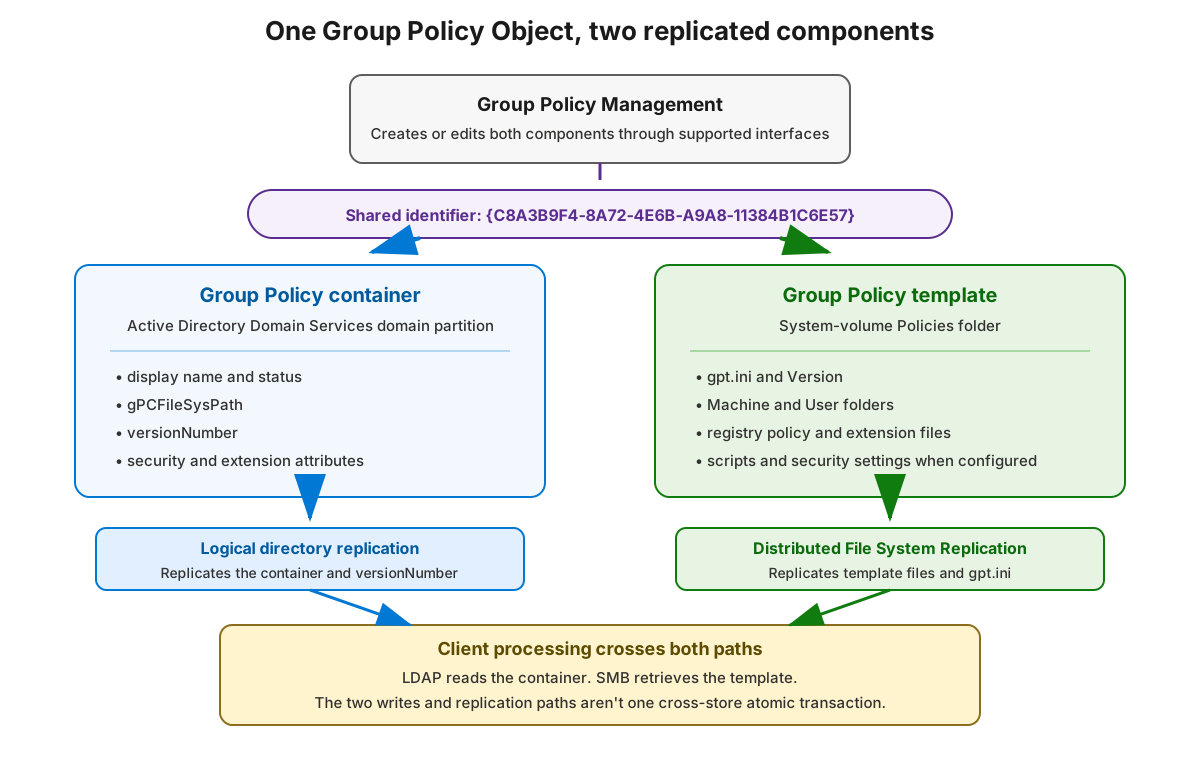
A domain Group Policy Object (GPO) spans two domain-controller data stores:
- The Group Policy container (GPC) is a directory object in the domain partition.
- The Group Policy template (GPT) is a folder in SYSVOL.
The components share a GPO identifier, but they don't share a storage engine, replication path, or replication transaction.
Troubleshooting scenario
We can learn how the AD DS database and SYSVOL work through an illustrative example. In this scenario, Contoso runs the contoso.com domain from two writable domain controllers:
| Server | Site | Roles |
|---|---|---|
SEA-DC-01 |
Seattle | Domain controller, Domain Name System server, global catalog |
BNE-DC-01 |
Brisbane | Domain controller, Domain Name System server, global catalog |
An administrator edits the Workstation Security Baseline Group Policy Object (GPO) through Group Policy Management. The GPO's identifier is {C8A3B9F4-8A72-4E6B-A9A8-11384B1C6E57}.
The Brisbane client impacted by the GPO is BNE-CL-01.contoso.com (BNE-CL-01). The supplied evidence covers 2026-07-15T08:30:00+00:00 through 2026-07-15T09:00:00+00:00; expected convergence was due by 2026-07-15T08:45:00+00:00. Its Group Policy events are correlated by Activity ID 4f789f6e-1189-4d09-b4bf-3a7f6b6d15c2.
After the expected convergence interval, Seattle clients apply the new computer setting. The affected Brisbane client applies the previous setting. Both domain controllers:
- Authenticate users.
- Advertise as domain controllers.
- Return the GPO when queried through Lightweight Directory Access Protocol (LDAP).
- Expose the expected
SYSVOLandNETLOGONshares.
The initial symptom doesn't identify the failed layer. The change spans:
- A Group Policy container (GPC) in the AD DS domain partition.
- A Group Policy template (GPT) in SYSVOL.
- AD DS replication for the GPC.
- Distributed File System Replication (DFSR) for the GPT.
- Domain Controller Locator, Domain Name System (DNS), LDAP, Server Message Block (SMB), and Group Policy client processing.
The investigation must establish which component hasn't converged. It mustn't start by copying policy files, editing the database, forcing broad replication, or resetting DFSR state.
Locate both components
We can use the fixed GUID {C8A3B9F4-8A72-4E6B-A9A8-11384B1C6E57} to identify the scenario GPO. Its display name is only an expected label; don't use the label as the identity.
| Component | Scenario location |
|---|---|
| GPC distinguished name | CN={C8A3B9F4-8A72-4E6B-A9A8-11384B1C6E57},CN=Policies,CN=System,DC=contoso,DC=com |
| Expected domain-based GPT path | \\contoso.com\SYSVOL\contoso.com\Policies\{C8A3B9F4-8A72-4E6B-A9A8-11384B1C6E57} |
| Example diagnostic path using a resolved DC DNS host name | \\bne-dc-01.contoso.com\SYSVOL\contoso.com\Policies\{C8A3B9F4-8A72-4E6B-A9A8-11384B1C6E57} |
The GPC contains attributes such as the display name, versionNumber, security information, and gPCFileSysPath. The GPT contains gpt.ini, Machine and User subfolders, and the files used by configured Group Policy extensions.
gPCFileSysPath is schema-single-valued. It's retrieved from the GPC and supplies the UNC under which Group Policy opens the GPT, including <path>\gpt.ini. A comparison across replicas must require exactly one nonblank raw value from each query. Multiple returned values indicate a retrieval or script representation anomaly, or invalid data; they aren't a normal multivalue state.
Compare each raw value with the protocol-shaped domain path:
\\<DNS-domain>\SYSVOL\<DNS-domain>\Policies\{<GPO-GUID>}
Use a strict ordinal case-insensitive comparison. Don't trim the value, collapse or change separators, add or remove a trailing separator, or rewrite path components. Letter case can differ; any other difference must fail the check.
A direct named-DC path is diagnostic evidence, not the normal client path. Derive it only after validating the complete domain path and its exact SYSVOL-relative suffix. Replace the domain namespace host with the DC's resolved DNS host name from dNSHostName; don't form a host name by appending the domain to a short server name.
Follow the separate replication paths
| GPO component | Replication path | Primary evidence |
|---|---|---|
| GPC | AD DS logical replication of the domain partition | GPC values and attribute metadata, with partner metadata and repadmin as relationship context |
| GPT | DFSR file replication in the Domain System Volume replication group | Bounded file captures, directional backlog, and DFS Replication events |
An edit through Group Policy Management coordinates writes to both components, but Windows doesn't provide one atomic commit across AD DS and SYSVOL. A brief mismatch can therefore be normal while each path converges.
AD partner metadata reports relationship status at capture. Even a successful relationship doesn't prove that this GPC object or either relevant attribute update arrived, and it says nothing about GPT delivery. Object-specific GPC evidence requires direct values and, when arrival identity matters, originating-update metadata. Multi-DC reads are sequential rather than an atomic snapshot.
Backlog is also directional and point-in-time. A backlog entry can represent normal latency. Only after the expected convergence interval, and with direct named-replica differences plus directional backlog or other DFSR evidence, should you investigate a SYSVOL convergence problem.
Interpret versions and byte evidence
The GPC stores versionNumber. The GPT stores a separate Version value in the [General] section of gpt.ini. Both encode user and computer counters in a 32-bit value:
- The high-order 16 bits represent the user configuration version.
- The low-order 16 bits represent the computer configuration version.
For example, 196615 represents user version 3 and computer version 7:
(3 * 65536) + 7 = 196615
Keep these evidence types distinct:
| Evidence | What it establishes | What it doesn't establish |
|---|---|---|
GPC versionNumber |
The directory value visible on the queried GPC replica | GPT content, object arrival from a particular update, or atomic cross-DC agreement |
Parsed [General] Version |
The value contained in the captured gpt.ini bytes |
Equality of every GPT file or which replica is fresher |
| SHA-256 hash | Equality or difference of the bytes captured for one named file during the reported read intervals | Freshness, replication direction, which copy should win, or full-GPT equality |
Two different direct captures prove that the named replicas differed during their respective read intervals. Equal hashes prove only bounded byte equality. Neither result alone identifies replication direction or freshness.
Trace client processing across both stores
A simplified processing flow is:
- Domain Controller Locator and DNS identify a suitable domain controller for directory access.
- The client uses LDAP to receive the applicable GPC attributes, including
gPCFileSysPath. - The client opens the GPT under that supplied path, including
<path>\gpt.ini. - A domain-based
\\<DNS-domain>\SYSVOLaccess is served through a DFS referral target. - Group Policy extensions interpret the relevant settings.
Access to the domain path proves that SMB access succeeded through a referral, but it doesn't identify which DC served the file. nltest /dsgetdc:<domain> identifies a DC selected by DC Locator; it doesn't prove that the same DC served a later DFS namespace read. Without separate referral evidence, record the SMB target as unspecified.
A manual PowerShell read uses the invoking process's network security context, normally the interactive user's context. It isn't necessarily the LocalSystem or computer-account context used for computer policy. Correlate manual access with the Group Policy Operational log for the affected processing cycle.
Use complementary evidence:
| Question | Evidence |
|---|---|
| Did the named GPC replicas agree at their respective query times, and do they carry the same originating update? | Domain-NC relationship evidence for context, sequential direct comparison of versionNumber and raw gPCFileSysPath, and a two-DC originating-stamp comparison for both attributes |
| Did named GPT file captures differ? | Parsed gpt.ini values and byte hashes from bounded, stable reads |
| Is a persistent difference consistent with DFSR direction? | Both directional backlog queries, timing, and DFS Replication evidence |
| Can the client read the domain path? | SMB access through the domain path; separate referral evidence is needed to name the target |
| What did the client process? | gpresult and the Microsoft-Windows-GroupPolicy/Operational log |
Apply the model to the scenario
The scenario provides these observations after the expected convergence interval:
| Evidence | SEA-DC-01 |
BNE-DC-01 |
|---|---|---|
Raw gPCFileSysPath |
\\contoso.com\SYSVOL\contoso.com\Policies\{C8A3B9F4-8A72-4E6B-A9A8-11384B1C6E57} |
Same raw value |
| Expected-path check | Passed with ordinal case-insensitive comparison and no normalization | Passed with the same comparison |
GPC versionNumber |
196615 |
196615 |
GPT parsed [General] Version |
196615 |
196614 |
| Domain-partition relationship status | Current at capture | Current at capture |
| SYSVOL share | Present | Present |
The sequential GPC reads show equal visible versions and paths at their respective query times; they aren't an atomic snapshot. Relationship status doesn't prove delivery of this GPC. Unit 7's attribute-metadata comparison determines whether versionNumber and gPCFileSysPath carry the same originating update.
The direct GPT captures show that the named copies contained different parsed versions during their respective bounded reads. This establishes a named-replica difference, not which copy is fresher or which DC served a separate domain-path read. Because the observation is after the expected convergence interval, correlate it with both backlog directions and DFSR evidence before investigating convergence. Backlog alone can still be normal latency.
Use these classification boundaries:
| Evidence pattern | Safe classification |
|---|---|
Missing, blank, or multiple returned gPCFileSysPath values |
Invalid or incomplete path evidence; multiple values aren't a valid normal GPC state |
| Different raw GPC paths between DCs | GPC replica discrepancy; relationship status alone doesn't assign an AD DS replication-engine cause |
| Replicas agree, but the raw path fails the expected domain-UNC comparison | Unexpected GPC path, not GPT version lag |
| Direct named-DC GPT captures differ | The named file copies differed during the reported intervals; use timing and directional DFSR evidence before investigating convergence |
| Domain path is readable | Access through a referral succeeded; the SMB target and computer-policy security context remain unproven |
| Versions or hashes are equal | Agreement for those visible values or captured bytes only, not proof of complete correctness or freshness |
Use supported management boundaries
Create, edit, link, back up, restore, and delete GPOs through Group Policy Management or another supported Group Policy interface. Don't edit GPC attributes, edit gpt.ini, or copy policy folders between DCs to force agreement. Preserve evidence and use supported troubleshooting guidance.
The fixed GUID connects the components. Separate, bounded evidence establishes what each path can prove.
For current technical reference, see Group Policy overview for Windows Server.