Guided troubleshooting exercise
In this example exercise, we diagnose a hypothetical Contoso Research incident.
Topology
- Forest:
contoso.com - Domain:
corp.contoso.com - Brisbane:
BNE-DC1,10.20.0.10, directory-integrated Domain Name System - Perth:
PER-DC1,10.40.0.10, directory-integrated Domain Name System - Affected member:
BNE-APP7,10.20.15.27 - Brisbane subnet:
10.20.0.0/16 - Perth subnet:
10.40.0.0/16 - Zones:
corp.contoso.com,_msdcs.contoso.com
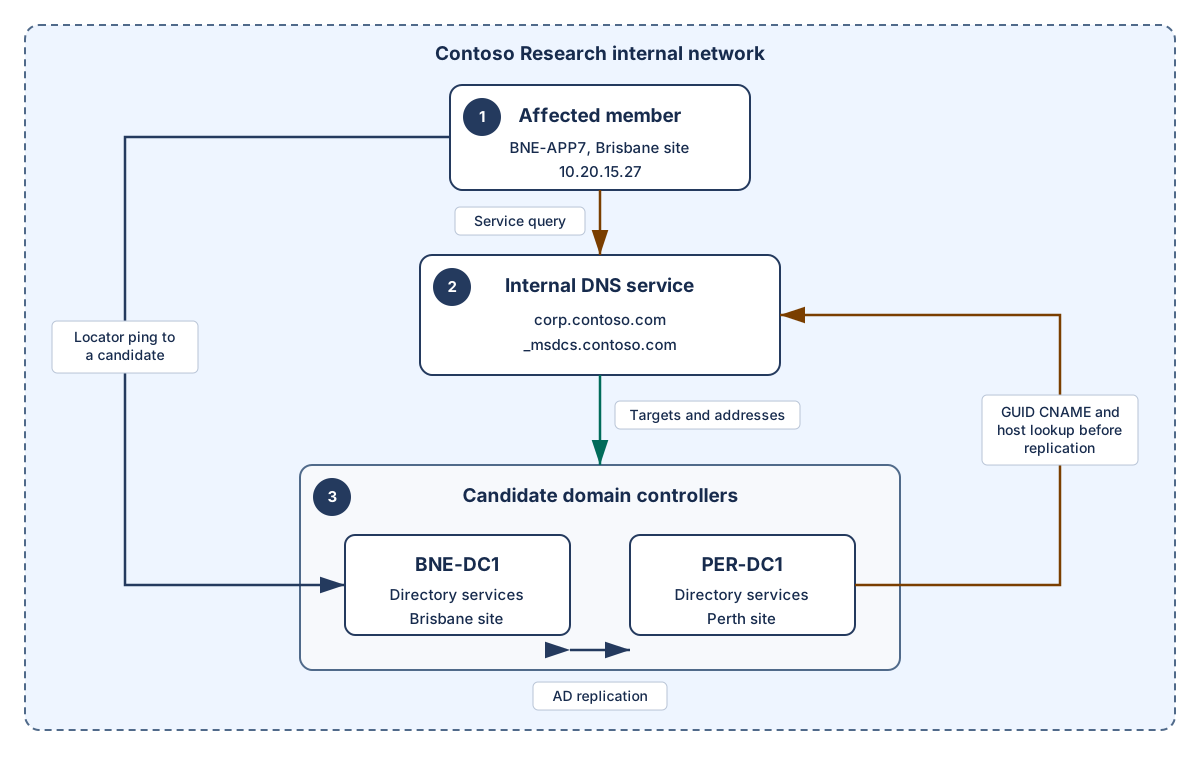
Text equivalent:
Intended: BNE-APP7 -> BNE-DC1 (10.20.0.10) -> corp.contoso.com/_msdcs.contoso.com
Alternate: BNE-APP7 -> PER-DC1 (10.40.0.10) -> the same AD-integrated zones
Faulty: BNE-APP7 -> 10.20.0.53 -> authoritative NXDOMAIN/no valid AD-zone path
Locator after correction: BNE-APP7 -> BNE-DC1 LDAP UDP ping -> Brisbane DC selection
The IP address 10.20.0.53 was incorrectly assigned to BNE-APP7 by a DHCP option or client policy change. It isn't an approved resolver for this member and has no valid resolution path for the Active Directory Domain Services zones. Therefore, the owning-layer correction is the client, DHCP, or policy assignment, not a change to 10.20.0.53.
Reported symptom: gpupdate /force on BNE-APP7 reports that no domain controller is available. Domain sign-in takes about 45 seconds. Public web names resolve.
Task 1: Triage the symptom
State:
- The exact failed directory operation.
- The affected scope.
- At least three separate hypotheses.
- Evidence required before remediation.
Hint 1
Treat public host resolution, directory service location, target reachability, authentication, plus directory health as separate layers.
Task 2: Inspect client configuration
ipconfig /all from BNE-APP7:
Windows IP Configuration

   Host Name . . . . . . . . . . . . : BNE-APP7
   Primary Dns Suffix  . . . . . . . : corp.contoso.com
   Node Type . . . . . . . . . . . . : Hybrid

Ethernet adapter Ethernet:
   IPv4 Address. . . . . . . . . . . : 10.20.15.27
   Subnet Mask . . . . . . . . . . . : 255.255.0.0
   Default Gateway . . . . . . . . . : 10.20.0.1
   DNS Servers . . . . . . . . . . . : 10.20.0.53
10.20.0.53 is an internal network resolver used by a development team. This DNS server address shouldn't be assigned and it isn't authoritative for corp.contoso.com. The DNS server is also not configured with a valid forwarding or delegation path for the directory zones.
Task 3: Query locator records
Output from BNE-APP7:
Resolve-DnsName "_ldap._tcp.dc._msdcs.corp.contoso.com" `
  -Type SRV -Server 10.20.0.53
Resolve-DnsName : _ldap._tcp.dc._msdcs.corp.contoso.com :
DNS name does not exist
Direct authoritative queries:
Resolve-DnsName "_ldap._tcp.dc._msdcs.corp.contoso.com" `
  -Type SRV -Server 10.20.0.10
NameTarget                    Port Priority Weight
----------                    ---- -------- ------
bne-dc1.corp.contoso.com      389  0        100
per-dc1.corp.contoso.com      389  0        100
Resolve-DnsName "_ldap._tcp.Brisbane._sites.dc._msdcs.corp.contoso.com" `
  -Type SRV -Server 10.20.0.10
NameTarget                    Port Priority Weight
----------                    ---- -------- ------
bne-dc1.corp.contoso.com      389  0        100
The same two queries against 10.40.0.10 return equivalent records.
Decide whether record absence, zone divergence, or the client query path is the primary fault.
Hint 2
Both authoritative servers return equivalent domain-wide plus site-specific records for the tested names. Compare that fact with the server the client actually uses.
Task 4: Test locator plus site
Output from the affected state:
nltest /dsgetsite
Brisbane
The command completed successfully
nltest /dsgetdc:corp.contoso.com /force
Getting DC name failed: Status = 1355 0x54b ERROR_NO_SUCH_DOMAIN
Interpret both results. The site result is cached directory topology evidence. /force reruns DC Locator discovery rather than using the cached locator result. It doesn't prove that the DNS Client resolver cache was bypassed or that resulting DNS data is authoritative or current. In this incident, discovery fails through the configured resolver.
Task 5: Review server evidence
Targeted output from BNE-DC1:
dcdiag /test:dns /v /s:BNE-DC1 /DnsBasic

TEST: Basic (Basc)
   PASS: The DNS server 10.20.0.10 is reachable
   PASS: The host record for BNE-DC1 is registered
   PASS: The SOA record for corp.contoso.com is present
Summary of DNS test results:
   BNE-DC1  PASS
Replication summary:
Source DSA          largest delta    fails/total %%   error
BNE-DC1                   00m:42s     0 / 5     0
PER-DC1                   00m:39s     0 / 5     0
The supplied summary shows no current replication failures, and both authoritative servers return equivalent data for the tested locator records. State whether that evidence justifies further replication troubleshooting. Remember that a clean summary and matching selected records don't prove complete partition or object convergence.
Task 6: Select the correction
Choose the least disruptive correction:
- Delete then recreate
corp.contoso.com. - Change the zone to nonsecure dynamic updates.
- Delete all domain controller locator records then restart Netlogon everywhere.
- Configure
BNE-APP7to use10.20.0.10plus10.40.0.10. - Clear every cache without changing configuration.
Apply the correction through the organization's managed DHCP or client policy source. If testing manually in an authorized lab, use the approved adapter configuration method with administrative rights and preserve the restoration information recorded at the start.
Task 7: Verify recovery
First confirm that ipconfig /all shows 10.20.0.10 and 10.40.0.10 on the active adapter from the approved source.
If the earlier nonexistent-name response remains cached after evidence capture and correction, wait for its negative-cache lifetime to expire or run one of these commands:
Clear-DnsClientCache
ipconfig /flushdns
The cache-clear command should complete successfully, and the next ordinary-path query should return the expected service location record. Cache clearing prepares a fair retest; it isn't the root correction.
Verify both the domain-wide and site-specific queries through the normal client path:
Resolve-DnsName "_ldap._tcp.dc._msdcs.corp.contoso.com" -Type SRV
NameTarget                    Port Priority Weight
----------                    ---- -------- ------
bne-dc1.corp.contoso.com      389  0        100
per-dc1.corp.contoso.com      389  0        100
Resolve-DnsName "_ldap._tcp.Brisbane._sites.dc._msdcs.corp.contoso.com" -Type SRV
NameTarget                    Port Priority Weight
----------                    ---- -------- ------
bne-dc1.corp.contoso.com      389  0        100
Confirm the site:
nltest /dsgetsite
Brisbane
The command completed successfully
nltest /dsgetdc:corp.contoso.com /force
           DC: \\BNE-DC1.corp.contoso.com
      Address: \\10.20.0.10
     Dom Name: corp.contoso.com
  Forest Name: contoso.com
     Dc Site Name: Brisbane
  Our Site Name: Brisbane
        Flags: GC DS LDAP KDC TIMESERV WRITABLE DNS_DC DNS_DOMAIN
               DNS_FOREST CLOSE_SITE FULL_SECRET
The command completed successfully
When these steps are taken, gpupdate /force then completes successfully. Finally, query both authoritative servers directly again and confirm that the tested locator records remain equivalent.
Reasoned solution
The primary fault is the incorrect DNS server assignment on BNE-APP7, introduced through DHCP option or client policy. The configured DNS can answer public names but has no valid authoritative or forwarding path for the Active Directory namespace. The DNS resolver returns a nonexistent-name response for the required service record. When authoritative servers are queried, they return equivalent data for the tested records. Site identification is correct, domain controller diagnostics pass, and the supplied replication summary has no current failures.
Correct the managed client, DHCP, or policy assignment so member server BNE-APP7 uses the two approved internal DNS servers that host the directory zones. Don't modify the development DNS server, change zone security, delete records, or rebuild zones. Those actions don't address the assigned query path.
Recovery is proven only after the approved DNS server assignment is visible, the exact domain-wide and site-specific queries succeed, the site remains Brisbane, locator selects the expected Brisbane domain controller, the original Group Policy operation succeeds, plus direct authoritative answers remain consistent for the tested records. These checks don't certify complete application-partition or object convergence.
Healthy-state checklist
- Client suffix matches the intended registration and lookup design.
- Preferred plus alternate servers can resolve both directory zones.
- Domain-wide plus site-specific service queries return intended targets.
- Target host records return reachable addresses.
- Client site is Brisbane.
- Locator returns
BNE-DC1with expected capabilities. - Domain controller Domain Name System diagnostics pass.
- Directory replication shows no related failure.
- Group Policy refresh succeeds.