Troubleshoot schema replication
Most schema incidents aren't corruption. They're targeting, timing, rights, or convergence problems. Implementing a disciplined troubleshooting sequence helps you isolate the cause of the problem.
Troubleshooting flow
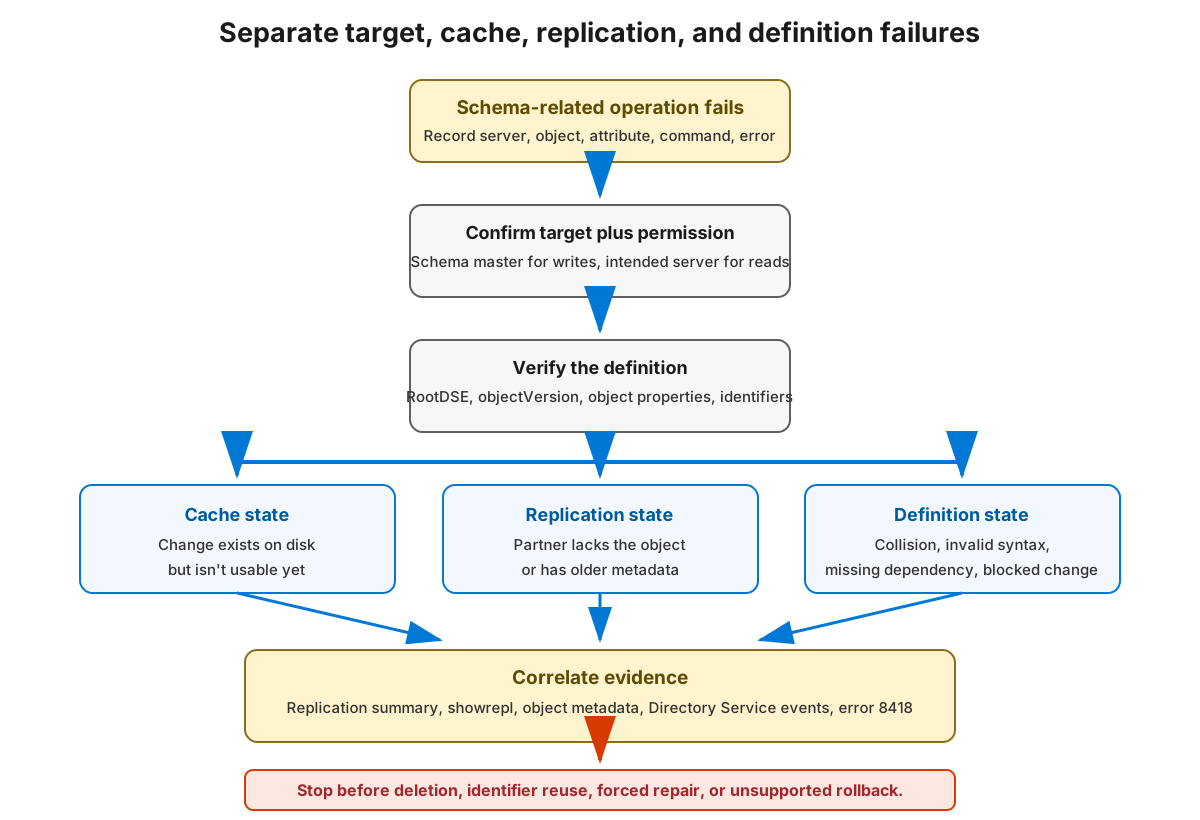
- Identify the exact class, attribute, server, operation, and error text.
- Confirm the schema master, the target DC, and your authorization.
- Read the target DC's RootDSE and schema
objectVersion, then confirm the expected schema object and its defining properties exist there. - Distinguish an on-disk change from a stale in-memory cache. The object may be written but not yet loaded into the cache.
- Check replication health for the schema partition and inspect the affected object's replication metadata.
- Read event logs (Directory Service) and interpret replication error 8418, a schema mismatch.
- Check for identifier collisions, invalid syntax combinations, range errors, missing dependencies, and prohibited changes.
- Stop and escalate rather than attempting improvised deletion, identifier reuse, or unsupported rollback.
Common causes
| Symptom | Likely cause | Check |
|---|---|---|
| "Can't perform schema operation" | Change sent to a DC that isn't the schema master | Confirm -Server $schemaMaster |
| Change fails with access denied | Insufficient rights (not in Schema Admins) | Verify delegated/temporary rights |
| New attribute not usable immediately | Stale in-memory schema cache | Wait for the timed refresh or a synchronous update |
| Object exists on one DC, missing on another | Replication lag or failure | Check replication health and metadata |
| Add rejected as duplicate | cn, lDAPDisplayName, OID, or schemaIDGUID collision |
Run uniqueness checks |
| Add rejected as invalid | Bad syntax triplet or range | Recheck attributeSyntax/oMSyntax/rangeLower/rangeUpper |
| Error 8418 during replication | Schema mismatch between DCs | Compare definitions and converge |
Read-only diagnostics
# READ: forest-wide replication summary
repadmin.exe /replsummary

# READ: inbound/outbound replication status for the schema master
repadmin.exe /showrepl $schemaMaster

# READ: replication test targeting the schema master
dcdiag.exe /test:Replications "/s:$schemaMaster"

# READ: replication metadata for a specific schema object
repadmin.exe /showobjmeta $schemaMaster $schemaObjectDN
Also compare the same object directly on two DCs, and normalize multivalued attribute ordering before you conclude they differ:
# READ: compare a schema object on two named domain controllers
Get-ADObject -Server 'dc01.contoso.com' -Identity $schemaObjectDN -Properties * |
    Select-Object lDAPDisplayName, whenChanged
Get-ADObject -Server 'dc02.contoso.com' -Identity $schemaObjectDN -Properties * |
    Select-Object lDAPDisplayName, whenChanged
Note
Matching objectVersion numbers don't prove convergence. Two DCs can report the same version yet differ on an individual extension object, so verify the specific object's metadata.
Error 8418 in context
Error 8418 ("The replication operation failed because of a schema mismatch between the servers involved") appears when a source and destination DC disagree on the schema. It usually means an extension hasn't fully replicated or a cache hasn't refreshed, not that the schema is corrupt. Let replication and cache convergence complete, verify the specific object with repadmin /showobjmeta, and retest before considering deeper action.
Worked scenario: Schema mismatch incident
An application team reports that creating a new object type succeeds on DC01 but fails on DC02. The following sequence explains how to address the problem:
- Targeting: DC01 is the schema master; the definition was added there.
- Cache: DC02 has replicated the object but its cache hadn't refreshed. The object was on disk but not yet enforced.
- Replication:
repadmin /showobjmetaon DC02 shows the object present and current after convergence. - Product version: Both DCs report the same
objectVersion, confirming the mismatch was timing, not a base-schema difference. - Resolution: After cache convergence on DC02, creation succeeds on both. No deletion or rollback was needed. The fix was patience plus verification, exactly the safe path over improvisation.