Locate the schema partition
The schema resides in its own directory partition. Knowing where that partition is, which server owns changes to it, and how definitions become effective is the basis for schema maintenance and troubleshooting task.
The schema naming context
Active Directory divides the directory into naming contexts (also called partitions). The schema is a distinct naming context whose distinguished name (DN) takes this form:
CN=Schema,CN=Configuration,<forest-root-DN>
Although the DN is nested under CN=Configuration, the schema is a separate partition with its own replication behavior and not just a container inside the configuration partition. In the contoso.com forest, the DN resolves to CN=Schema,CN=Configuration,DC=contoso,DC=com.
RootDSE is a virtual root entry that every DC exposes without requiring a client to bind to a specific naming context. Its schemaNamingContext attribute tells you the exact schema DN, and Get-ADForest reports the schema master.
# READ: discover the schema partition and the schema master
Import-Module ActiveDirectory

$rootDSE      = Get-ADRootDSE
$schemaNC     = $rootDSE.schemaNamingContext
$schemaMaster = (Get-ADForest).SchemaMaster

[pscustomobject]@{
    SchemaNamingContext = $schemaNC
    SchemaMaster        = $schemaMaster
}
Determining the DN through RootDSE, then targeting the schema master explicitly with -Server $schemaMaster, is safer than assuming the forest-root DN from the current domain or querying an arbitrary DC.
Forest-wide replication and the schema master
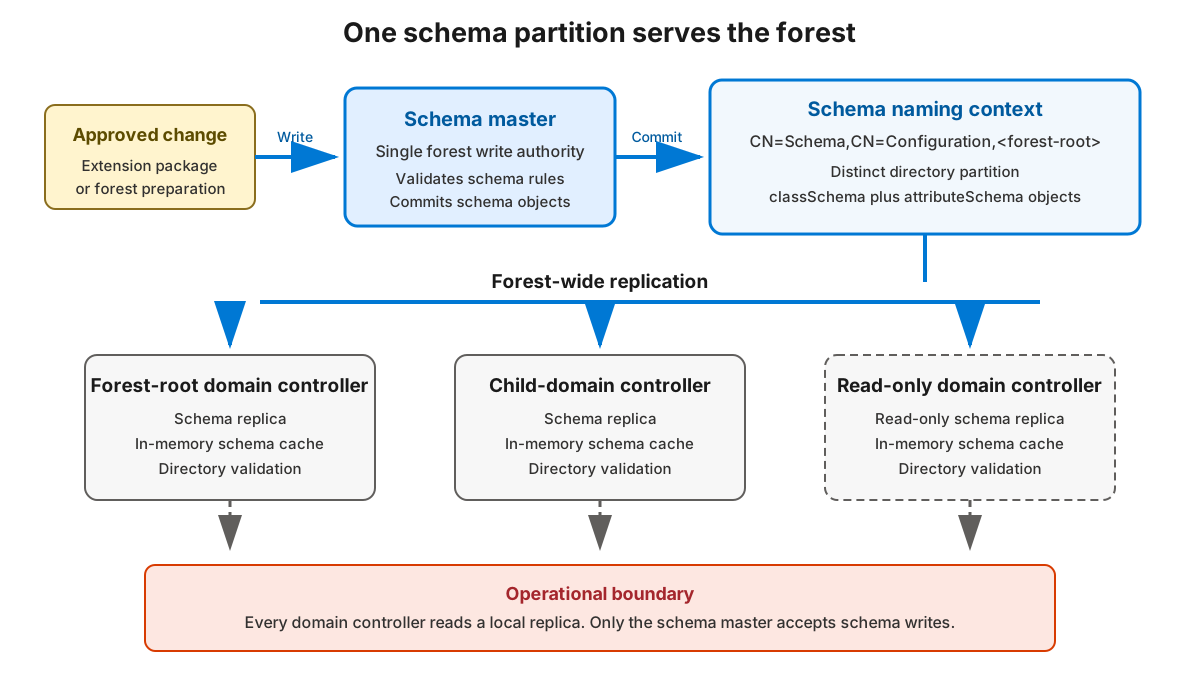
Every DC in the forest holds a replica of the schema partition, but only one DC accepts changes. That DC holds the schema master, one of five Flexible Single Master Operations (FSMO) roles and the only forest-level role that governs schema writes. Centralizing writes on a single master prevents conflicting definitions from being created in different places at the same time. Changes made on the schema master then replicate to every other DC.
Aggregate abstract schema and the schema cache
Two more constructs sit mediate between the stored definitions and the running directory:
- The
CN=Aggregateabstract schema is a single entry that exposes commonly needed effective definitions in the standard LDAP form, so clients can read the operational schema without walking everyclassSchemaandattributeSchemaobject. - The in-memory schema cache is the copy each DC actually enforces at run time. Writes update the persisted objects first; the DC then loads them into its cache.
When the schema is modified, the following occurs:
- An automatic cache update normally occurs five minutes after the last schema change, and any new change resets that timer.
- An explicit
schemaUpdateNowoperation forces a synchronous refresh so the change is effective immediately on that DC.
Schema changes become effective in stages:
- Written on the schema master's copy of the partition.
- Available in the schema master's in-memory cache.
- Replicated and cached on every other DC.
This staging explains why a newly added attribute can exist on the schema master yet appear "missing" on another DC until convergence occurs.
Note
A schema extension doesn't automatically add fields or object-creation pages to administrative tools. Display-specifier and application UI integration are separate from the schema definition.