Apply schema extensions
This unit explains the mechanics of a controlled extension so you can read and review one. Every write shown here's demonstration-only.
The change lifecycle
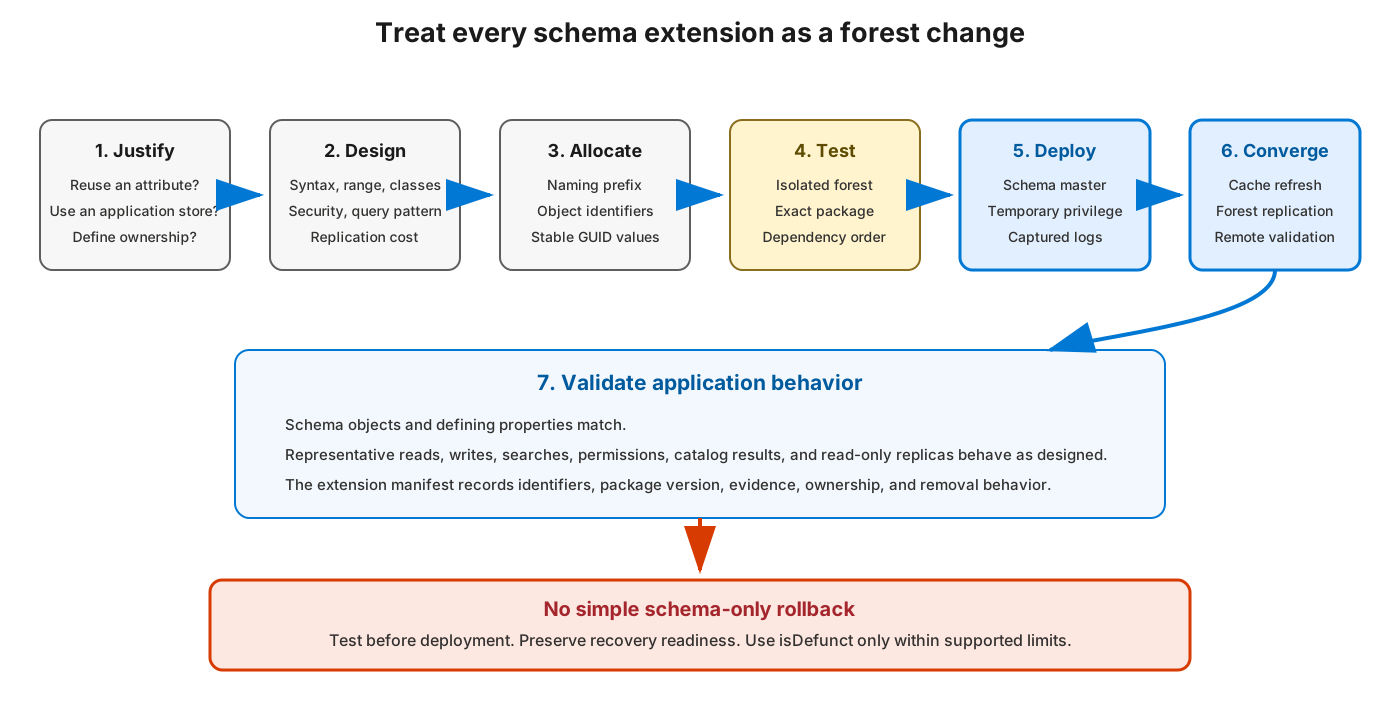
A change moves through ordered stages. Applying definitions out of order, or validating before replication converges, is where most extension problems begin.
- Confirm no existing attribute, app store, or supported mechanism fits
- Define owners, classification, retention, query patterns, object count, lifecycle
- Create the extension manifest (prefix, OIDs, names, GUIDs, linkIDs, syntax, usage, security, index/GC decisions, version, source)
- Review ranges, cardinality, inheritance, legal parents, indexing, GC/RODC, security, storage, replication cost
- Check collisions across cn, lDAPDisplayName, OID, schemaIDGUID, rightsGuid, linkID
- Verify temporary rights, schema-master availability, replication health, recovery readiness
- Test the exact signed/checksummed package in an isolated forest
- Capture prechange schema inventory and replication-health evidence
- Apply definitions in dependency order; refresh cache only when required; validate on the schema master
- Verify forest-wide replication and cache convergence
- Validate application behavior, queries, permissions, indexing, GC/RODC outcomes
- Capture post-change evidence, update the manifest, remove temporary rights, monitor
Dependency order and schema-master targeting
A class can't reference an attribute that doesn't yet exist. Therefore attributes are created before the classes that use them. All schema writes must target the schema master explicitly; sending them to another DC fails because only the master accepts schema changes.
Reading an LDIF extension
LDIF is the text format used to add and modify schema objects. The example below is deliberately non-runnable: it uses placeholders such as <enterprise-OID>, <attribute-schema-ID-GUID-base64>, <class-schema-ID-GUID-base64>, and <schema-NC> instead of usable identifiers. The two schemaIDGUID placeholders represent different values because the attribute and class can't share one schemaIDGUID. It shows the attribute first, then the class that references it.
# CHANGE (demonstration-only): add one attribute, then one dependent class

dn: CN=contoso-EmployeeCostCenter,<schema-NC>
changetype: add
objectClass: attributeSchema
cn: contoso-EmployeeCostCenter
lDAPDisplayName: contosoEmployeeCostCenter
attributeID: <enterprise-OID>.1
# Double colon means the following value is base64 text for the 16-byte schemaIDGUID value.
schemaIDGUID:: <attribute-schema-ID-GUID-base64>
# Unicode string syntax
attributeSyntax: 2.5.5.12
oMSyntax: 64
isSingleValued: TRUE
rangeLower: 1
rangeUpper: 16
# Indexed
searchFlags: 1

dn: CN=contoso-CostedUser,<schema-NC>
changetype: add
objectClass: classSchema
cn: contoso-CostedUser
lDAPDisplayName: contosoCostedUser
governsID: <enterprise-OID>.2
schemaIDGUID:: <class-schema-ID-GUID-base64>
# Auxiliary class
objectClassCategory: 3
subClassOf: top
mayContain: contosoEmployeeCostCenter
Read it this way:
- Each
changetype: addrecord creates one object; the minimum meaningful fields are the identifiers, syntax and cardinality (attribute), and class category and superclass (class), plus anymayContain/mustContain. - Some properties depend on an object's DN and can be easier to set after the object exists. For example, setting
defaultObjectCategoryto the new class definition can use a follow-upchangetype: modifyrecord. - A
modifyrecord lists an operation (add,replace, ordelete), the attribute, its value, and a terminating-.
Before applying, run the uniqueness checks from the governance unit against cn, lDAPDisplayName, OID, schemaIDGUID, and linkID. Several core properties, including attributeID/governsID, attributeSyntax, oMSyntax, and isSingleValued, are immutable after creation, so errors here can't be edited away later.
Importing and refreshing the cache
# CHANGE (demonstration-only): import an approved, reviewed extension file
ldifde.exe -i -f .\extension.ldf -s $schemaMaster -j .\ldifde-logs
New definitions are written to the persisted objects, but each DC enforces its in-memory cache. The schema master's cache updates automatically about five minutes after the last change. To make definitions effective immediately on the master, an LDIF modify requests a synchronous refresh:
# CHANGE (demonstration-only): force an immediate schema-cache update
dn:
changetype: modify
add: schemaUpdateNow
schemaUpdateNow: 1
-
Verify convergence (read-only)
After a change, confirm the change has replicated. Matching objectVersion values won't prove that every extension object and property has converged.
# READ: inspect the replication metadata of a specific schema object
$schemaObjectDN = $attribute.DistinguishedName
repadmin.exe /showobjmeta $schemaMaster $schemaObjectDN

# READ: compare the same object on two named DCs
$dcA = 'dc01.contoso.com'
$dcB = 'dc02.contoso.com'
$comparisonProperties = @(
    'lDAPDisplayName','attributeID','governsID','schemaIDGUID',
    'attributeSyntax','oMSyntax','isSingleValued','searchFlags',
    'isMemberOfPartialAttributeSet','isDefunct'
)
Get-ADObject -Server $dcA -Identity $schemaObjectDN -Properties $comparisonProperties |
    Select-Object $comparisonProperties
Get-ADObject -Server $dcB -Identity $schemaObjectDN -Properties $comparisonProperties |
    Select-Object $comparisonProperties
Validate the definitions on the schema master, confirm forest-wide replication and cache convergence, and only then enable the dependent application.
Retiring a definition
You can't delete a schema object. To retire one, an approved changesets isDefunct to true, which deactivates the class or attribute. Existing data remains and the object stays in the schema, so treat deactivation as disabling, not removing. Uninstalling an application doesn't remove the schema definitions it added.