Design default-deny segmentation
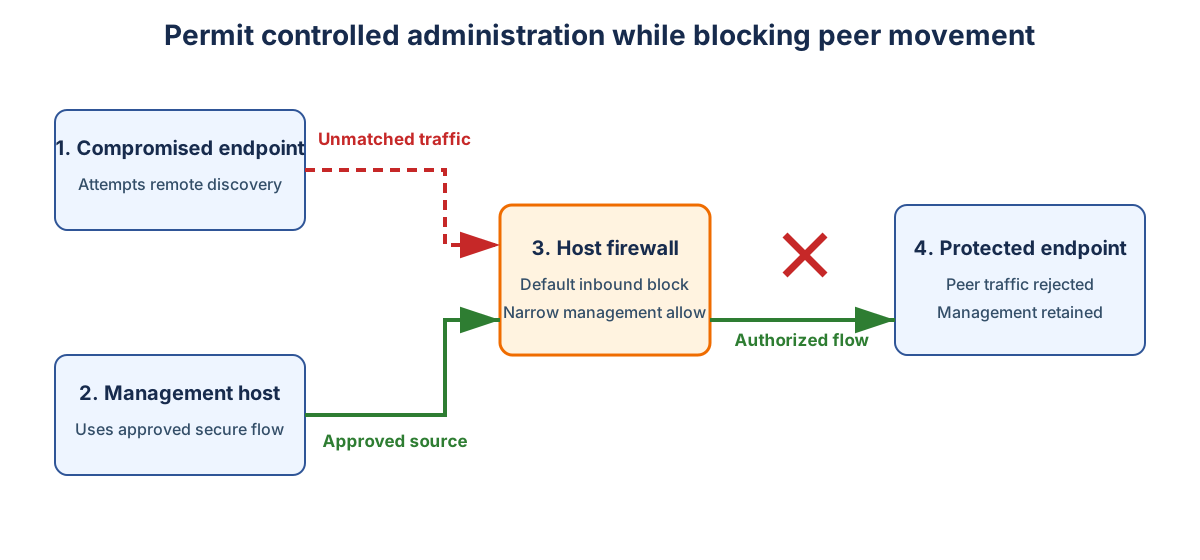
Attackers commonly use stolen but valid credentials to gain access to remote management tools, file sharing, service control, remote procedure calls, or management instrumentation. Allowing endpoint-to-endpoint reachability makes these techniques cheap. A strategy for addressing these attack vectors is to configure Windows Firewall to reduce lateral movement across the network.
Imagine the following scenario:
- A workstation is compromised.
- Peer discovery traffic reaches local firewalls.
- Unmatched inbound traffic is dropped.
- Approved management traffic remains available from controlled sources.
- Repeated blocked connection attempts create evidence of the workstation's compromise.
Build a traffic matrix
The following table looks at possible communication paths between hosts on your network and how you can use that as a way of creating firewall rules.
| Source tier | Destination tier | Service | Direction | Protection | Owner |
|---|---|---|---|---|---|
| User workstation | User workstation | None by default | Inbound | Block | Endpoint team |
| Management host | User workstation | Remote support | Inbound | Authenticated | Support team |
| Application server | Database server | Database listener | Inbound | Address scoped | Application owner |
| Privileged workstation | Domain Controller | Administrative services | Inbound | Authenticated | Identity team |
| Collector | Server | Monitoring agent | Inbound | Address scoped | Operations team |
For example, for the hosts listed in the table there's no reason for one user workstation to communicate directly with another, hence you should block traffic between these two types of hosts. There's good reason for a management computer to communicate with a user workstation and for a known privileged or administrative workstation to communicate with a Domain Controller. In those scenarios, you'd create rules that allowed authenticated connections.
Prioritize high-value restrictions
Start creating and applying firewall rules where broad reachability creates the most attacker value:
- Peer workstation file sharing
- Peer workstation remote procedure calls
- Remote service management
- Windows Remote Management
- Remote Desktop
- Administrative shares
- Sensitive application listeners
- Legacy plaintext services
Preserve required domain-member outbound flows.
Control policy authority
Windows can merge local rules with centrally delivered rules. Local administrators or application installers can then add exceptions that weaken policy.
For mature enforcement:
- Deliver policy centrally.
- Disable local firewall rule merging where operations can support it.
- Disable local connection security rule merging where required.
- Assign policy ownership.
- Audit new rule groups.
- Test application installation behavior.
During discovery, temporary merging can reduce disruption. Treat it as a migration state, not the final authority model.
To block firewall rule merging using PowerShell using the command:
Set-NetFirewallProfile -Profile Domain,Private,Public `
  -AllowLocalFirewallRules False
To block firewall rule merging using Group Policy:
- In the GPO editor, navigate to:
Computer Configuration\Policies\Windows Settings\Security Settings\Windows Defender Firewall with Advanced Security - Open
Windows Defender Firewall Properties, select each profile, then selectCustomizein the Settings area. - On the
Customize Settingsdialog, in the rule merging section, setApply local firewall rulestoNo. - Repeat for the Domain, Private, and Public profiles as required.
To block connection security rule merging using PowerShell, use the command:
Set-NetFirewallProfile -Profile Domain,Private,Public `
  -AllowLocalIPsecRules False
You use the same method for blocking connection security rule merging with Group Policy as you do for firewall merging.
Stage enforcement
Staged enforcement allows you to test each change incrementally. This way you can test the influence of a new change to firewall configuration one at a time, rather than doing it all at once and having to pick it apart when something goes wrong. Use the following controlled sequence:
- Keep the firewall service running.
- Enable logging.
- Inventory required flows.
- Build narrow allow rules.
- Test representative devices.
- Set unmatched inbound traffic to Block.
- Expand by role.
- Remove temporary exceptions.
- Disable local merging where appropriate.
Important
Don't disable the Windows Firewall service. If enforcement must be disabled temporarily, disable firewall profiles while leaving the service running.
Define success criteria
A successful firewall policy doesn't mitigate every possible attack. A successful firewall policy:
- Removes unnecessary paths.
- Restricts administration to controlled sources.
- Protects high-value listeners.
- Survives profile changes.
- Produces useful dropped-traffic evidence.
- Has a tested rollback path.