Explain Internet Protocol security
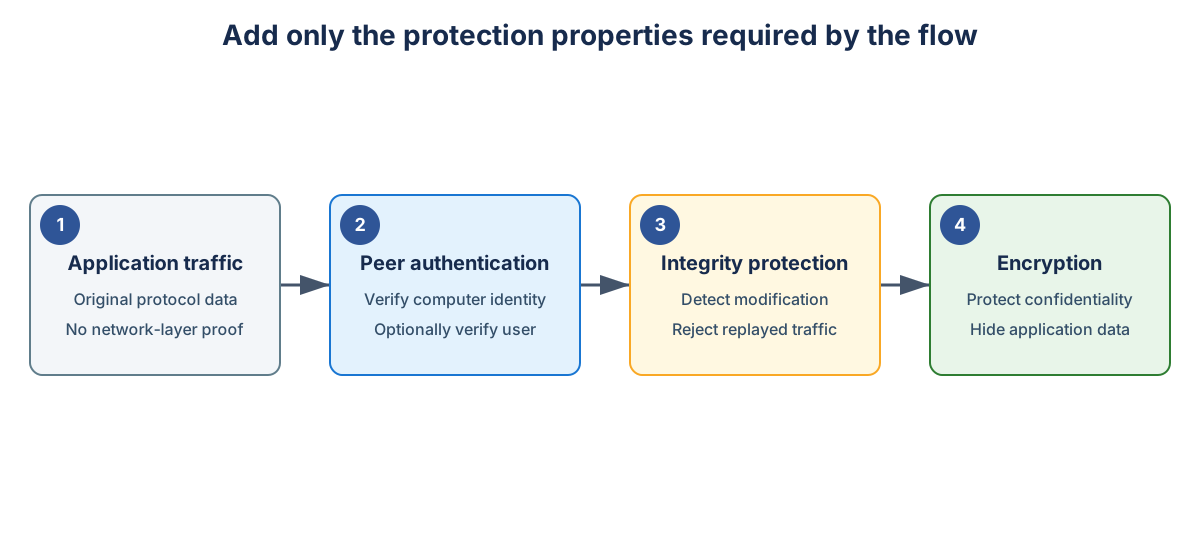
Connection security rules define which traffic must be authenticated, integrity-protected, or encrypted. They specify endpoints, authentication methods, profiles, and whether protection is requested or required. Connection security rules also configure IPsec. IPsec authenticates peers, protects packet integrity, prevents replay, and can encrypt traffic. IPsec functions to protect traffic at the network layer.
Connection security rules do not permit or block traffic. Firewall rules control access. Secure access typically requires both: an IPsec connection security rule and a firewall rule set to allow only secure connections.
Separate the security properties
Internet Protocol security (IPsec) can provide:
- Peer authentication
- Data-origin authentication
- Integrity protection
- Confidentiality through encryption
- Replay protection
Understand Encapsulating Security Payload
Encapsulating Security Payload (ESP) is an IPsec protocol that authenticates traffic, protects packet integrity, prevents replay attacks, and optionally encrypts packet contents for confidentiality. Encapsulating Security Payload can protect transport traffic between peers.
Authentication
Authentication establishes peer identity before protected traffic is accepted. Windows can use:
- Kerberos for trusted domain relationships
- Computer certificates for untrusted forests, nondomain systems, or heterogeneous environments
- Compatible legacy methods when required
Note
Avoid using preshared keys for authentication. They provide weak identity granularity and difficult lifecycle management.
Integrity
Integrity protection lets the receiver detect whether a packet is modified between source and destination. A cryptographic integrity value allows for the verification of traffic integrity and modified packets fail validation.
Confidentiality
Encryption protects application data from passive inspection. Using IPsec encryption can compensate for a legacy protocol that can't provide transport encryption itself.
Note
Internet Protocol security doesn't repair weak application authorization. It protects the path and can enforce peer identity before the application receives traffic.
Understand security associations
A security association records negotiated peer, authentication, cryptographic, lifetime, and traffic-protection state.
Negotiation has two conceptual layers that occur in sequence:
- Establish an authenticated control channel between peers.
- Establish protection for matching application traffic.
If one peer has no compatible policy, authentication method, proposal, or traffic selector, the required association doesn't form.
When troubleshooting the negotiation process, keep in mind:
- Internet Key Exchange commonly uses User Datagram Protocol port
500. - Network Address Translation traversal commonly uses User Datagram Protocol port
4500.
This information allows you to configure appropriate traffic capture mechanisms.
Select authentication
Your aim when selecting authentication methods is to choose the most robust option.
Use Kerberos when:
- Both computers participate in a trusted domain path.
- Domain name resolution is reliable.
- Domain controllers are reachable.
- Time synchronization supports authentication.
Use certificates when:
- No domain trust exists.
- A nondomain device requires access.
- Cross-organization policy requires independent trust.
- A non-Windows peer supports compatible standards.
Certificate deployment also requires trusted roots, valid purposes, private-key access, renewal, and revocation availability.
Protect legacy traffic
Ensure that you protect legacy traffic where the protocol transmits information in a nonencrypted format.
When you have line-of-business service that uses unencrypted protocols configure:
- Firewall scope to limit which systems can reach the listener.
- Peer authentication to verify the source computer.
- User authorization to restrict who uses the flow.
- Integrity protection to detect traffic modification.
- Encryption to protect application data.
This pattern provides compensating control while the application remains unchanged.
Use selective deployment
Don't begin with enterprise-wide mandatory isolation unless dependencies are known and recovery paths are proven.
Prioritize the following workloads:
- Privileged administration
- Sensitive file services
- Regulated data paths
- Legacy plaintext applications
- High-value servers
- Systems with constrained patch options