Understand Azure Databricks architecture
When you work with Azure Databricks as a data engineer, understanding its architecture helps you make informed decisions about how to organize your data, configure compute resources, and manage security. The architecture determines how your workloads run, where your data resides, and how different components interact.
Azure Databricks uses a hierarchical structure that organizes resources from the account level down to individual data objects. This structure, combined with the separation between control and compute planes, provides flexibility and security for your data engineering workloads.
Azure Databricks account hierarchy
Azure Databricks organizes resources in a hierarchical structure that starts at the account level. The account is the top-level construct you use to manage Azure Databricks across your organization. At this level, you manage identity and access, create and configure workspaces, attach Unity Catalog metastores, and oversee billing and policies.
The metastore is the top-level container for metadata in Unity Catalog, registering information about your data and AI assets such as tables, views, volumes, models, and functions, along with the permissions that govern access to them. Each metastore is region-specific, and workspaces attached to the same metastore share a unified view of data, enabling centralized governance across your organization.
Unity Catalog organizes data using a three-level namespace structure: <catalog-name>.<schema-name>.<object-name>. Unlike the legacy Hive metastore that operates per workspace, Unity Catalog metastores operate at the account level, allowing you to define data access policies once and apply them consistently across all attached workspaces.
Before Unity Catalog, Azure Databricks used the Hive metastore (legacy) as a workspace-level metadata store. When a workspace is enabled for Unity Catalog, the legacy Hive metastore becomes accessible as a catalog named hive_metastore, allowing you to query existing data using the format hive_metastore.<schema-name>.<table-name>. Databricks recommends migrating to Unity Catalog for enhanced security, centralized governance, and built-in auditing.
You create multiple workspaces within an account. Workspaces are the collaboration environments where you and your team run compute workloads such as data ingestion, interactive exploration, scheduled jobs, and machine learning training. Each workspace provides an isolated environment for your projects while sharing the same account-level governance.
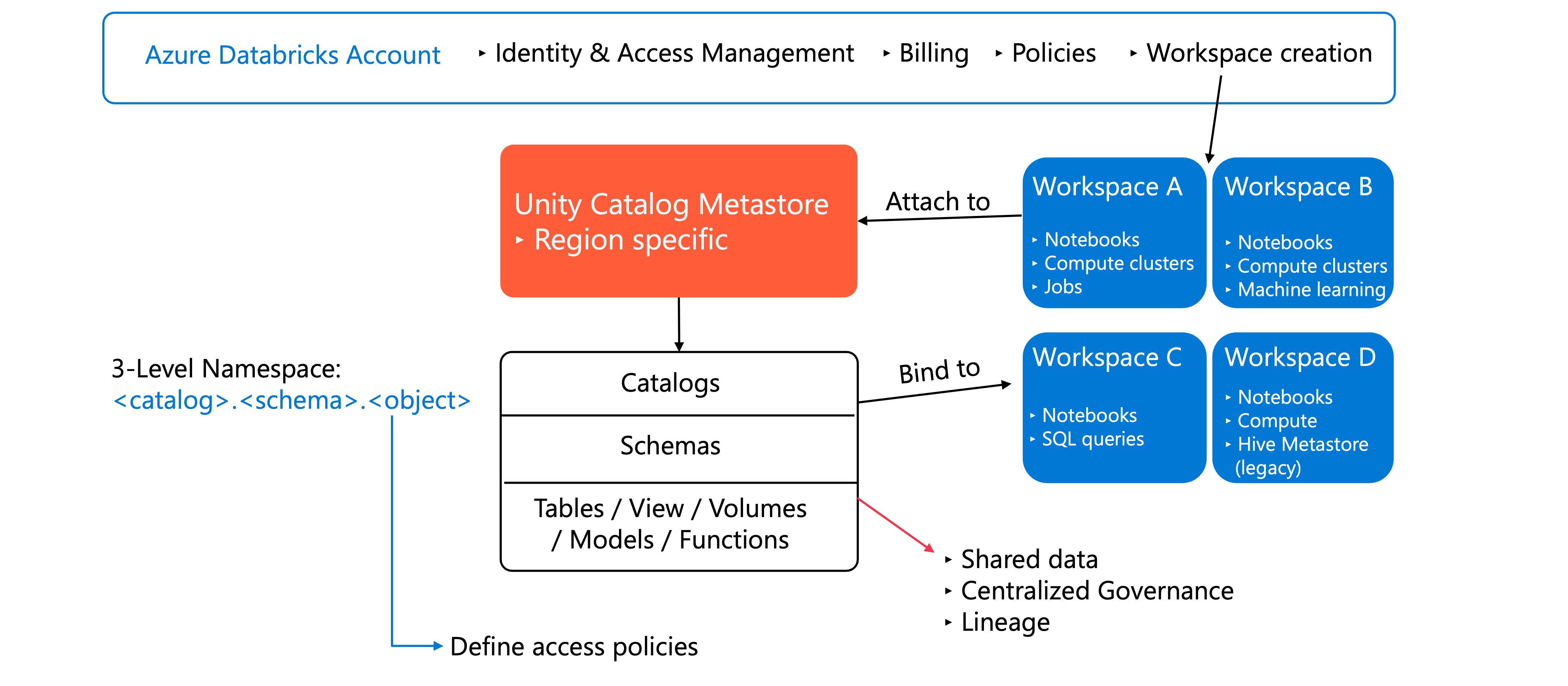
This hierarchical approach allows you to separate concerns: manage organization-wide policies at the account level, isolate projects in workspaces, and govern data centrally through Unity Catalog.
Control plane and compute plane
Azure Databricks separates its architecture into two distinct planes: the control plane and the compute plane.
The control plane includes the backend services that Azure Databricks manages in your Azure Databricks account. This plane hosts the web application you use to interact with Azure Databricks, manage configurations, and monitor your workloads. The control plane handles orchestration, job scheduling, and cluster management, but it doesn't process your data.
The compute plane is where your data processing happens. Azure Databricks offers two types of compute planes, each designed for different use cases.
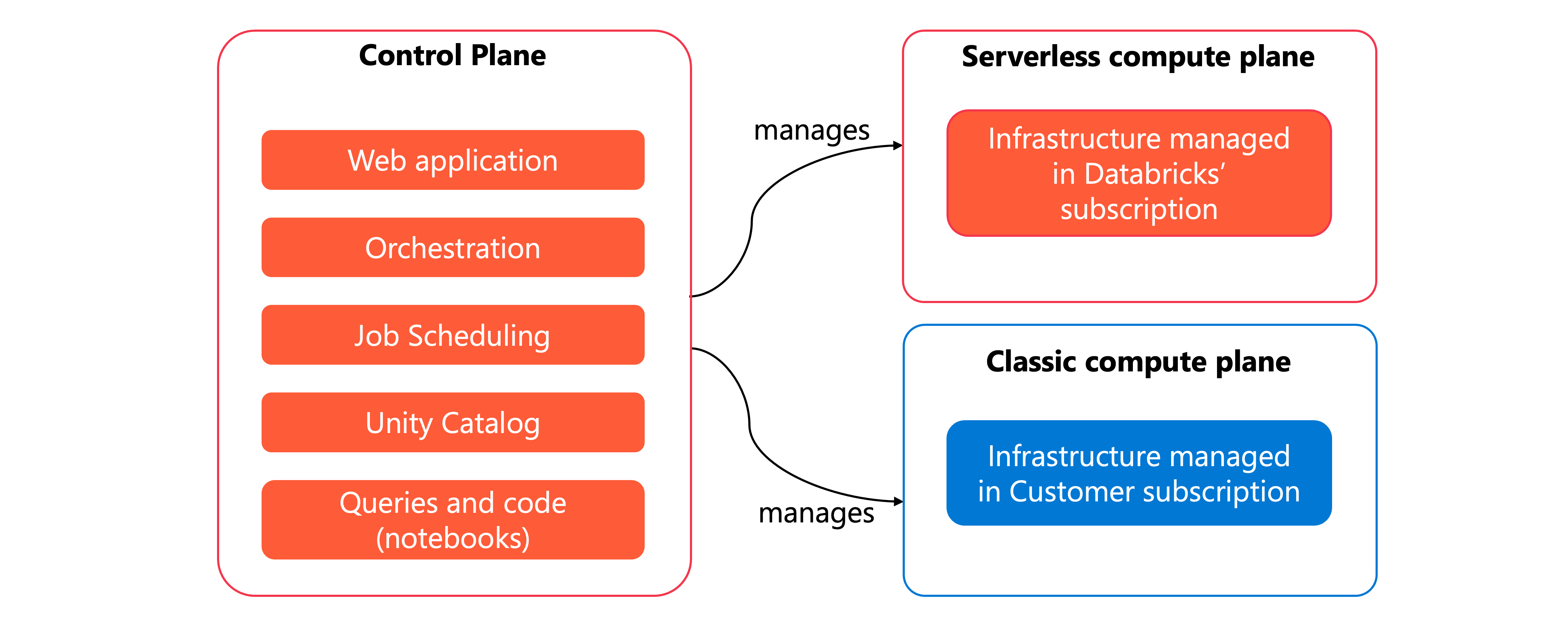
With serverless compute, your compute resources run in a serverless compute plane within your Azure Databricks account, not in your Azure subscription. Azure Databricks fully manages the infrastructure, automatically scaling resources based on your workload demands. The serverless compute plane includes network boundaries to isolate workspaces and additional security controls between clusters. This option simplifies operations because you don't need to manage virtual networks or compute resources yourself.
With classic compute, your compute resources run in your own Azure subscription in what's called the classic compute plane. Azure Databricks creates new compute resources within each workspace's virtual network in your subscription. This approach provides natural isolation because resources run in your subscription, giving you more control over networking and security configurations.
Note
Classic workspaces are referred to as Hybrid workspaces in the Azure portal.
The separation between control and compute planes allows Azure Databricks to manage orchestration centrally while processing your data in isolated, secure environments.
Workspace storage
Workspace storage is handled differently depending on your workspace type. Classic workspaces have an associated workspace storage account that resides in your Azure subscription. Serverless workspaces use default storage—a fully managed storage location within your Azure Databricks account, not in your own Azure subscription. You'll explore default storage in detail in a later unit.
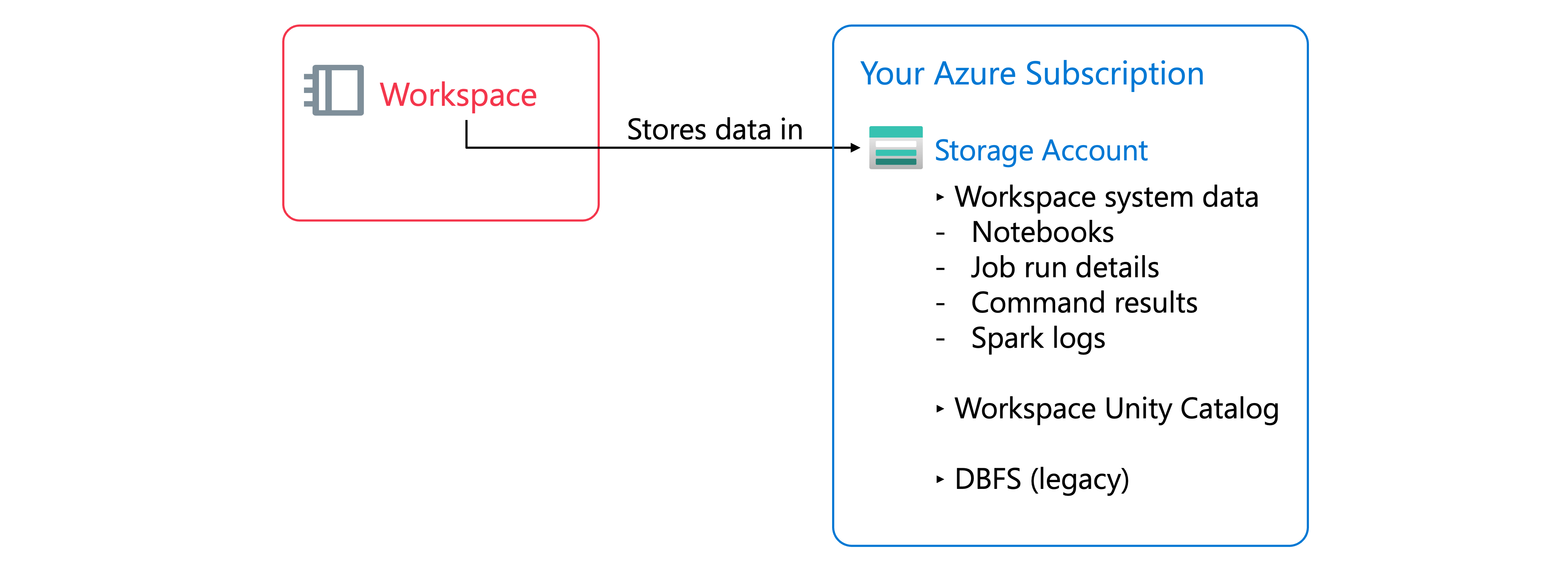
Regardless of workspace type, workspace storage contains two categories of data.
Workspace file system data includes the assets that you and your team create and manage through the Azure Databricks UI—notebooks, SQL queries and dashboards, alerts, repos, libraries, and other small files such as Python or YAML configuration files.
Workspace system data is generated internally by Azure Databricks features and includes SQL query results, job run results, notebook revisions, SQL query plans used for observability, and cluster logs.
In classic workspaces, both categories reside in the workspace storage account in your Azure subscription. If your classic workspace was enabled for Unity Catalog automatically, the workspace storage account also contains the default workspace catalog. All users in your workspace can create data assets in the default schema within this catalog. Users access this data through Unity Catalog's governance layer and don't have direct access to the underlying storage, ensuring security and proper access control.
The classic workspace storage account may also contain DBFS (Databricks File System), which is a distributed file system accessible under the dbfs:/ namespace. DBFS root and DBFS mounts are legacy features. Storing and accessing data using DBFS root or DBFS mounts is a deprecated pattern. Instead, you should use Unity Catalog-managed tables and volumes for better governance and security.
Understanding where your data resides helps you implement appropriate security controls, such as enabling firewall support for your workspace storage account to limit access to authorized resources and networks only.