Understand external storage
As a data engineer, you need to connect Azure Databricks to data stored in cloud storage locations like Azure Data Lake Storage containers. You might have production data in one storage account and development data in another, or you might need to work with data that's managed by teams outside of Databricks. External locations in Unity Catalog allow you to securely connect cloud storage to your workspaces while maintaining governance and access control.
What are external locations?
External locations are Unity Catalog objects that define secure connections to cloud storage. Each external location combines two components: a cloud storage path and a storage credential that authorizes access to that path.
A storage credential represents an authentication mechanism, such as an Azure managed identity or service principal. The storage credential provides the authentication required to access your cloud storage. Storage credentials are defined once in Unity Catalog and reference the identity configured in your Azure tenant.
An external location specifies which storage credential to use and which cloud storage path to access. This separation between credentials and locations allows one storage credential to be referenced by multiple external locations if they all access storage in the same security boundary.
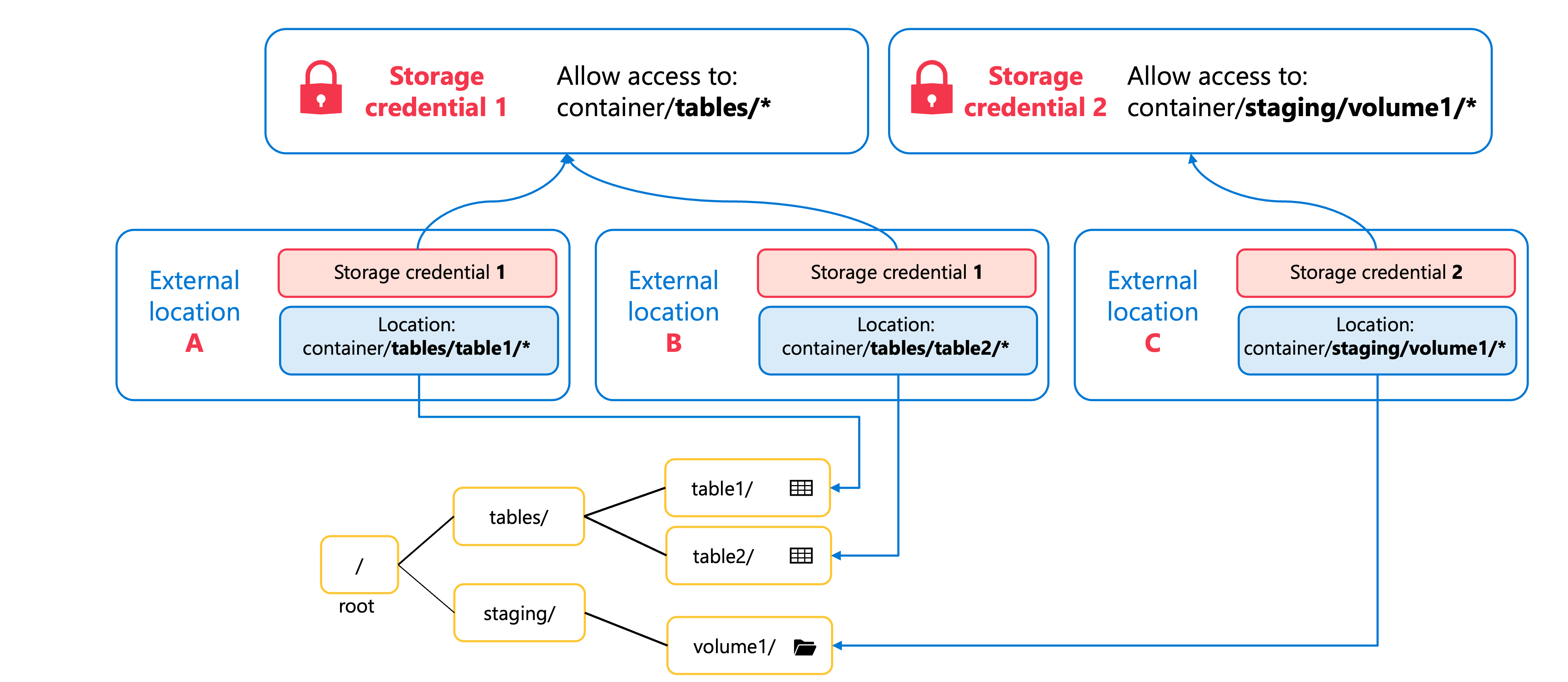
External locations can reference storage in Azure Data Lake Storage containers, AWS S3 buckets (read-only), or Cloudflare R2 buckets. For Azure Databricks workloads, you'll typically use Azure Data Lake Storage containers because they integrate natively with Unity Catalog and support both read and write operations.
Why do we need external locations?
External locations serve two purposes in Unity Catalog: they enable you to work with external data assets, and they allow you to define managed storage locations at different levels of your data hierarchy.
External tables and volumes let you work with data that's stored and managed outside of Unity Catalog. When you create an external table, you're essentially registering existing data in cloud storage so that Unity Catalog can govern access to it. The data files remain in their original location, managed by your cloud provider or other data platforms. This approach is useful when you have large amounts of existing data, when other systems also need to access the data, or when you want to maintain control over the data lifecycle outside of Databricks.
Managed storage locations use external locations to define where Unity Catalog should store managed tables and volumes. Even though the data is managed by Unity Catalog, it still needs to reside in cloud storage that you own. An external location specifies the storage path, which is then assigned as the managed storage location for a catalog or schema. This allows you to determine where your data physically resides while Unity Catalog handles the data lifecycle.
The key difference lies in who manages the data. With external tables and volumes, you manage the data files and Unity Catalog governs access. With managed storage locations, Unity Catalog manages both the data lifecycle and access control, but stores the data in a location you specify through an external location.
| Aspect | External Tables/Volumes | Managed Storage Locations |
|---|---|---|
| Data Management | You manage the data files | Unity Catalog manages the data |
| Data Location | Data remains in original location | Data stored in location you specify |
| Use Case | Existing or shared data | New data managed by Unity Catalog |
Understand storage credentials
Before you can create external locations, you need storage credentials—Unity Catalog securable objects that encapsulate the authentication mechanism for accessing cloud storage. Storage credentials centralize credential management. Instead of handling authentication in notebooks or queries, you define credentials once in Unity Catalog and reference them across multiple external locations.
Azure managed identities are the recommended authentication mechanism. A managed identity is an Azure resource that provides an identity for applications connecting to resources that support Microsoft Entra ID authentication. Azure automatically manages the credential lifecycle—no passwords, no secrets to rotate, and support for storage accounts protected by network firewalls.
Service principals are a legacy alternative. They require you to create an application identity in Microsoft Entra ID and manage client secrets manually, including periodic rotation. Managed identities are preferred for these reasons.
Storage credentials are metastore-level objects available to all attached workspaces. Only users with appropriate privileges can use them to create external locations.
Note
A detailed walkthrough of creating and configuring external storage will be covered in a subsequent module.
Workspace binding for external locations
By default, an external location is accessible from all workspaces attached to your metastore. This means that any user with appropriate privileges can use the external location from any workspace. However, you might want to restrict access to specific workspaces to align with your organization's security boundaries or data governance policies.
Workspace binding restricts an external location to designated workspaces. When enabled, users can only access the external location from assigned workspaces, regardless of their Unity Catalog privileges. This creates an additional layer of access control beyond user-level permissions.
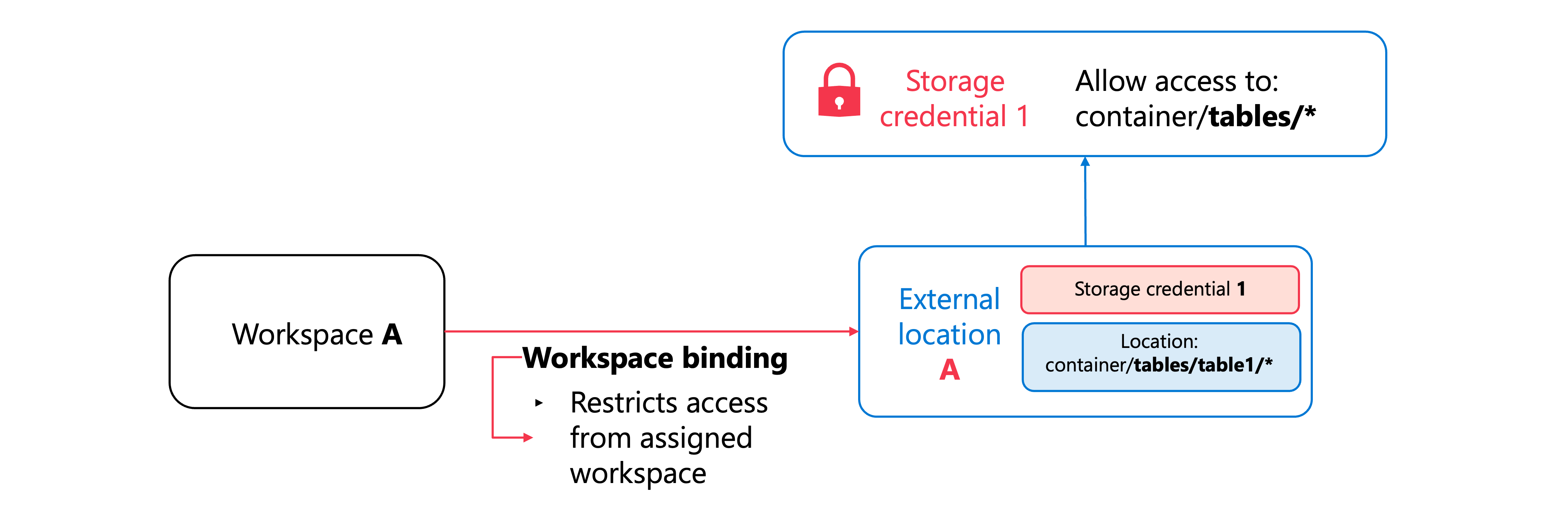
Workspace binding applies independently to both external locations and storage credentials. By default, a storage credential is also accessible from all workspaces attached to the metastore. You can bind a storage credential to specific workspaces so it can only be used to create external locations within designated workspaces—a common pattern for ensuring production credentials are used only in production workspaces.
Workspace binding is relevant when workspaces represent different environments (production versus development) or when compliance requirements mandate that certain data remains accessible only from specific compute environments. For example, production data can be bound exclusively to production workspaces, preventing access from development environments even for privileged users.