Describe how knowledge, tools, and MCP servers extend agent capabilities
The capabilities of a Copilot Studio agent are determined by two fundamental building blocks: knowledge and tools. Knowledge gives an agent something to read and reason over. Tools give an agent something to do—the actions it can take to retrieve live data, run processes, or interact with external systems.
Knowledge sources
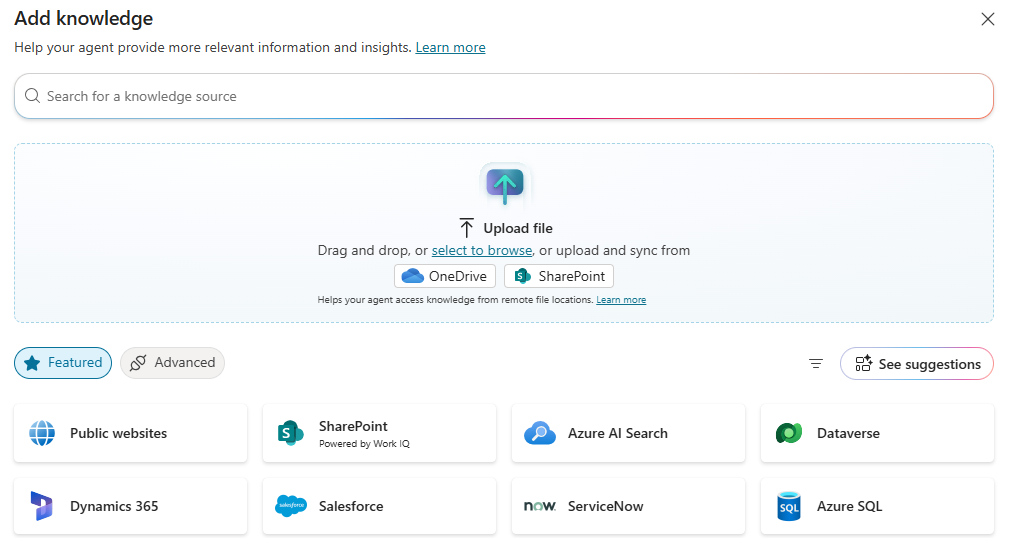
A knowledge source is any content repository that an agent can search when answering a user's question. Copilot Studio supports several types:
- SharePoint sites and documents: Agents can index SharePoint sites, document libraries, and specific files. This is the most common knowledge source for internal agents, enabling employees to query company policies, training materials, and project documentation in natural language.
- Public websites: Agents can index publicly accessible web pages, enabling customer-facing agents to answer questions based on product documentation sites, marketing content, or support portals.
- Uploaded files: Makers can upload files directly to the agent—PDFs, Word documents, or spreadsheets—which are indexed and made available as knowledge without requiring a connected document repository.
- Dataverse knowledge: Agents can search structured Dataverse tables as knowledge sources, enabling agents to answer questions about business records such as customer accounts, product catalogs, or case history.
- Custom knowledge connectors: Organizations with content stored in external systems—such as ServiceNow, Salesforce, or custom knowledge bases—can connect those systems as knowledge sources through Power Platform connectors.
Tools
While knowledge enables an agent to answer questions, tools enable an agent to take action. Copilot Studio supports six categories of tools:
- Power Platform connectors: Pre-built integrations with over 1,400 external services including Salesforce, SAP, ServiceNow, and Microsoft SQL Server. Connectors enable agents to read from and write to connected systems in real time.
- Agent flows: Deterministic, rule-based automation workflows built in Copilot Studio that the agent can invoke as needed. Covered in detail in a later unit.
- MCP servers: Model Context Protocol servers that expose structured data and capabilities from enterprise systems directly to the agent. Covered in the next unit.
- Custom prompts: Maker-defined prompt templates that structure the agent's output format for specific use cases—for example, always generating a structured comparison when querying competing products.
- Computer Using Agents (CUA): An advanced capability that allows agents to interact with graphical user interfaces of legacy systems that don't have APIs, by simulating mouse clicks and keyboard input.
- Child agents: A primary agent can invoke other specialized agents as tools, enabling multi-agent architectures where a coordinating agent routes requests to domain-specific specialist agents.
How the agent decides when to use tools and knowledge
With generative orchestration enabled, the AI model within the agent acts as a dynamic orchestrator. When a user sends a message, the model evaluates all available knowledge sources and tools and decides at runtime which combination to use. For example, if a user asks the Benefits Advisor agent "What is my current vacation balance and when does the accrual year reset?", the agent might search SharePoint knowledge for the accrual year policy and invoke a Dataverse connector tool to look up the user's specific vacation balance—combining both results into a single, coherent response.
MCP servers
Model Context Protocol (MCP) is an open standard that defines how AI agents and models communicate with external data sources and services. MCP servers expose a curated set of capabilities—queries, actions, and data operations—that an agent can call at runtime. Microsoft Copilot Studio supports MCP servers as a first-class tool type, enabling agents to connect to live enterprise data in a structured, secure way.
What is an MCP server?
An MCP server is a backend service that exposes a defined set of operations to an AI agent. The server declares what it can do—the operations it exposes, the parameters those operations accept, and the data they return—and the agent's AI orchestrator decides at runtime which operations to call and in what order, based on the user's request.
MCP servers differ from traditional API integrations in that they are designed specifically for AI consumption. Rather than a maker hardcoding a sequence of API calls in an explicit conversation flow, the agent reads the MCP server's capability description and dynamically composes the operations it needs—making MCP connections more flexible and requiring less explicit configuration than traditional connectors.
The Dataverse MCP server
Microsoft provides a first-party Dataverse MCP server that makes structured Dataverse data interactive for Copilot Studio agents. The server exposes nine operations agents can use at runtime:
| Operation | Description |
|---|---|
| List tables | Discover which Dataverse tables are available in the connected environment |
| Describe table | Retrieve the schema for a specific table, including column names and data types |
| Read data | Query table records using structured or natural language filters |
| Create record | Insert a new record into a Dataverse table with schema-aware field mapping |
| Update record | Modify an existing record in Dataverse with schema validation |
| List prompts | Retrieve a list of saved AI prompt templates available in the environment |
| Execute prompt | Run a specific prompt template against data |
| List knowledge sources | Discover available Dataverse knowledge sources configured for agent use |
| Retrieve knowledge | Search and retrieve content from a Dataverse knowledge source |
Once connected to the Dataverse MCP server, makers don't need to configure individual operations. The agent's AI orchestrator reads the available operations and chooses which ones to call based on what the user is asking—for example, calling List tables, Describe table, and Read data in sequence to answer a natural language question about business data.
Third-party MCP servers
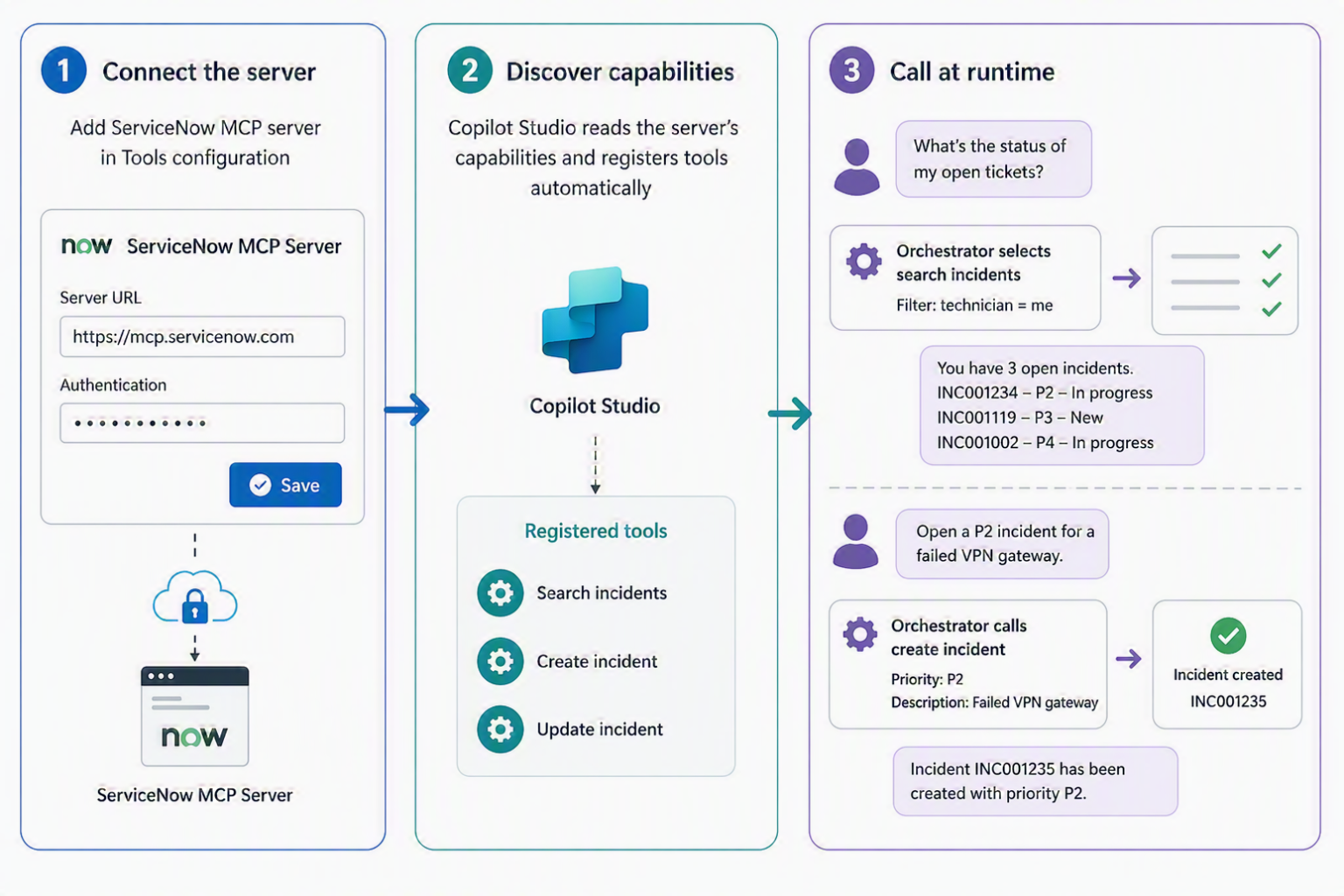
Beyond the Dataverse MCP server, Copilot Studio supports connections to third-party and custom MCP servers, covering enterprise platforms such as GitHub, Atlassian Jira and Confluence, SAP, ServiceNow, and Salesforce. Makers connect an MCP server by providing its URL and any required authentication credentials in the Copilot Studio tools configuration. Once connected, the server's capabilities are automatically discovered and made available to the agent's AI orchestrator.
MCP servers and DLP governance
Because MCP server connections use Power Platform connectors for their underlying connectivity, they are subject to Power Platform DLP policies. If an administrator blocks a connector that an MCP server relies on, the agent cannot use that MCP server's tools. This keeps MCP-connected agents within the same governance boundaries as all other Power Platform integrations.
Contoso Professional Services in action
Contoso Professional Services runs a help desk agent in Microsoft Teams for its field technicians. The company tracks all IT incidents in ServiceNow, and technicians frequently ask the agent questions such as "what's the status of my open tickets?" or "open a P2 incident for a failed VPN gateway."
Rather than hardcoding individual ServiceNow API calls inside the agent's conversation flow, the maker connects a ServiceNow MCP server. The ServiceNow MCP server describes its incident operations—search, create, update—in a form the agent's orchestrator can read. The maker sets up the connection once by supplying the server URL and authentication credentials, and the agent handles requests at runtime by dynamically composing the operations it needs. The same connection handles "list my tickets," "open an incident," and "escalate this one" without separate configuration for each scenario.