Describe how to monitor Copilot Studio agent usage and adoption
Deploying an agent is the beginning of a continuous cycle of monitoring, learning, and improvement. Copilot Studio provides built-in analytics that give makers and administrators visibility into how agents are being used, which conversations succeed or fail, and where engagement is growing or declining.
The Copilot Studio analytics dashboard
Each agent in Copilot Studio has a dedicated analytics page accessible from the agent's authoring interface.
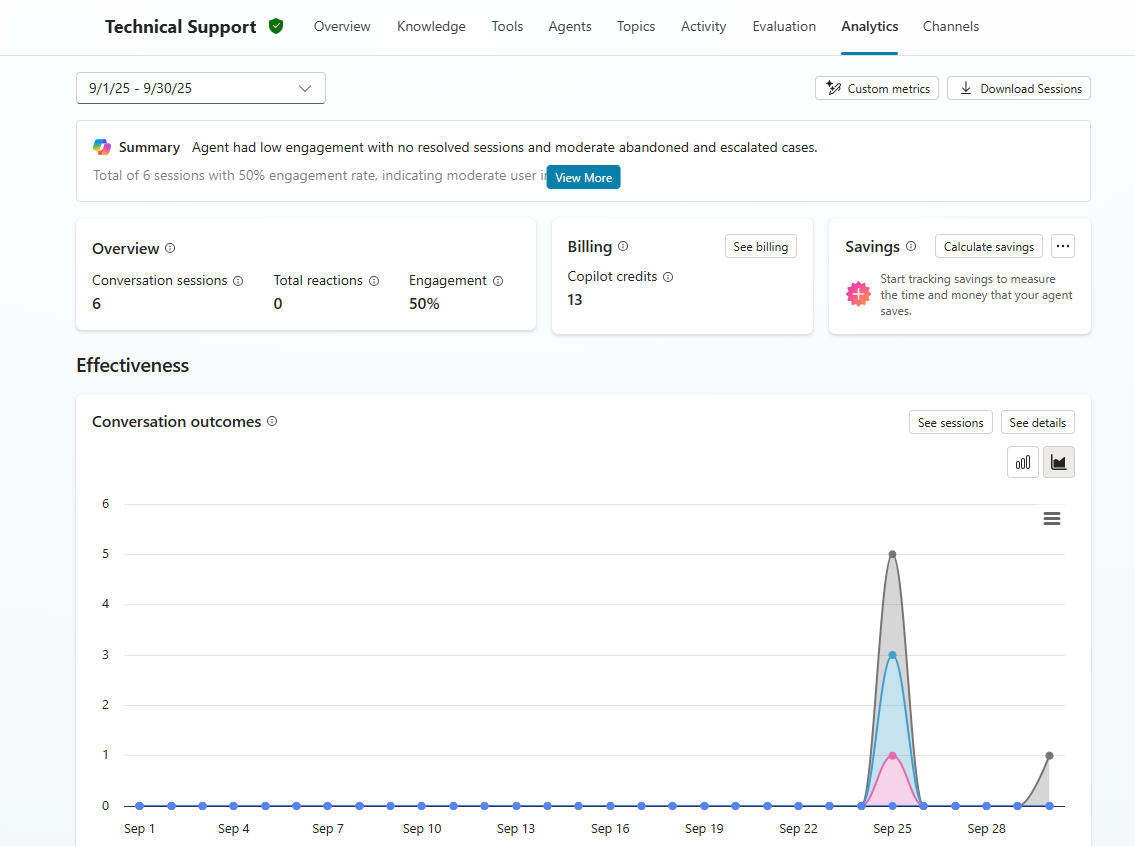
The analytics page organizes metrics across several views.
Overview
The Overview page presents key performance indicators that summarize agent health at a glance:
- Total sessions: The number of distinct conversation sessions the agent handled in the selected time period.
- Engagement rate: The percentage of sessions where the agent provided at least one substantive response, indicating users actively engaged beyond a greeting.
- Resolution rate: The percentage of sessions where the user's need was resolved without escalation or repeated questions.
- Escalation rate: The percentage of sessions handed off to a human agent or escalated through a defined escalation path.
- Abandonment rate: The percentage of sessions where the user stopped interacting before their question was resolved.
Topic analytics
The Topics page shows which topics are triggered most frequently, which have high abandonment or escalation rates, and which are performing well. Makers use topic analytics to identify gaps in conversation coverage and to prioritize which topics to refine or expand.
Customer satisfaction
If the agent is configured with a satisfaction survey at the end of conversations, the Customer Satisfaction (CSAT) page displays aggregate satisfaction scores and trends. Makers can drill into low-scoring sessions to review transcripts and understand what went wrong.
Active users
The Active Users page tracks unique users who interacted with the agent, displaying daily active users (DAU) and monthly active users (MAU). Trend lines help makers understand whether adoption is growing, stable, or declining. Active user metrics require the agent to be configured with Microsoft Entra ID authentication.
Custom metrics
Copilot Studio supports custom metrics that makers define using natural language. By describing a business outcome to track—such as "how often users requested escalation to a specialist"—Copilot Studio generates a metric calculated from conversation transcripts and displays it as a visualization on the analytics page.
Agent Inventory in the Copilot Studio Kit
The Copilot Studio Kit, available as a separately installed solution, provides an Agent Inventory feature that gives administrators tenant-wide visibility into all Copilot Studio agents across all environments. The inventory includes metadata such as creation date and publish status, feature usage data showing whether each agent uses knowledge sources or generative orchestration, agent growth timelines, and a breakdown of AI feature adoption across the tenant's agent portfolio.