Introduction
Contoso Bakehouse is a fictional artisan bakery chain with sales, franchise, and transaction data in Azure Databricks, governed by Unity Catalog. The data team has spent months building reliable data pipelines and clean, well-documented tables. Now, three different teams need answers from that data—without writing a single line of SQL.
Sofia, a regional sales manager, is in a Microsoft Teams meeting when a question comes up about Q1 sales by country. She doesn't have time to navigate to a separate tool or wait for a report to refresh. She wants to ask the question right where she's working, get an answer she can trust, and get back to the conversation.
Marcus, on the central data engineering team, built the Genie Space that answers Sofia's questions. His job now is to make sure Sofia can access it from Microsoft Teams—and that the Unity Catalog permissions he configured still apply when she does. He also needs to know what to configure before Priya can build on top of his work.
Priya, a maker on the productivity team, wants to build a Copilot Studio agent for executives. That agent should answer data questions from the Genie Space, but also pull in context from recent emails and meeting notes. She needs to know how to wire those two things together and what limits apply.
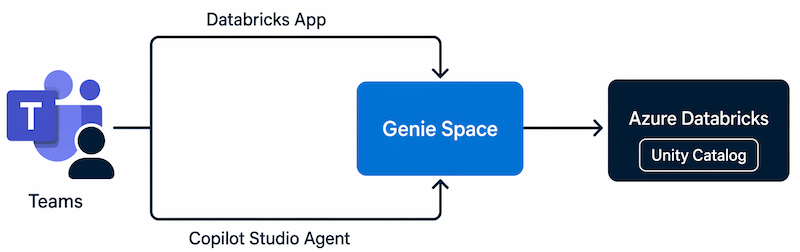
In this module, you learn how each of these scenarios works. You explore the two paths for accessing a Genie Space in Microsoft Teams—the Databricks app and a Copilot Studio agent—understand how Unity Catalog governs data access across both, apply effective prompting techniques, configure the permissions each path requires, and build and publish a Copilot Studio agent that surfaces a Genie Space inside Microsoft Teams.