Use Rebase in Git
When you merge two branches, you often need to use the three-way merge. Doing so creates a new commit that combines the code from the two branches. This also keeps a track of the complete commit history. But if you look at the history, you can see many branch structures that aren't easy to read.
In the next graphic on the three-way merge, you can clearly see the two tracks with their commits joining again in commit G.
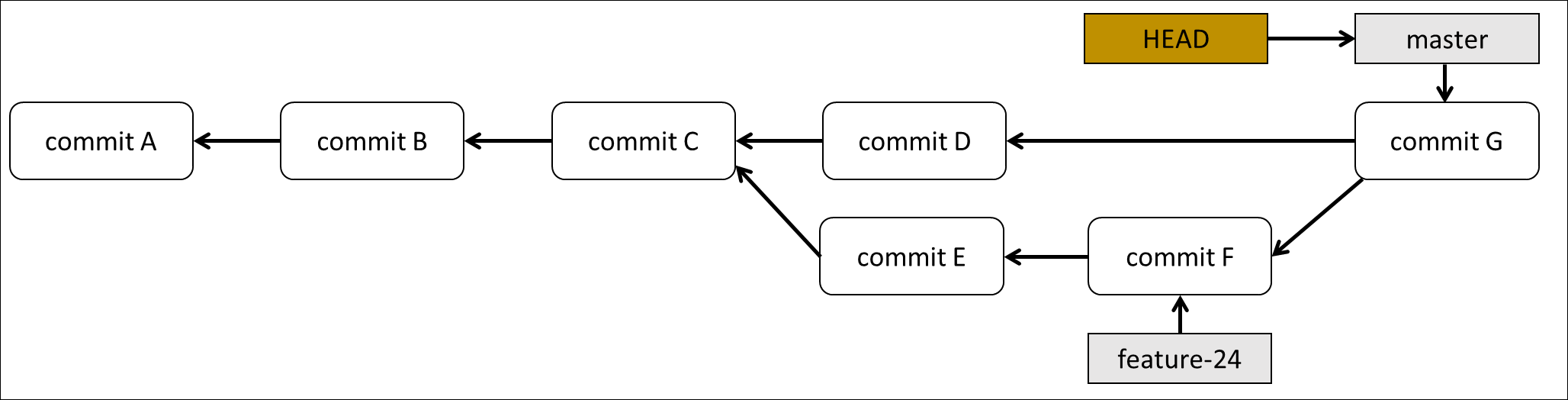
Sometimes developers don't want to keep this structure, but they want a nice clean line if they look at the commit history. So you can use git rebase, where you replay all your commits but starting on another parent. In the graphic on three-way merge, the parent (for both branches) is commit C. With rebase, you can take commit E and commit F, and rebase them on commit D. By doing this, you get one track with all the commits instead of this branching structure.
With rebase, you're not using the same commits and replaying them on another parent. You're creating new commits that perform the same code changes.
We're using the same example as with the three-way merge. A branch feature-24 was created with two commits. Instead of merging the branch with the main branch, a rebase command is used. This takes the commits from the feature branch and apply them on another parent commit.
The new parent commit is commit D. A rebase can create merge conflicts if in commit D, files are changed that are also changed in one of the other commits. As you can see, the same changes are applied on commit D, but new commits are created. They're indicated as commit E' and commit F'. The end result is one clean, straight line of commits.

The rebase command is used on the branch you would like to rebase on.
git checkout feature-24
git rebase main
Branching can be dangerous, certainly if you're working in a team and you're doing a rebase on a remote branch. By doing this you're rewriting history. Maybe a colleague is still working with that feature branch, but in the meantime, it was rebased. This can be used on a local repository if you aren't working with other developers on the same branch. So, you need to use this function with care!