Introduction
A familiar ticket lands in your queue: "The database is slow." No query, no time range, no error. Before Copilot, you'd spend 30 minutes pulling DMVs and Query Store data just to form a guess. With Copilot in the Azure SQL Database portal, you ask the question in plain language and get a candidate query and wait type to investigate. The diagnosis is still yours. You just skip the boilerplate that gets you to it.
Most people use generative AI through a chat-based tool. Microsoft Copilot is a chat-based tool that provides smart, real-time assistance to help you complete tasks more quickly and easily.
Note
Behind the scenes
Generative AI uses large language models (LLMs), which are AI systems trained on massive amounts of text, to understand and generate human-like language. They are like an intelligent autocomplete. LLMs are a type of AI model that uses natural language processing (NLP) techniques to work.
NLP is a broader technology that helps computers understand and use human language to make things like chatbots, voice assistants, and translations work smoothly. LLMs are one powerful example of NLP in action.
Make Copilot part of your DBA toolkit
Azure SQL DBAs work with Copilot through three surfaces.
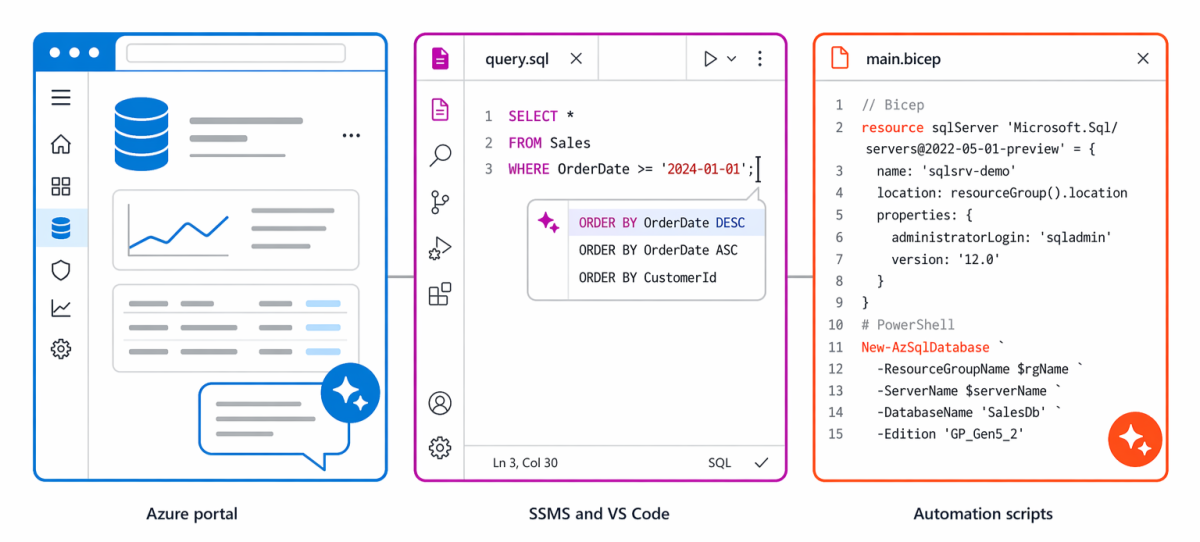
Copilot in Azure SQL Database is built into the Azure SQL Database page in the Azure portal. It diagnoses performance issues, interprets database watcher alerts, explains query plans, and suggests remediation in natural language, without leaving the portal. Its scope is the single database you have open.
GitHub Copilot in SSMS and VS Code is an AI code assistant integrated into the query editor in SQL Server Management Studio (SSMS) and the VS Code mssql extension. It completes T-SQL as you type, converts natural-language comments into working queries, explains errors, suggests index recommendations, and optimizes queries. It works against Azure SQL Database, Azure SQL Managed Instance, SQL Server, SQL Server on Azure VMs, and SQL database in Fabric.
GitHub Copilot for infrastructure automation brings the same completion and generation experience to Bicep, Terraform, PowerShell, and Azure CLI. Copilot drafts the first version of common DBA scripts, including provisioning templates, security baselines (TDE, firewall, Entra-only auth), backup and failover policies, monitoring and alert rules, and scheduled scaling jobs.
Stay in control of every change
Copilot accelerates your existing work. It doesn't change ownership, responsibility, or standards.
- You still validate every suggestion against your environment. Copilot doesn't know your service-level agreements (SLAs), your maintenance windows, or your data growth patterns.
- You still apply least-privilege principles and review every permission.
- You still test in nonproduction before applying changes to production.
- You still own the final decision for implementation.
In the next unit, you start with the portal, using Copilot in Azure SQL Database to turn a performance complaint into a focused diagnostic hypothesis.