Identify deployment constraints that require zero‑touch provisioning
Before you configure any tools or policies, it's important to understand the constraints of the deployment you're supporting. In this scenario, the most important constraint is that IT will never physically handle the devices. That immediately rules out traditional provisioning approaches such as manual imaging or on-premises join processes.
In a traditional deployment, IT might image devices, join them to the network on-premises, or configure settings before handing them to users. None of those approaches are available in this scenario. Because devices are delivered directly to employees, any configuration that depends on physical access or a corporate network is unworkable. Recognizing these limitations early helps IT avoid designs that work well in theory but break down once devices are in users' hands.
Because users will be signing in from home or other remote locations, the deployment must work entirely over the internet. The first sign-in experience needs to guide the user through setup while quietly handling enrollment and configuration in the background. From the user's point of view, they should simply sign in and start working.
Zero-touch deployment overview
This diagram shows how the enrollment process fits together. It presents a cascading view, from vendor shipment to complete enrollment.
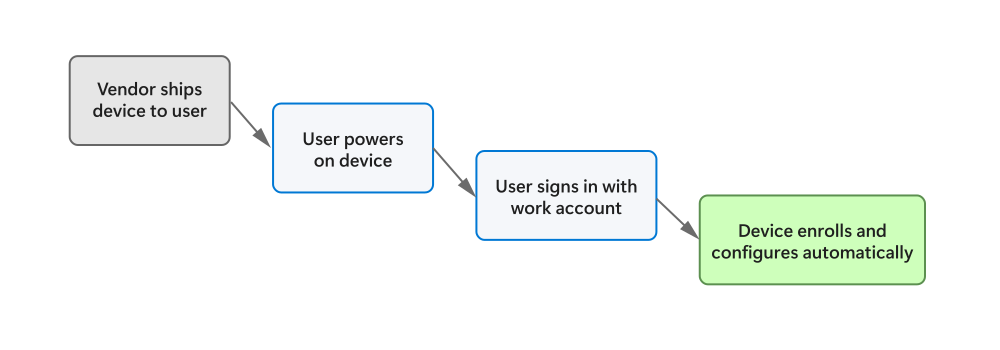
To keep this process simple and replicable, several technical requirements emerge.
- Devices must enroll automatically into management as soon as the user signs in
- Configuration and security settings must apply consistently, without per-device customization
- Updates must be centralized so devices don't drift out of compliance over time
- Finally, IT needs a reliable way to confirm that deployment succeeded and to troubleshoot any issues
Together, these requirements reduce operational overhead and help ensure consistent outcomes across large numbers of devices.
Common aspects of deployment to consider
This table summarizes some of the most common elements of device deployment, and how they might differ depending on your organization's approach.
| Aspect | Traditional approach | Zero-touch approach |
|---|---|---|
| Device handling | IT configures device directly | Device ships directly to user |
| Network dependency | Requires corporate network | Internet-only |
| Setup effort | Manual, per device | Automated, repeatable |
| Risk point | Physical handoff | First sign-in |
Why this matters: Smooth deployments that manage themselves as much as possible reduce risk for businesses while enabling scalability.
Because none of the setup can depend on physical access or corporate networking, only cloud-based provisioning models are viable.