Configure update management
A successful deployment doesn't end on day one. Devices must remain secure and reliable over time, which means updates need to be automatic and predictable. These update behaviors are typically implemented using centralized Windows update management services—such as Windows Update for Business or Windows Autopatch—as part of the broader Windows management ecosystem.
As the number of managed devices increases, centralized control allows IT to define update behavior once and apply it consistently, rather than managing each device individually.
In this scenario, IT wants to avoid manually approving or installing updates on individual devices. Instead, it defines update behavior centrally. Policies determine how quickly updates are installed, whether they're rolled out gradually, and how to handle restarts.
For example, quality updates might install automatically in the background, while feature updates are staged over time to reduce risk. Restart behavior is tuned so users aren't interrupted during the workday. The goal is to keep devices current without turning updates into a recurring disruption.
Note
Quality updates are regular updates that include security fixes and reliability improvements, typically applied frequently to keep devices protected. Feature updates are broader updates that might introduce new capabilities or changes to the Windows experience. They're usually deployed less frequently to reduce disruption.
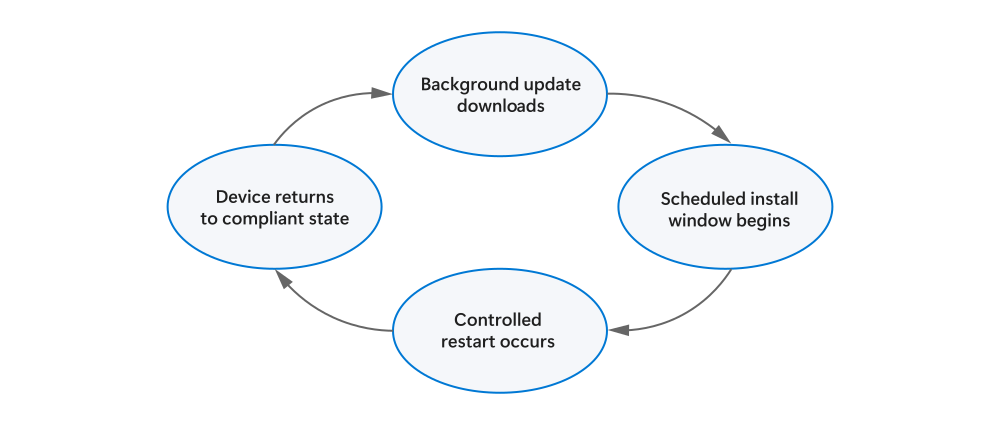
Update flow over time
This diagram illustrates how the update process cycles from one stage to the next.
In this way, update configuration also has a direct impact on support volume. Poorly timed restarts or inconsistent update behavior often surface as user complaints rather than clear technical failures. By defining update behavior centrally and predictably, IT reduces uncertainty for users and avoids a steady stream of tickets related to unexpected downtime. This helps IT scale operations without a corresponding increase in support demand. Ultimately, update management becomes an ongoing operational safeguard rather than a one-time configuration task.
Once update management is in place, devices continue to patch themselves as long as they're online. IT retains visibility into update status with less need for manual intervention.
Exercise: Choose update behavior
Users complain about unexpected restarts during work hours, but security requires timely updates.
Your task
Choose an update approach that balances:
- Security requirements
- User experience
- Operational scale
What success looks like
You can justify your update strategy and explain how it reduces disruption while maintaining compliance.