AI capabilities in modern Windows ecosystems
AI is becoming a core part of how organizations improve productivity, streamline workflows, and support modern work. Rather than existing as standalone tools, AI capabilities are increasingly integrated across platform ecosystems—from operating systems and hardware to cloud services and productivity applications.
Windows ecosystems are designed to integrate AI across devices, applications, and services, helping organizations adopt AI in a secure, scalable, and role-appropriate way. This integrated approach allows businesses to enhance workflows while maintaining governance, security, and operational consistency.
AI integration across workflows
AI in Windows ecosystems is designed to support everyday work rather than replace existing tools or processes. These capabilities enhance familiar workflows by making tasks faster, more contextual, and easier to complete.
Examples of AI integration include:
- Intelligent recommendations in Windows Search and system settings
- Language, meeting, and summarization features through Microsoft 365 Copilot
- Real-time audio and video improvements such as background noise reduction and eye-contact correction
- AI-assisted creativity tools such as Cocreator in Paint or lay out suggestions in PowerPoint
Because these capabilities are integrated across the OS and productivity stack, employees benefit from AI with minimal disruption to familiar workflows. This helps drive adoption and ensures AI enhances productivity without introducing extra complexity.
Hybrid AI in the Windows ecosystem
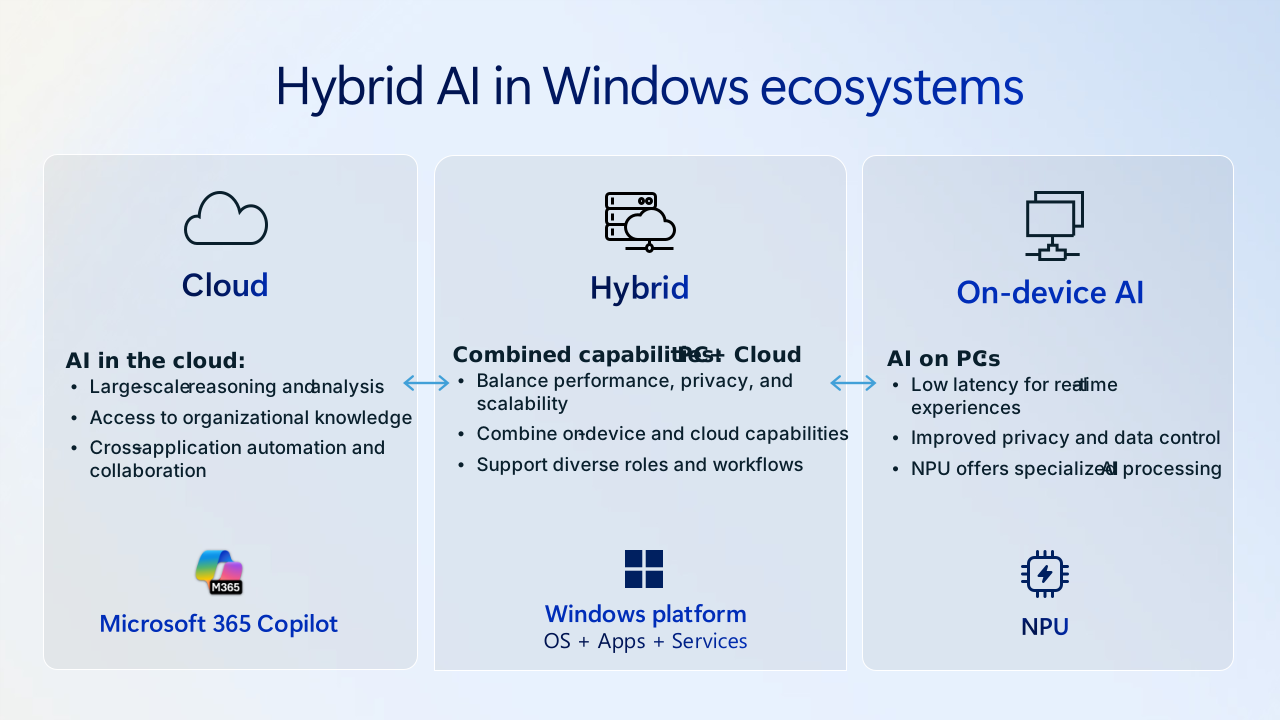
Windows ecosystems support a hybrid AI model that combines on-device processing with cloud-based intelligence. This approach allows organizations to balance performance, privacy, scalability, and governance across different workloads.
On-device AI
Modern Windows devices, particularly those equipped with supported NPUs, can enable certain AI processing directly on the device. This approach supports:
- Lower latency for real-time experiences
- Improved energy efficiency
- Processing of sensitive data without sending information to the cloud
On-device AI can enhance features such as live captions, background effects, and local AI-assisted workflows.
Cloud-based AI
Cloud-based AI enables more advanced capabilities by applying large-scale models and organizational context. Windows ecosystems integrate cloud AI through Microsoft 365 and Azure services.
Cloud-based AI supports:
- Large-scale reasoning and analysis
- Access to organizational knowledge and context
- Cross-application collaboration and automation
This flexibility allows organizations to adopt AI capabilities based on their operational needs and governance requirements.
Some organizations also use development platforms such as Microsoft Foundry on Windows to build and deploy AI models across cloud and local environments. These approaches support hybrid AI scenarios, where models run in the cloud for scale and on devices for responsiveness, privacy, and efficiency.
Hybrid AI capabilities
Most organizations benefit from a combination of on-device and cloud-based AI. Windows ecosystems are designed to support this hybrid approach.
The table below extends earlier examples by showing how hybrid AI capabilities align to different organizational needs.
| AI need | Example scenario | Windows ecosystem capability |
|---|---|---|
| Low-latency, privacy-sensitive tasks | Live captions or camera effects | On-device NPU processing |
| High-context organizational tasks | Drafting documents using company data | Microsoft 365 Copilot cloud models |
| Creative workflows | Image generation or content refinement | Device GPU/NPU combined with cloud services |
| Cross-team collaboration | Meeting recaps or shared summaries | Cloud AI with device-level integration |
This hybrid model helps ensure AI capabilities remain useful across diverse roles, from frontline workers to executives.
AI across device ecosystems
Platform ecosystems differ in how AI capabilities are delivered across devices, operating systems, and productivity tools. Some ecosystems rely primarily on application-level AI features, while others integrate AI across the operating system, hardware, and cloud services.
Windows ecosystems integrate AI across:
- Device-level AI acceleration through NPUs
- Operating system experiences such as Windows Studio Effects and search improvements
- Productivity tools such as Microsoft 365 Copilot
- Cloud-based AI services through Microsoft Azure
This integrated approach helps organizations adopt AI across workflows without relying on separate tools or fragmented experiences.
Long-term platform value
AI adoption isn't a one-time decision. Organizations benefit from platforms that can evolve alongside new AI capabilities. Windows ecosystems align AI development across hardware, the operating system, Microsoft 365, and cloud services.
This alignment enables:
- Predictable platform evolution through OS and service updates
- Consistent governance across devices and cloud services
- Future-ready hardware supported by multiple OEM partners
- Flexible AI adoption across roles and departments
By integrating AI into the broader platform ecosystem, organizations can adopt new capabilities while maintaining consistency and security.
Why AI ecosystems matter
AI capabilities are most effective when integrated into existing workflows and governed through familiar management and security tools. Windows ecosystems support this approach by combining device-level intelligence, cloud-based AI, and enterprise governance into a unified platform.
By integrating AI across the operating system, hardware, and cloud services, organizations can adopt new capabilities without introducing more complexity or disrupting existing workflows.
What this means for modern organizations
AI is becoming part of everyday work, from improving communication and automating tasks to supporting decision-making across teams. Platform ecosystems play a critical role in how organizations deploy and scale these capabilities.
Windows ecosystems provide flexibility for adopting AI across roles, devices, and workflows while maintaining security, governance, and operational consistency. This helps organizations introduce AI thoughtfully, scale over time, and support evolving business needs.