Manage assignment rules
As your organization uses assignment rules, you might find that your needs change. This change might mean that the criteria that you used when the rule was initially created is no longer valid or that you no longer need the rule. Several options are available for you to manage assignment rules, such as editing, deleting, or deactivating rules.
Edit an assignment rule
You might encounter scenarios where the rule that you created isn't working as intended or that the criteria that you want to use for a record assignment has changed. At any time, you can modify rules to reflect the needs of your organization.
In the Sales Hub app, go to Sales Insights settings > Work Assignment. Select the segment that has one or more rules under the Assignment rule column. Select the rules, Your segment will appear with all the attached Assignment rules displayed. Select the assignment rule you want to edit.

The same Create assignment rule pane that you used to create the rule opens. Modify any rule assignment section based on your needs. When you're finished, select Save.
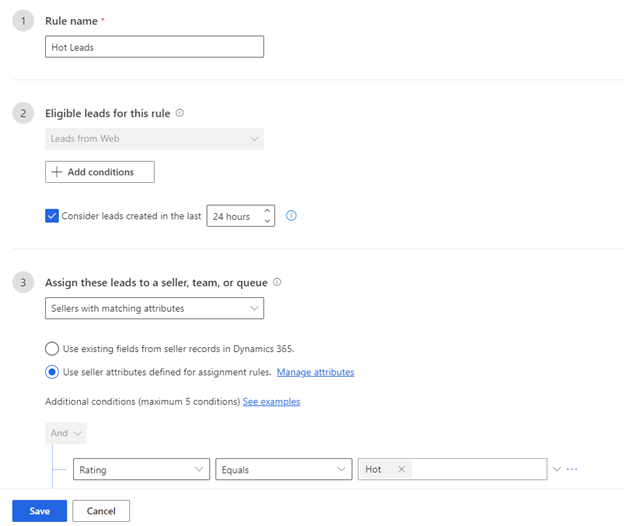
The changes apply to new leads that you create in the future in the application. The leads that were already assigned through the rule don't change.
Delete or deactivate an assignment rule
You can deactivate or delete an assignment rule that your organization no longer requires. Deactivation keeps the rule, but you won't use it to assign leads to sellers in the future. Deleting the rule removes it from the application but leads that were already assigned to sellers through the rule aren't affected.
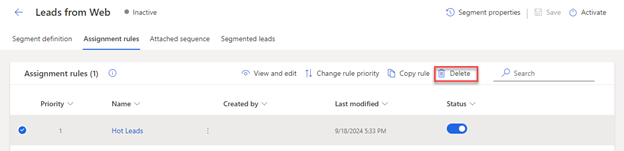
In the Sales Hub app, go to Sales Insights settings > Work assignment. Select the segment that has one or more rules under the Assignment rule column. Your segment will appear with all the attached Assignment rules displayed. Select the assignment rule you want to edit.
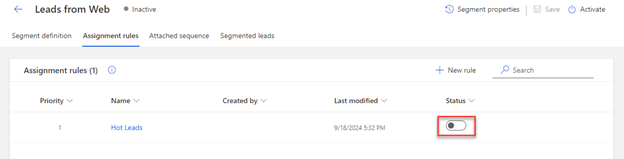
Deactivate - Turn off the toggle in the Status column.
Delete - Select the delete icon.