Wrap up your day with Copilot
A productive sales day doesn't end when the last customer meeting is over. Reviewing progress, organizing next steps, and preparing for tomorrow can help maintain momentum and ensure important opportunities continue moving forward.
Microsoft 365 Copilot can help you summarize customer engagements, organize follow-up activities, and prepare for the next day's priorities so you can start each morning ready to focus on what matters most.
Create a daily sales recap
At the end of the day, it's helpful to review customer conversations, active opportunities, and any blockers that may require attention.
Copilot in Outlook or Teams can help summarize your day and highlight the most important updates.
Example prompt:
"Draft my end-of-day sales update: deals progressed, blockers, and top three priorities for tomorrow."
Copilot can help you quickly review progress across your pipeline and identify the actions that should remain top of mind.
Schedule time for tomorrow's priorities
Maintaining momentum often requires dedicated time for prospecting, customer preparation, and follow-up activities.
Microsoft 365 Copilot Chat can help you review your calendar, identify available focus time, and draft a plan for reserving time for priority work.
Example prompt to schedule tomorrow's priorities
"Block 9:00–10:30 tomorrow for prospecting and deal preparation. Add notes and reminders."
This helps ensure important sales activities remain protected and visible on your calendar.
Important
Requires an eligible Microsoft 365 license. File upload and image generation limits apply.
Get your device ready for tomorrow
As your day comes to a close, you may want to adjust device settings to support your next work session.
Agent in Settings on your Copilot+ PC allows you to use natural language to locate and manage settings more quickly.
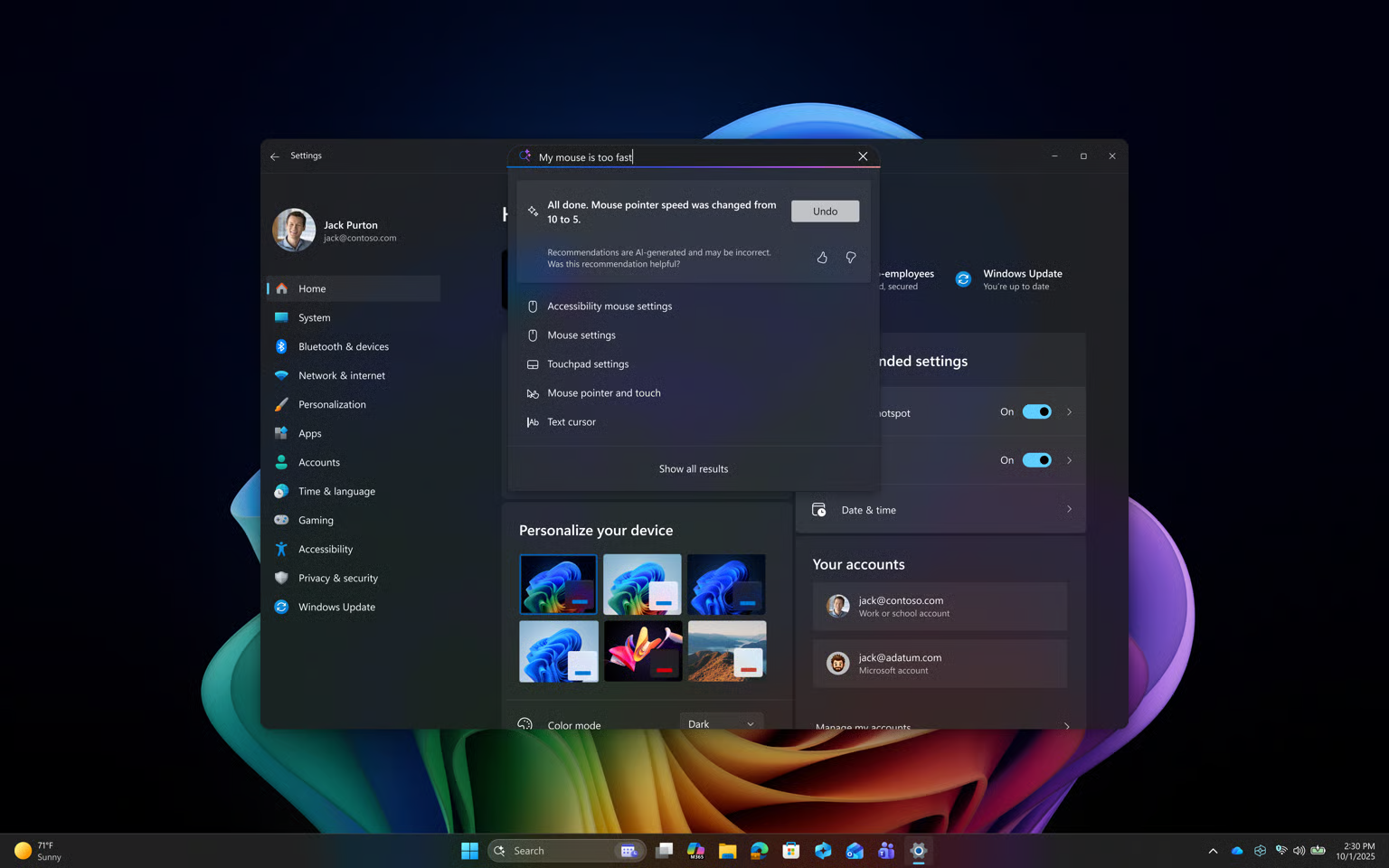
Example scenario: Prepare your device for tomorrow's work
After finishing your workday, you want to restore your normal notification settings after a focused work session.
Using Agent in Settings, you can describe what you want to do in natural language, such as:
"Turn off Focus mode."
or
"Restore standard notifications."
Agent in Settings can help you quickly locate and adjust settings without navigating through multiple menus.
Wrapping up your day is more than simply checking off completed tasks. Reviewing customer interactions, organizing follow-up actions, and planning future work can help ensure opportunities continue moving forward. A few minutes spent preparing today can make it easier to begin tomorrow with a clear understanding of priorities and customer needs.
Tip
Looking for more ways to work smarter with Copilot+ PCs? Explore the Copilot+ PC Hub to discover additional experiences, role-based workflows, and guided learning resources.