Traverse relationships with graph queries
Tip
See the Text and images tab for more details!
Some data relationships are naturally represented as networks, including social connections, organizational hierarchies, product recommendations, and fraud detection patterns. While you can model these relationships using foreign keys and joins, graph queries using the MATCH operator provide a more intuitive and often more efficient way to traverse connected data.
Visualize graph data structures
Before writing graph queries, it helps to visualize how graph data is organized. Consider a simple social network where people know each other and purchase products:
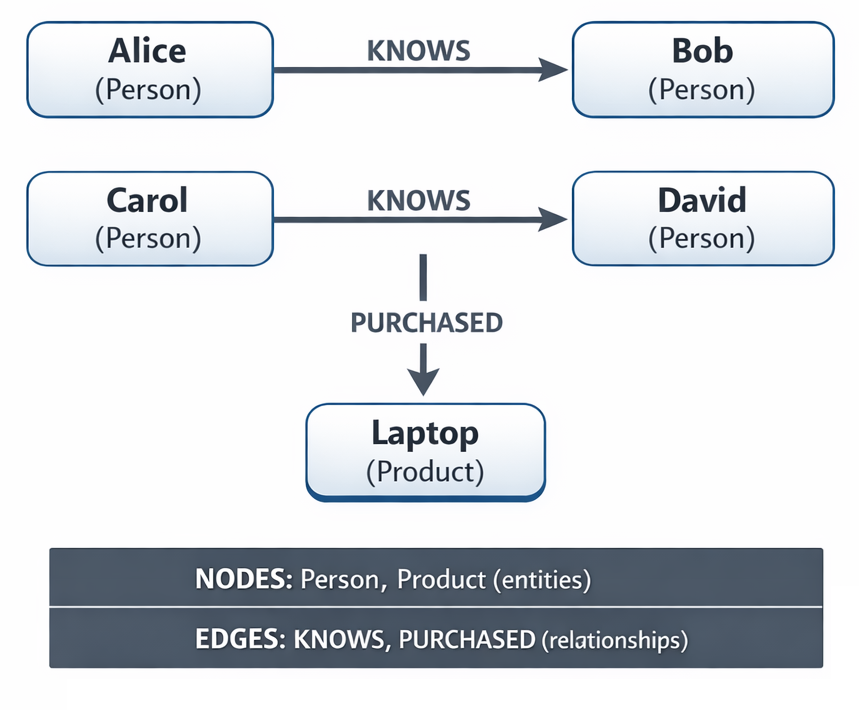
In this model:
- Nodes (boxes) represent entities like people and products
- Edges (arrows) represent relationships between nodes. Arrow direction indicates the relationship direction (Alice knows Bob, not necessarily Bob knows Alice).
Note
This diagram illustrates graph concepts. The code examples throughout this unit use similar but simplified data to focus on specific features.
Understand graph capabilities
The graph capabilities extend the relational model with dedicated node and edge tables. Nodes represent entities such as people, products, and locations. Edges represent relationships between them, such as "knows," "purchased," or "located in."
The key advantage of graph queries is pattern matching. Instead of writing complex multi-way joins, you express the pattern you're looking for using an ASCII style syntax:
-- Traditional relational approach (multiple joins)
SELECT p1.Name, p2.Name
FROM Person AS p1
INNER JOIN Friendship AS f ON p1.PersonID = f.Person1ID
INNER JOIN Person AS p2 ON f.Person2ID = p2.PersonID;

-- Graph approach (pattern matching)
SELECT Person1.Name, Person2.Name
FROM Person AS Person1, Friendship, Person AS Person2
WHERE MATCH(Person1-(Friendship)->Person2);
Note
Graph tables are fully compatible with existing relational features. You can join graph tables with regular tables, use indexes, and apply all standard T-SQL operations.
Create node tables
Node tables store entities in your graph. Create them using CREATE TABLE with the AS NODE clause:
-- Create a Person node table
CREATE TABLE dbo.Person (
    PersonID INT PRIMARY KEY,
    Name NVARCHAR(100) NOT NULL,
    Email NVARCHAR(200),
    Department NVARCHAR(50)
) AS NODE;

-- Create a Product node table
CREATE TABLE dbo.Product (
    ProductID INT PRIMARY KEY,
    Name NVARCHAR(200) NOT NULL,
    Category NVARCHAR(100),
    Price DECIMAL(10, 2)
) AS NODE;

-- Create a Location node table
CREATE TABLE dbo.Location (
    LocationID INT PRIMARY KEY,
    City NVARCHAR(100) NOT NULL,
    CountryRegion NVARCHAR(100) NOT NULL
) AS NODE;
SQL Server automatically adds a $node_id column to node tables that uniquely identifies each node. The system uses this column internally for graph relationships.
The following example inserts four people into the Person node table, then queries the table to show both the business columns and the system-generated $node_id. Notice that the INSERT statement uses only the user-defined columns. SQL Server generates the $node_id automatically for each row:
-- Insert person data using standard INSERT syntax
INSERT INTO dbo.Person (PersonID, Name, Email, Department)
VALUES
    (1, 'Alice Johnson', 'alice@contoso.com', 'Engineering'),
    (2, 'Bob Smith', 'bob@contoso.com', 'Marketing'),
    (3, 'Carol Davis', 'carol@contoso.com', 'Engineering'),
    (4, 'David Lee', 'david@contoso.com', 'Sales');

-- Query shows the system-generated $node_id alongside user columns
SELECT $node_id, PersonID, Name FROM dbo.Person;
Create edge tables
Edge tables represent relationships between nodes. Create them using CREATE TABLE with the AS EDGE clause:
-- Create a "reports to" relationship edge
CREATE TABLE dbo.ReportsTo (
    StartDate DATE,
    ReportType NVARCHAR(50)
) AS EDGE;

-- Create a "purchased" relationship edge
CREATE TABLE dbo.Purchased (
    PurchaseDate DATE NOT NULL,
    Quantity INT NOT NULL,
    TotalAmount DECIMAL(10, 2)
) AS EDGE;

-- Create a "knows" relationship edge (social connection)
CREATE TABLE dbo.Knows (
    ConnectionDate DATE,
    ConnectionStrength INT  -- 1-10 scale
) AS EDGE;
SQL Server automatically adds $edge_id, $from_id, and $to_id columns to edge tables. You can insert edges by specifying the $from_id and $to_id values from the connected nodes, like this:
-- Alice reports to Bob
INSERT INTO dbo.ReportsTo ($from_id, $to_id, StartDate, ReportType)
SELECT
    (SELECT $node_id FROM dbo.Person WHERE Name = 'Alice Johnson'),
    (SELECT $node_id FROM dbo.Person WHERE Name = 'Bob Smith'),
    '2023-01-15',
    'Direct';

-- Create social connections
INSERT INTO dbo.Knows ($from_id, $to_id, ConnectionDate, ConnectionStrength)
SELECT
    (SELECT $node_id FROM dbo.Person WHERE Name = 'Alice Johnson'),
    (SELECT $node_id FROM dbo.Person WHERE Name = 'Carol Davis'),
    '2022-06-01',
    8;
Tip
Edge tables can store properties about the relationship itself, like dates, weights, or types. This is useful for temporal analysis or weighted graph algorithms.
Query graphs with the MATCH clause
The MATCH clause uses a pattern syntax to specify the relationships you want to find. The basic pattern uses arrows to show relationship direction:
-- Find who reports to whom
SELECT
    Employee.Name AS Employee,
    Manager.Name AS Manager,
    r.StartDate
FROM dbo.Person AS Employee,
     dbo.ReportsTo AS r,
     dbo.Person AS Manager
WHERE MATCH(Employee-(r)->Manager);
The arrow direction matters:
(Node1)-(Edge)->(Node2): Edge goes from Node1 to Node2(Node1)<-(Edge)-(Node2): Edge goes from Node2 to Node1
The following example finds all people who know Alice:
SELECT
    Connector.Name AS PersonWhoKnowsAlice,
    k.ConnectionStrength
FROM dbo.Person AS Connector,
     dbo.Knows AS k,
     dbo.Person AS Target
WHERE MATCH(Connector-(k)->Target)
  AND Target.Name = 'Alice Johnson';
Traverse multiple relationships
Single-hop queries find direct connections, but graph databases excel at multi-hop traversals. You can chain multiple edge patterns in a single MATCH clause to follow paths through several relationships. This capability lets you answer questions like "who are my friends' friends?" or "what products did my colleagues purchase?" without writing complex nested subqueries.
The following example finds friends of friends by chaining two KNOWS relationships. The pattern Person1-(k1)->Person2-(k2)->Person3 starts at Person1, follows one KNOWS edge to Person2, then follows another KNOWS edge to reach Person3:
-- Find friends of friends (2-hop connections)
SELECT DISTINCT
    Person1.Name AS Person,
    Person3.Name AS FriendOfFriend
FROM dbo.Person AS Person1,
     dbo.Knows AS k1,
     dbo.Person AS Person2,
     dbo.Knows AS k2,
     dbo.Person AS Person3
WHERE MATCH(Person1-(k1)->Person2-(k2)->Person3)
  AND Person1.Name = 'Alice Johnson'
  AND Person3.Name <> Person1.Name;  -- Exclude self
You can also combine different relationship types in a single traversal. The following example crosses from KNOWS to PURCHASED edges to find what products were bought by people that a given person knows:
-- Find products purchased by people in the same department
SELECT DISTINCT
    p1.Name AS Person,
    p1.Department,
    prod.Name AS Product
FROM dbo.Person AS p1,
     dbo.Knows AS k,
     dbo.Person AS p2,
     dbo.Purchased AS pu,
     dbo.Product AS prod
WHERE MATCH(p1-(k)->p2-(pu)->prod)
  AND p1.Department = p2.Department;
Important
Each edge table alias can only appear once in a single MATCH pattern. To traverse the same edge type multiple times, use separate aliases.
Use SHORTEST_PATH for variable-length traversals
You can use SHORTEST_PATH to find the shortest connection across a variable number of relationships. The FOR PATH keyword marks tables that participate in variable-length matching, and quantifiers like + (one or more) or {1,3} (one to three) control the traversal depth.
The following example finds all people reachable from Alice within three hops and counts the distance to each:
SELECT
    StartPerson.Name,
    LAST_VALUE(ReachablePerson.Name) WITHIN GROUP (GRAPH PATH) AS ReachablePerson,
    COUNT(ReachablePerson.Name) WITHIN GROUP (GRAPH PATH) AS Distance
FROM dbo.Person AS StartPerson,
     dbo.Knows FOR PATH AS k,
     dbo.Person FOR PATH AS ReachablePerson
WHERE MATCH(SHORTEST_PATH(StartPerson(-(k)->ReachablePerson){1,3}))
  AND StartPerson.Name = 'Alice Johnson';
Choose between graph and relational approaches
Graph queries aren't always the best choice. Consider these guidelines when deciding between graph and traditional relational approaches:
Use graph queries when:
- Relationships are the primary focus of your queries
- You need to traverse variable or unknown depths (friends of friends of friends)
- The data naturally forms a network (social graphs, hierarchies, routes)
- Query patterns would require many self-joins in relational SQL
- You're performing path-finding or connectivity analysis
Use relational queries when:
- Relationships are simple and fixed-depth (parent-child with one level)
- You're primarily filtering and aggregating entity attributes
- The data model is mostly tabular with few relationships
- Performance is critical and indexes on foreign keys are sufficient
- Your team is more familiar with traditional SQL patterns
Troubleshoot common graph query challenges
Graph queries have unique syntax requirements that can cause errors. The following table describes common challenges and how to resolve them.
| Challenge | Cause | Solution |
|---|---|---|
| Query returns no results | Arrow direction in MATCH pattern doesn't match how edges were inserted |
Verify how edges were inserted. If $from_id is Employee and $to_id is Manager, the arrow must point from Employee to Manager. |
| Syntax error with repeated edge | Same edge alias used multiple times in one MATCH pattern |
Create separate aliases for each traversal of the same edge type. |
SHORTEST_PATH query fails |
Edge and node tables not marked with FOR PATH |
Add FOR PATH keyword to all tables participating in variable-length matching. |
| Edge references nonexistent nodes | Business key columns used instead of $node_id values |
Use subqueries to select $node_id from node tables when inserting edges. |
Note
Graph tables and the MATCH operator are available in SQL Server 2017 and later, and Azure SQL Database. The SHORTEST_PATH function requires SQL Server 2019 or later. Check your platform's documentation for specific feature availability.
For more information about graph features, see Graph processing with SQL Server and MATCH (Transact-SQL).