Note
Access to this page requires authorization. You can try signing in or changing directories.
Access to this page requires authorization. You can try changing directories.
Symptoms
After you unassign the Microsoft 365 or Office 365 license for a user whose regular mailbox has a hold applied, the following symptoms occur:
The Microsoft 365 admin center displays either of the following error messages on the Account tab of the flyout pane that shows the user's details:
- Exchange: An unknown error has occurred. Refer to the correlation ID: aaaa0000-bb11-2222-33cc-444444dddddd.;
- The execution of cmdlet Disable-Mailbox failed..; Exchange: An unknown error has occurred.
Changes that you make to the user's attributes in Microsoft Entra ID don't sync to Exchange Online.
The user's mailbox remains active instead of changing to an inactive mailbox.
Note
This issue can affect cloud users in Exchange Online and hybrid Exchange environments.
Cause
The issue occurs if you unassign the license for an active user whose regular mailbox has a hold applied. The behavior is by design.
If a mailbox has no hold applied when the user license is unassigned, Exchange Online disconnects the mailbox from the user account and permanently deletes the mailbox after 30 days. However, if a hold exists when the user license is unassigned, Exchange Online generates an error because it can't disconnect a mailbox whose content must be retained.
Resolution
To fix the issue, follow these steps:
For each user who has an account error, choose from the following options based on your objectives:
Unassign the user license and preserve the mailbox content. For example, select this option if a user has left your organization and you want to preserve the mailbox content and reassign the license to another user.
Unassign the user license and delete the mailbox content. For example, select this option if a user has left your organization and you want to delete the mailbox content and reassign the license to another user.
Identify all users in your tenant who have account errors
Run the following PowerShell cmdlets to connect to Microsoft Graph PowerShell:
Install-Module Microsoft.Graph -Scope AllUsers -Repository PSGallery -Force
Connect-MgGraph -Scopes User.Read.All
Run the following Get-MgBetaUser PowerShell cmdlet to list all user accounts in your tenant that have errors:
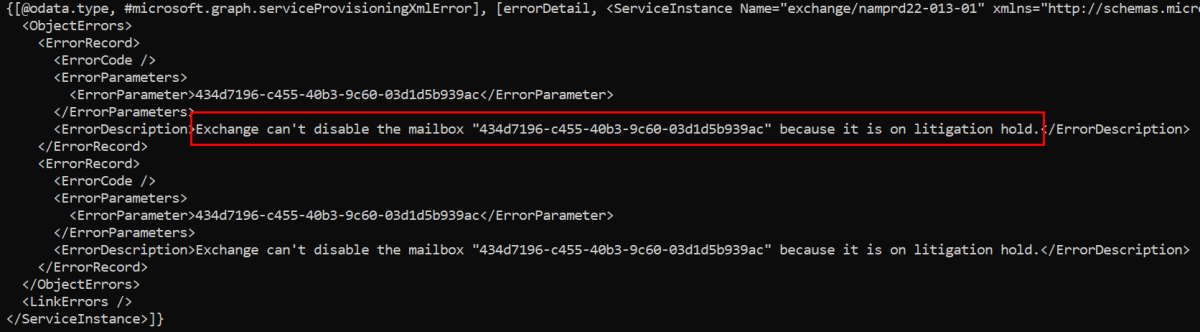
Get-MgBetaUser -All | Select-Object -Property UserPrincipalName -ExpandProperty ServiceProvisioningErrors | FL UserPrincipalName, AdditionalPropertiesCheck the ErrorDescription value of the AdditionalProperties parameter for each listed user. In the following example, the error description confirms that Exchange Online can't disable a mailbox that has a litigation hold.

Unassign the user license and preserve the mailbox content
To convert a user mailbox that has an account error to an inactive mailbox, follow these steps:
Reassign the user license to resolve the account error. The following steps must be completed while the user account is licensed.
For a cloud user account that's synced from on-premises Active Directory by using Microsoft Entra Connect, select one of the following options:
Delete the on-premises account.
Move the on-premises account to an organizational unit that doesn't sync to Microsoft Entra ID.
Specify an attribute value in Microsoft Entra Connect that prevents the on-premises account from syncing to Microsoft Entra ID.
For a user account that was created directly in the cloud, delete the user account.
After you complete these steps, Exchange Online performs the following actions:
Immediately unassigns the user license and adds it to the pool of available licenses.
Adds the deleted user account to the Deleted users list in the Microsoft 365 admin center and the Microsoft Entra admin center. Exchange Online will permanently remove the deleted user account after 30 days unless you restore it. If you restore the user account, make sure that you reassign a license.
Initiates the conversion of the user mailbox to an inactive mailbox. The conversion is finalized when the user account is permanently deleted.
Tip
Inactive mailboxes preserve email content and don't require a user license after they're created. For more information about how to convert a user mailbox to an inactive mailbox, see Create and manage inactive mailboxes. To list the inactive mailboxes in your organization, see View inactive mailboxes.
Unassign the user license and delete the mailbox content
Reassign a user license to resolve the account error. The next step must be completed while the user account is licensed.
Follow these steps to remove one or more holds on the mailbox:
After you complete these steps, Exchange Online disconnects the mailbox from the user account and permanently deletes the mailbox after 30 days, or after 60 days if you enabled Delicensing Resiliency.