Note
Access to this page requires authorization. You can try signing in or changing directories.
Access to this page requires authorization. You can try changing directories.
Summary
The program deployment process in Configuration Manager links a program from an existing package to a target collection and generates policy for targeted clients. Understanding this server-side flow helps you trace how a deployment is created, processed, and made available to clients.
This article explains how Configuration Manager processes deployment notifications, synchronizes permissions, identifies target devices, and builds and signs deployment policy. Use the log examples and status messages to follow a deployment from object creation through policy generation and assignment.
Package, program, and deployment relationship
A package supplies metadata and, optionally, source content. A program belongs to the package and defines the command that the client runs. A deployment represents the deployment of one program to a collection.
The following table lists the SMS Provider WMI classes used for program deployment, their identifying properties, and their purposes.
| WMI class | Key identity | Purpose |
|---|---|---|
SMS_Package |
PackageID |
Identifies the package and its source-content settings. |
SMS_Program |
PackageID and ProgramName |
Defines the command and its execution settings. |
SMS_Advertisement |
AdvertisementID |
Links one PackageID and ProgramName pair to a target CollectionID. |
Note
An SMS_Advertisement deploys a specific program, not the package by itself.
Package creation, program creation, content distribution, and program deployment are related but separate operations. For the creation flow, see Package creation in Configuration Manager. The examples in this article use placeholders instead of environment-specific identifiers. Log excerpts illustrate the processing sequence.
Program deployment from a package
When you deploy from the Packages node in the Configuration Manager console, you select a program that belongs to the package. The server-side flow starts by using an SMS_Advertisement that links PackageID, ProgramName, and CollectionID. The flow continues through policy generation, target mapping, and status reporting.
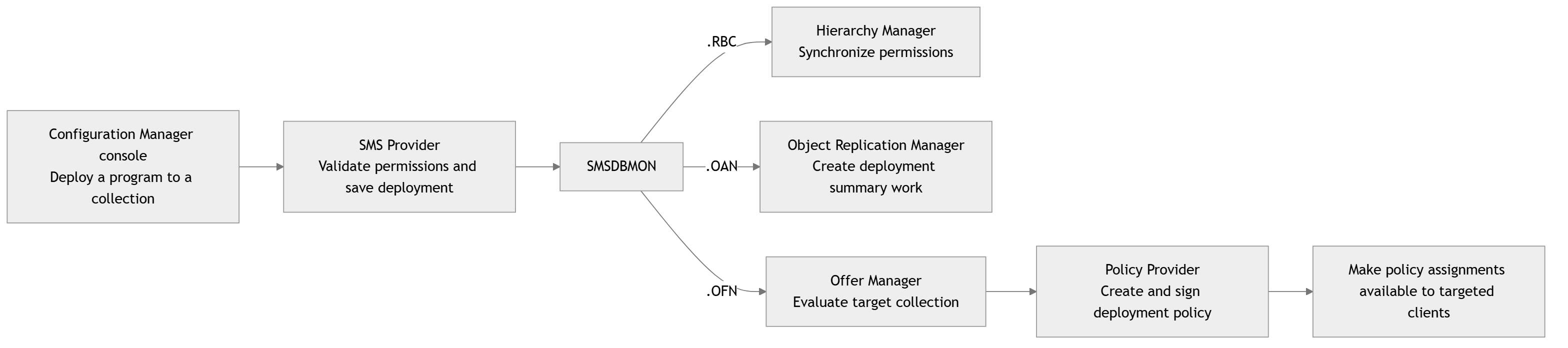
SMS Provider creates the program deployment object
The SMS Provider creates an SMS_Advertisement WMI instance for the selected program and collection. Before recording the deployment, Configuration Manager checks that the administrator can read the package and can both read and deploy to the target collection.
Configuration Manager saves the association between the package, program, and target collection, applies security scope information, and generates an audit record. The deployment identifier lets you follow this operation through the server-side logs.
Representative smsprov.log entries:
Requested class = SMS_Advertisement
Property PackageID = [PackageID]
Property ProgramName = [ProgramName]
Property CollectionID = [CollectionID]
Auditing: User [user@contoso.com] created an instance of class SMS_Advertisement
AdvertisementID = [AdvertisementID]
Successfully committed SMS_Advertisement instance
The deployment has WMI representations in SMS_Advertisement and SMS_AdvertisementLatest under root\SMS\site_[SiteCode]. Its identifying properties include AdvertisementID, PackageID, ProgramName, and CollectionID.
SMSDBMON generates deployment notifications
After Configuration Manager saves the deployment, SMSDBMON places notification files in component inboxes. These notifications initiate security synchronization, deployment summarization, and offer processing.
Representative verbose smsdbmon.log entries are:
SND: Dropped ...\inboxes\objmgr.box\[AdvertisementID].OAN
SND: Dropped ...\inboxes\offermgr.box\[AdvertisementID].OFN
SND: Dropped ...\inboxes\hman.box\[RecordID].RBC
| File extension | Purpose | Processing components |
|---|---|---|
.RBC |
RBAC synchronization request | Hierarchy Manager |
.OAN |
Offer availability notification | Object Replication Manager |
.OFN |
Offer processing notification | Offer Manager, followed by Policy Provider |
Hierarchy Manager synchronizes deployment permissions
Hierarchy Manager processes the .RBC file and synchronizes the deployment's role-based administration (RBAC) permissions across the hierarchy.
Representative hman.log entries:
HandleRBACPermissions: Check if there is request.
HandleRBACPermissions: Get 1 request, try to sync.
End sync rbac permissions.
Object Replication Manager creates summary work
Object Replication Manager watches objmgr.box, detects the .OAN file, and creates summarization work for deployment state and reporting.
Representative objreplmgr.log entries:
File notification triggered.
+++Begin processing changed OAN objects
Found notification file ...\inboxes\objmgr.box\[AdvertisementID].OAN
Processing SMS Object [AdvertisementID]
Catalog evaluation: Handling offer object, id = [AdvertisementID]
Successfully added single summary tasks for offer [AdvertisementID], Status = 0.
Successfully processed SMS Object [AdvertisementID]
Offer Manager maps the deployment to target resources
Offer Manager processes the .OFN notification and evaluates the target collection to determine which devices are targeted by the deployment.
Offer Manager also makes the notification available for Policy Provider to continue policy generation.
Representative offermgr.log entries:
Processing new offer [AdvertisementID]
Examining collection: [CollectionID]
Advanced client offer changes detected for collection [CollectionID], 1 added and 0 deleted.
Prepared policies based on 1 offer(s) for 1 resources in collection [CollectionID]
Waiting for changes...
Policy Provider builds and signs deployment policy
Policy Provider detects the .OFN file, creates deployment policy and its assignment, and makes the assignment available to targeted clients. It signs the device policy so that clients can verify it. The policypv.log file records policy creation and signing.
Representative policypv.log entries:
Detected changes in offer [AdvertisementID]
Looking for software policy and policy assignments that should be created...
Successfully created policy [PolicyID] and policy assignment [PolicyAssignmentID]
Successfully updated the resource to policy mapping for 1 resources
Found 1 device policies which require signing.
Successfully signed device policy [PolicyID] version 1.00
Finished checking for deployment [AdvertisementID]
Status messages for program deployment
Configuration Manager records status messages in the site database for auditing, monitoring, and reporting. You can review these messages in the Configuration Manager console to trace administrative actions and component processing without reading individual log files. Start with status messages to check progress and outcomes, and review the logs when you need more detail.
The following table lists audit and component status messages associated with program deployment, including the component, message ID, and description.
| Component | Message ID | Description |
|---|---|---|
| Microsoft.ConfigurationManagement.exe | 30006 | Audit: User [user@contoso.com] created deployment [AdvertisementName] ([AdvertisementID]) deploying program [ProgramName]. |
| Microsoft.ConfigurationManagement.exe | 30007 | Audit: User [user@contoso.com] modified the properties of deployment [AdvertisementName] ([AdvertisementID]) deploying program [ProgramName]. |
| Microsoft.ConfigurationManagement.exe | 30008 | Audit: User [user@contoso.com] deleted deployment [AdvertisementName] ([AdvertisementID]) deploying program [ProgramName]. |
| SMS_OFFER_MANAGER | 3900 | Offer Manager processed a new deployment. The message text contains [AdvertisementName]; the offer-ID attribute contains [AdvertisementID]. |
| SMS_OFFER_MANAGER | 3901 | Offer Manager removed deployment [AdvertisementID] while processing its deletion notification. |
| SMS_POLICY_PROVIDER | 5100 | Policy Provider created a policy and policy assignment based on package [PackageName] ([PackageID]), program [ProgramName], and deployment [AdvertisementName] ([AdvertisementID]). |
| SMS_POLICY_PROVIDER | 5101 | Policy Provider updated the policy and policy assignment based on the package, program, and deployment. This is an update event, not initial policy creation. |
| SMS_POLICY_PROVIDER | 5102 | Policy Provider removed policy [PolicyID] and its related policy assignment during policy cleanup. |
Next steps
- For supported deployment instructions, see Deploy packages and programs.
- For the preceding creation flow, see Package creation in Configuration Manager.