Note
Access to this page requires authorization. You can try signing in or changing directories.
Access to this page requires authorization. You can try changing directories.
Summary
When you run application lifecycle management (ALM) actions for a managed agent solutions in Microsoft Copilot Studio, you might experience expression errors or invalid reference errors. These errors typically occur in a situation in which component dependencies are missing. This situation can affect managed solution layers. This article provides steps to diagnose and resolve these component errors so that you can successfully publish your agent.
Symptoms
When you publish a managed agent in Copilot Studio, you might experience either or both of the following errors:
Expression errors:
IdentifierNotRecognized- Incompatible type comparison
- Unexpected characters
- Power Fx errors
Invalid reference errors:
- Element disabled or not found
The following screenshot shows an example of the IdentifierNotRecognized error.

Cause
Missing component dependencies in your solution cause these expression and reference errors during agent publishing.
Solution
To resolve these errors, add the required dependencies to your solution:
In Power Apps, open the solution that contains the agent.
Go to Objects, and check whether the following components are included in your solution (if applicable):
- Workflows
- Environment variables
- Connection references
For each component that shows a Not Recognized error, open the command menu (⋮), select Advanced, and then select Add required objects.
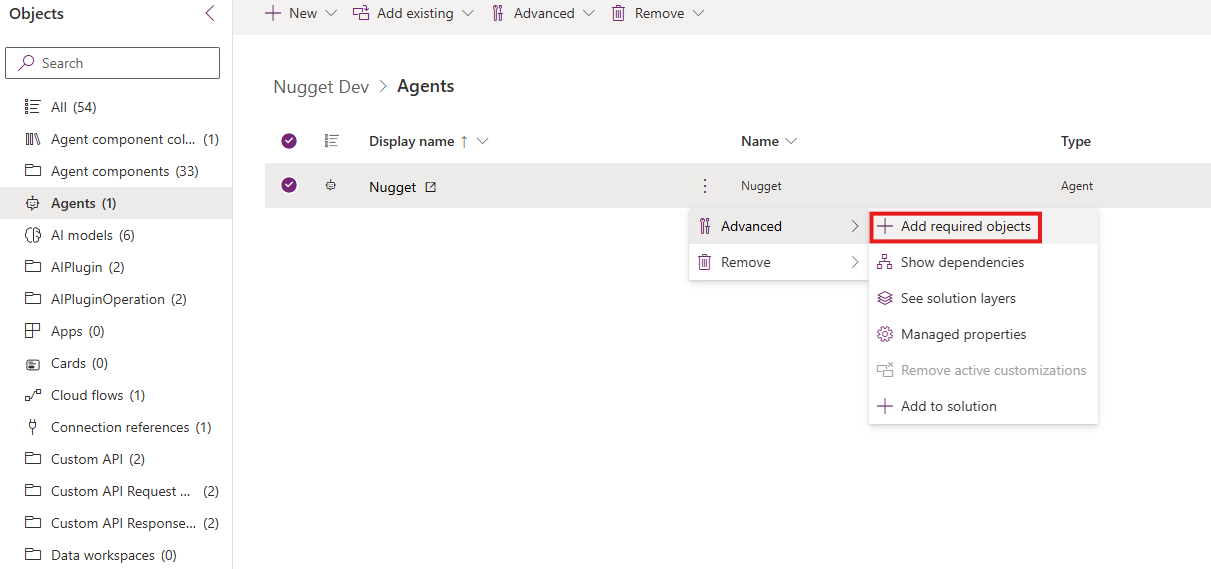
To automatically include all dependencies, repeat the previous step for the main Agent component.
Export the solution again. This step also exports the included dependencies.
Create a support case
If you still receive the same errors after you apply the solution, contact Microsoft Support. For more information, see Find support and give feedback for Copilot Studio.
When you create a support case, include the following information:
- A network trace that captures the errors
- The complete error details (download the full error that's shown during the upgrade or uninstall)
- Screenshots of the following views:
- Solution layers view
- Agent dependencies
- Customize column showing conflicts (if applicable)
- A description of the steps that you already tried
- The solution .zip file, if possible