Note
Access to this page requires authorization. You can try signing in or changing directories.
Access to this page requires authorization. You can try changing directories.
Original product version: SQL Server
Original KB number: 2449398
Summary
This article helps you resolve common SQL Server installation errors that stop SQL Server Setup before it can finish. These errors can occur when the installation media is damaged or the installation source is corrupted, and they appear either in the SQL Server Setup wizard or in the SQL Server Setup log files. Common examples include Error 2337, The cabinet file 'Sql.cab' required for this installation is corrupt and cannot be used, and Setup.rll is either not designed to run on Windows or it contains an error. Use the resolutions in this article to replace or repair the installation source, and then rerun Setup.
Symptoms
When you try to install Microsoft SQL Server, you receive one or more of the following error messages or experience one or more of the following symptoms. Additionally, you can't continue the setup.
Error messages that appear in the SQL Server Setup wizard
The system cannot open the device or file specified.
Setup.rll is either not designed to run on Windows or it contains an error.
The installer has encountered an unexpected error installing this package.
Setup.exe badimage.
Error occurred during the login process due to bad media.
The cabinet file 'Sql.cab' required for this installation is corrupt and cannot be used.
Error reading from file
You might also experience one of the following symptoms:
- You can't select the 64-bit installation.
- Some components are missing on the Select Component page of Setup.
Note
Installation of SQL Server 2022 (16.x) is supported on x64 processors only. For more information, see Hardware and software requirements for SQL Server 2022.
Error messages in the SQL Server Setup log files
Error 2337
SQL Server installation failed.
Network error occurred while attempting to read from the file.
The ENU localization is not supported by this SQL Server Media.
Could not find the Database Engine startup handle (Summary.txt file)
Source for file 'p76pctiy.dll' is uncompressed (sql_engine_core_shared)
You might also see the following error message in Event Viewer:
Failed to initialize SQLSQM timer.
Note
For more information about SQL Server Setup log files, see View and read SQL Server Setup log files.
Cause
This problem might occur for one of the following reasons:
- The installation media is damaged.
- The installation source is corrupted.
Solution
To resolve the problem, use one of the following methods.
Download the SQL Server installation media again
Download the SQL Server image again from the original location, and then rerun the Setup program.
Install from a local drive instead of a network location
If you installed SQL Server over a computer network, install it again from a local drive, and then rerun the Setup program.
Rename the Setup.rll file
Open File Explorer.
Locate and select the resources\1033 folder under the Setup Bootstrap folder for your SQL Server version. The path resembles the following one, where
<nnn>is the SQL Server version number and<release folder>is the folder for the release that you're installing:C:\Program Files\Microsoft SQL Server\<nnn>\Setup Bootstrap\<release folder>\resources\1033For example,
<nnn>is 160 for SQL Server 2022 (16.x) and 150 for SQL Server 2019 (15.x). For the version numbers of other releases, see File locations for default and named instances of SQL Server.Right-click setup.rll, and then select Rename.
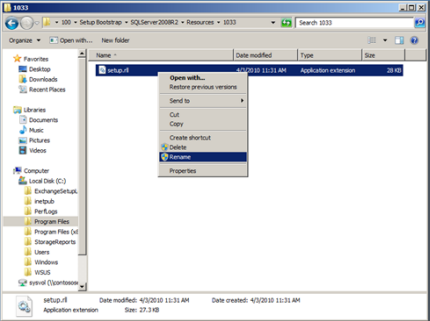
Enter setup.rll.old, and then press Enter.
Rerun the Setup program.
Change the operating system settings for localized SQL Server versions
If you use a localized version of SQL Server, you can change the operating system settings to support localized versions. For more information about how to change the operating system settings, see Local language versions in SQL Server.
Important
Installations of different language versions of SQL Server instances on the same computer aren't supported.
What to do if SQL Server Setup still fails
The error messages in this article can have causes other than damaged media. If the previous methods don't resolve the problem, use the following resources to continue troubleshooting:
Identify the underlying error first. Open the Summary.txt file in the Setup log folder and search for
errororfailed. This step is essential when Setup reports only a generic message such asSQL Server installation failed.Check the disk sector size. Setup failures and
Could not find the Database Engine startup handleerrors can also occur when a storage device, such as an NVMe solid-state drive (SSD), reports a disk sector size larger than 4 KB. For more information, see Troubleshoot SQL Server errors related to system disk sector size greater than 4 KB.Verify operating system support. Confirm that your SQL Server version and servicing level are supported on the Windows version that you're installing on. For more information, see Version requirements for SQL Server in Windows operating system.
Repair an existing instance. If SQL Server is already installed and you suspect that the instance files are corrupted, see Repair a failed SQL Server installation.
Remove a partial installation. If a previous attempt left files behind and blocks a new installation, see Remove a partial installation of SQL Server.
Troubleshoot update failures. If the error occurs when you apply a cumulative update (CU) or a service pack (SP) instead of during a new installation, see Troubleshoot common SQL Server cumulative update installation issues.