Note
Access to this page requires authorization. You can try signing in or changing directories.
Access to this page requires authorization. You can try changing directories.
Applies to: Windows Server 2016
You receive the following error message after completing the configuration of the Remote Desktop Connection Broker (RD Connection Broker) server for high availability.
Could not create the database <DatabaseName>. Please check that the broker server has access to the SQL server, the path for -DatabaseFilePath parameter exists and contains the SQL Server database file, the connection to SQL database is correct and SQL database is online. See the SQL Server and broker event log for more details.
Configure RD Connection Broker for High Availability wizard
When configuring the RD Connection Broker server for high availability, the Database connection string field should be as follows:
DRIVER=SQL Server Native Client <VersionNumber>;SERVER=<SQL Server Name>;Trusted_Connection=Yes;APP=Remote Desktop Services Connection Broker;Database=<New database file name>

Note
- The string value is case-sensitive. Make sure the value for "Trusted_Connection" is "Yes" and not "YES".
- The SQL Server Native Client version should be compatible with the SQL server.
- Don't include the file extension when you input the file name into the string.
Verify permission for the RD Connection Broker server on SQL Server
Verify that correct permission is assigned to the RD Connection Broker Server on the SQL Server. To do that, follow these steps:
- Sign in to the SQL server.
- Open Microsoft SQL Management Studio.
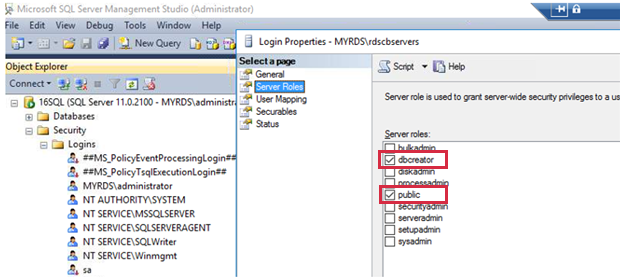
- Go to Security > Logins in Object Explorer, right-click the RD Connection Broker server, and select Properties.
- Make sure the dbcreator and public checkboxes are selected under the Server roles pane.
Note
The RD Connection Broker server is now allowed to create databases in the SQL server. The RD Connection Broker service will attempt to migrate Windows Internal Database (WID) to a SQL Server instance when converting the RD Connection Broker server to a high available cluster.
Check case-sensitivity of SQL Server collation
The database creation script for Remote Desktop Services (RDS) supports only case-insensitive collations. Make sure that the instance collation of the SQL Server database is set to be case-insensitive.