Note
Access to this page requires authorization. You can try signing in or changing directories.
Access to this page requires authorization. You can try changing directories.
Copilot Chat in Visual Studio is designed to be context-aware, delivering highly relevant and tailored responses by deeply understanding your project’s structure and content. This article provides a behind-the-scenes look at how Copilot Chat constructs and utilizes context to enhance your coding workflow.
How Copilot Chat gathers solution context
Copilot Chat uses a multi-layered approach to context-building within your codebase to ensure its suggestions and answers are relevant and accurate.
Codebase indexing
If your repository is hosted on GitHub or Azure DevOps, Copilot creates a remote index of your codebase and computes an embedding that captures patterns and relationships in your code. Learn more about remote indexing on GitHub.
If your code is hosted elsewhere, Copilot builds a local index.
Semantic search
Based on your prompt, Copilot might determine that it needs more project context to respond accurately. In such cases, it performs a semantic search on the remote or local index.
Unlike traditional search, which matches exact words, semantic search focuses on meaning. Using advanced vector embeddings, Copilot identifies files with the highest semantic similarity to your request and adds them to its context.
These files supplement the system prompt, instructions, implicit context (such as chat history and open files), and any explicit content you provide, like errors.
Learn how to add references as context in chat.
How Copilot Chat applies code suggestions
Copilot Chat frequently provides code suggestions in its responses. These suggestions must be accurately mapped to your codebase before they can be applied and tested.
Model based code mapping
Copilot Chat uses speculative decoding to accurately insert suggestions into existing files, reducing the risk of errors. In Agent mode, this enables Copilot to make reliable edits that support building, debugging, and testing your code independently.
Copilot memories
Copilot memories enable Copilot to learn your project's specific coding standards and best practices, making it project-aware and consistent across sessions.
How Copilot memories work
Memories use intelligent detection to understand your team's preferences as you prompt in the chat. As you prompt, Copilot identifies instances where you correct its behavior, indicate a standard, or ask it to remember something.
When such instances are detected, you see a confirmation nudge to save the preference.

Copilot then categorizes the preference into one of three files:
.editorconfigfor coding standardsCONTRIBUTING.mdfor best practices, guidelines, and architectural standards.README.mdfor high-level project information
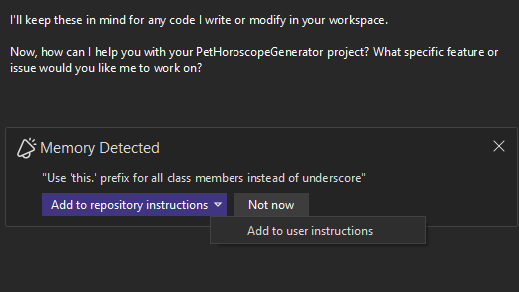
When a preference is detected, you can choose where to save it:
- User-level preferences: Saved to
%USERPROFILE%/copilot-instructions.md. These preferences apply to all your Copilot sessions across projects. - Repo-level preferences: Saved to
/.github/copilot-instructions.md. These preferences are shared with your team via the repository.
This approach lets you personalize Copilot for your own workflow while also establishing shared coding standards for your team.
As you continue to prompt Copilot, you teach it to respond more effectively to your needs and help your team by documenting development best practices that enhance their future Copilot interactions.