Language
Note
Access to this page requires authorization. You can try signing in or changing directories.
Access to this page requires authorization. You can try changing directories.
Visual Studio provides several refactorings for converting between types, string formats, and syntax styles. You can access these refactorings through the Quick Actions and Refactorings menu (Ctrl+.).
Convert anonymous type to class
Applies to: C#, Visual Basic
This refactoring converts an anonymous type to a named class, useful when your code grows and you want to continue building on the type.
Place your cursor in an anonymous type.
Press Ctrl+. to trigger the Quick Actions and Refactorings menu.

Press Enter to accept the refactoring.

Convert anonymous type to tuple
Applies to: C#, Visual Basic
This refactoring converts an anonymous type to a tuple for more lightweight syntax.
Place your cursor in an anonymous type.
Press Ctrl+. to trigger the Quick Actions and Refactorings menu.

Press Enter to accept the refactoring.

Convert between regular string and verbatim string literals
Applies to: C#
This refactoring converts between regular string and verbatim string literals. Converting to a regular string can save space, while converting to a verbatim string can provide more clarity.
Place your caret on either the regular string or verbatim string literal.
Press Ctrl+. to trigger the Quick Actions and Refactorings menu.
Select one of the following options:
Select Convert to regular string.

Select Convert to verbatim string.

Convert typeof to nameof
Applies to: C#, Visual Basic
This refactoring converts typeof(<QualifiedType>).Name to nameof(<QualifiedType>) in C# and GetType(<QualifiedType>).Name to NameOf(<QualifiedType>) in Visual Basic. Using nameof avoids the reflection involved with retrieving a type object.
Place your cursor within the
typeof(<QualifiedType>).Nameinstance for C# or theGetType(<QualifiedType>).Namein Visual Basic.Press Ctrl+. to trigger the Quick Actions and Refactorings menu.
Select from one of the following options:
C#
Select Convert 'typeof' to 'nameof':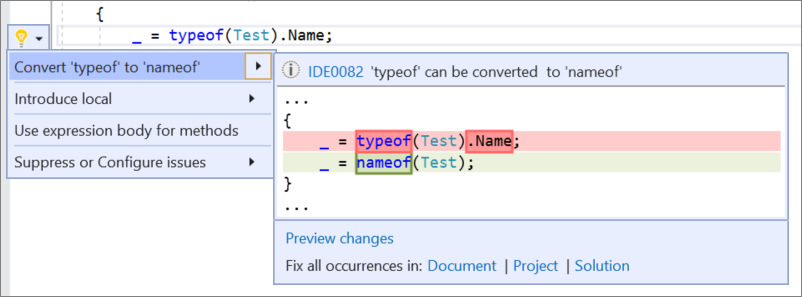
Visual Basic
Select Convert 'GetType' to 'NameOf':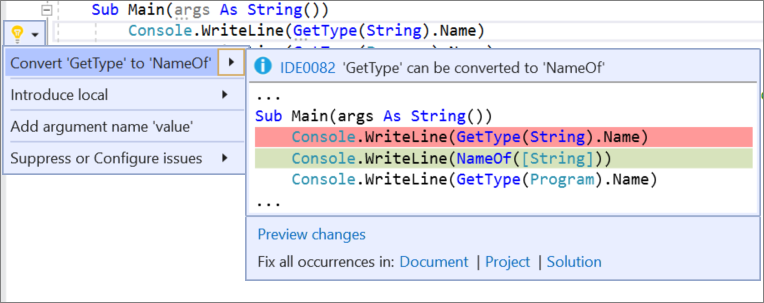
Use explicit type instead of var
Applies to: C#
This refactoring replaces var in a local variable declaration with an explicit type, improving readability. However, var must be used when a variable is initialized with an anonymous type and the properties of the object are accessed at a later point. For more information, see Implicitly typed local variables (C#).
Place the caret on the
varkeyword.Press Ctrl+. or click the screwdriver
 icon in the margin of the code file.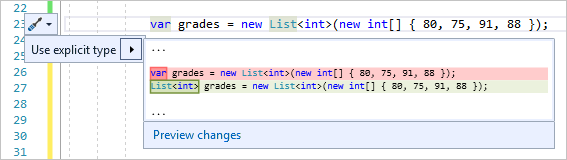
Select Use explicit type. Or, select Preview changes to open the Preview Changes dialog, and then select Apply.
Simplify string interpolation
Applies to: C#, Visual Basic
This refactoring simplifies a string interpolation expression for more clarity and concise syntax.
Place your caret on the string interpolation.
Press Ctrl+. to trigger the Quick Actions and Refactorings menu.
Select Simplify interpolation.
