Note
Access to this page requires authorization. You can try signing in or changing directories.
Access to this page requires authorization. You can try changing directories.
Visual Studio provides several refactorings for modernizing C# syntax with newer language features. You can access these refactorings through the Quick Actions and Refactorings menu (Ctrl+.).
Use new()
Applies to: C#
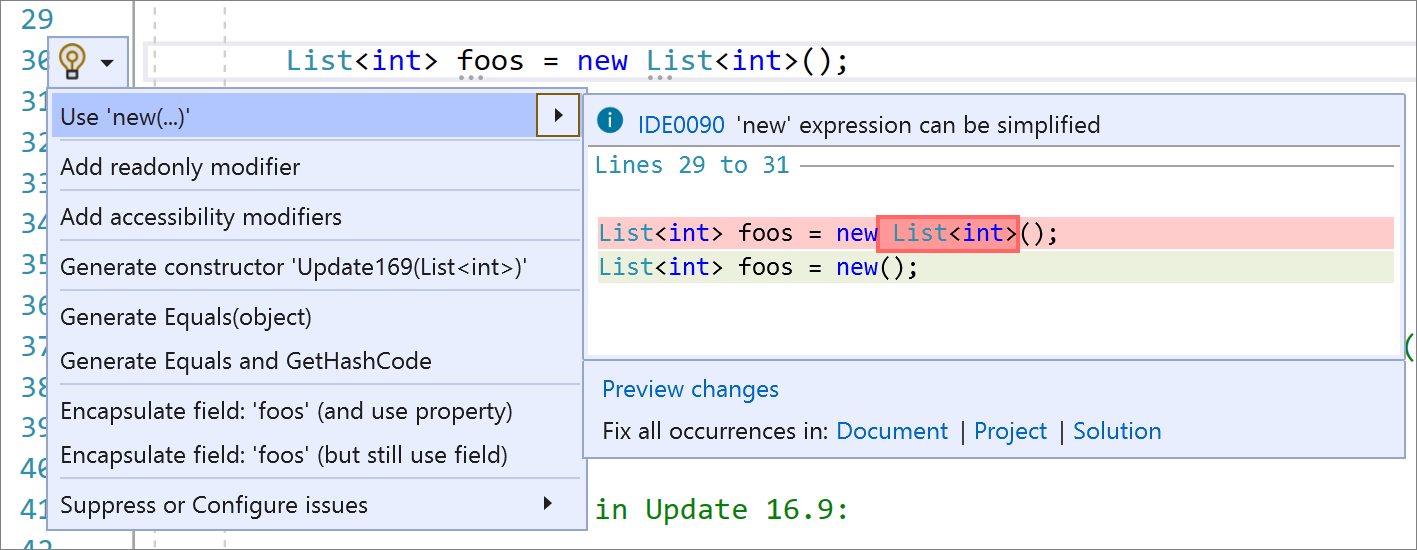
This refactoring uses new() (target-typed new expressions) so you don't have to write repetitive code by repeating the type twice. It's useful when you can't use var or have a code style preference to not use var.
Place your caret on the field declaration.
Press Ctrl+. to trigger the Quick Actions and Refactorings menu.
Select Use 'new(…)':
Use pattern matching
Applies to: C#
This refactoring applies C# pattern matching capabilities to make code more clear and concise.
Place your caret inside the statement.
Press Ctrl+. to trigger the Quick Actions and Refactorings menu.
Select Use pattern matching.

Use expression body or block body for lambda expressions
Applies to: C#
This refactoring converts a lambda expression to use either an expression body or a block body, according to your preference.
- Place your cursor on the right of a lambda operator.
- Press Ctrl+. to trigger the Quick Actions and Refactorings menu.

- Select Use block body for lambda expressions or Use expression body for lambda expressions.