Note
Access to this page requires authorization. You can try signing in or changing directories.
Access to this page requires authorization. You can try changing directories.
As a Viva Insights Administrator, you can configure some of the filters analysts can use when they create or access reports using advanced analysis. These filters are available for several different organizational attributes in Viva Insights, such as FunctionType, Organization, ManagerId, and PersonId.
By enabling these filters, analysts can add more levels of group customization to their queries for more targeted insights. Once enabled, these filters can be found under Filter by in prebuilt reports in the Reports tab.
How to enable the filters
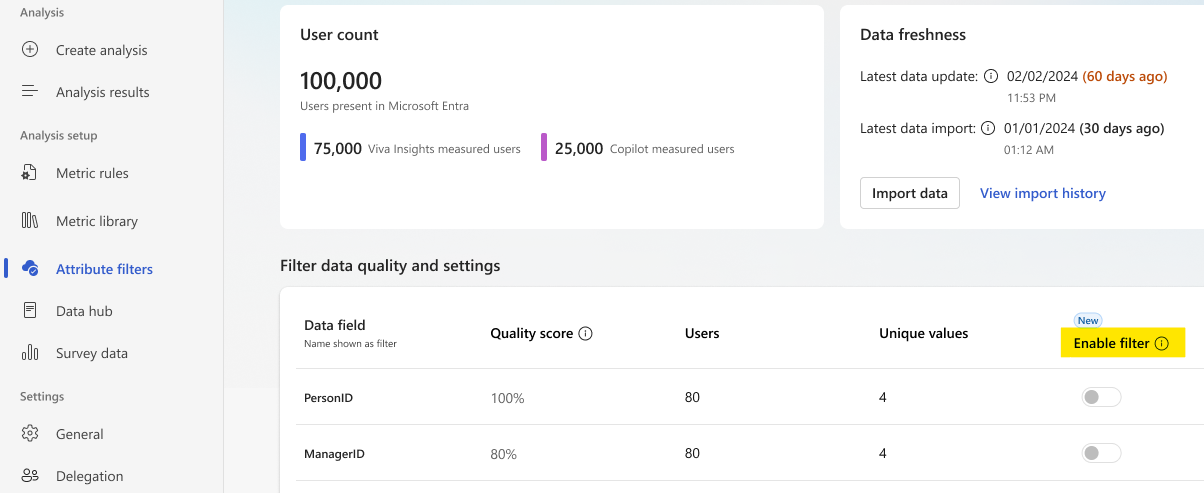
In the Viva Insights web app, under Analysis setup on the left, select Attribute filters.
Under Data field quality, select Enable filter for the filtered attributes you'd like analysts to access in their reports.
- Organization, CountryOrRegion, and FunctionType are enabled by default for Power BI reports. Organization is a mandatory filter in prebuilt Power BI reports that you can't turn off.