Note
Access to this page requires authorization. You can try signing in or changing directories.
Access to this page requires authorization. You can try changing directories.
Introduction
Learning agent empowers people to continuously grow and achieve more by offering personalized, just-in-time learning that strengthens critical skills, enhances competencies, and helps people use Copilot more effectively in their everyday work scenarios. The Learning agent is Microsoft’s AI-powered solution designed to help enterprise users build both technical and soft skills through personalized learning experiences. Using advanced AI, Learning agent delivers tailored learning recommendations, curated learning paths, and interactive role-play exercises, drawing from internal enterprise content and trusted third-party sources like LinkedIn Learning.

Benefits
By integrating learning directly into daily work, Learning agent empowers employees to upskill efficiently, stay current with industry trends, and drive personal and organizational growth. Here are some of the agent’s key features:
Personalized suggestions: Learning content based on users’ role, skills profile, and recent work activity in Microsoft 365
Assignment notifications: Nudges to make sure users don't miss their required trainings
Copilot upskilling: Dynamic tips and contextual, task-based prompts to help boost Copilot skills
LinkedIn role play: Practice workplace scenarios with an AI coach
Bite-size and structured opportunities: Learn in quick chat conversations or in a longer form, course-like structures
Adaptive learning: Empower users to achieve more through skill assessments and personalized learning plans.
Enterprise content integration: Suggestions include organizational resources like SharePoint sites to provide the most relevant content
Gamification: Features like learning streaks make learning more fun and rewarding
Supported languages
English (en US)
Agent setup
Learning agent is currently available to authorized users in Private Preview exclusively through the Frontier program. Organizational admins deploy the Learning Agent via the Microsoft Copilot agent store.
Note
Supported platforms: Microsoft Copilot Web https://m365.cloud.microsoft&https://copilot.cloud.microsoft Microsoft Copilot Chat Native App and Teams (Web & App). (current preview) Not supported apps: Word, PowerPoint, or Excel App Copilot (current preview) License requirements: Microsoft Copilot License; Viva Suite license / Viva Premium (not mandatory – If enabled Learning agent will access -Viva Learning capabilities.
For admins
In the Microsoft 365 admin center, go to the Agents page, and search for the Learning (Frontier) agent. From here, you can deploy it to everyone in your organization or specific groups.
 For more detailed information, see Manage Copilot agents in the Microsoft 365 admin center.
For users
From Microsoft Copilot, go to the Agent Store by selecting All agents, then search "Learning." You can also select “Learning(Frontier)” in the Built by Microsoft section. Once you find the agent, you can select and add it.
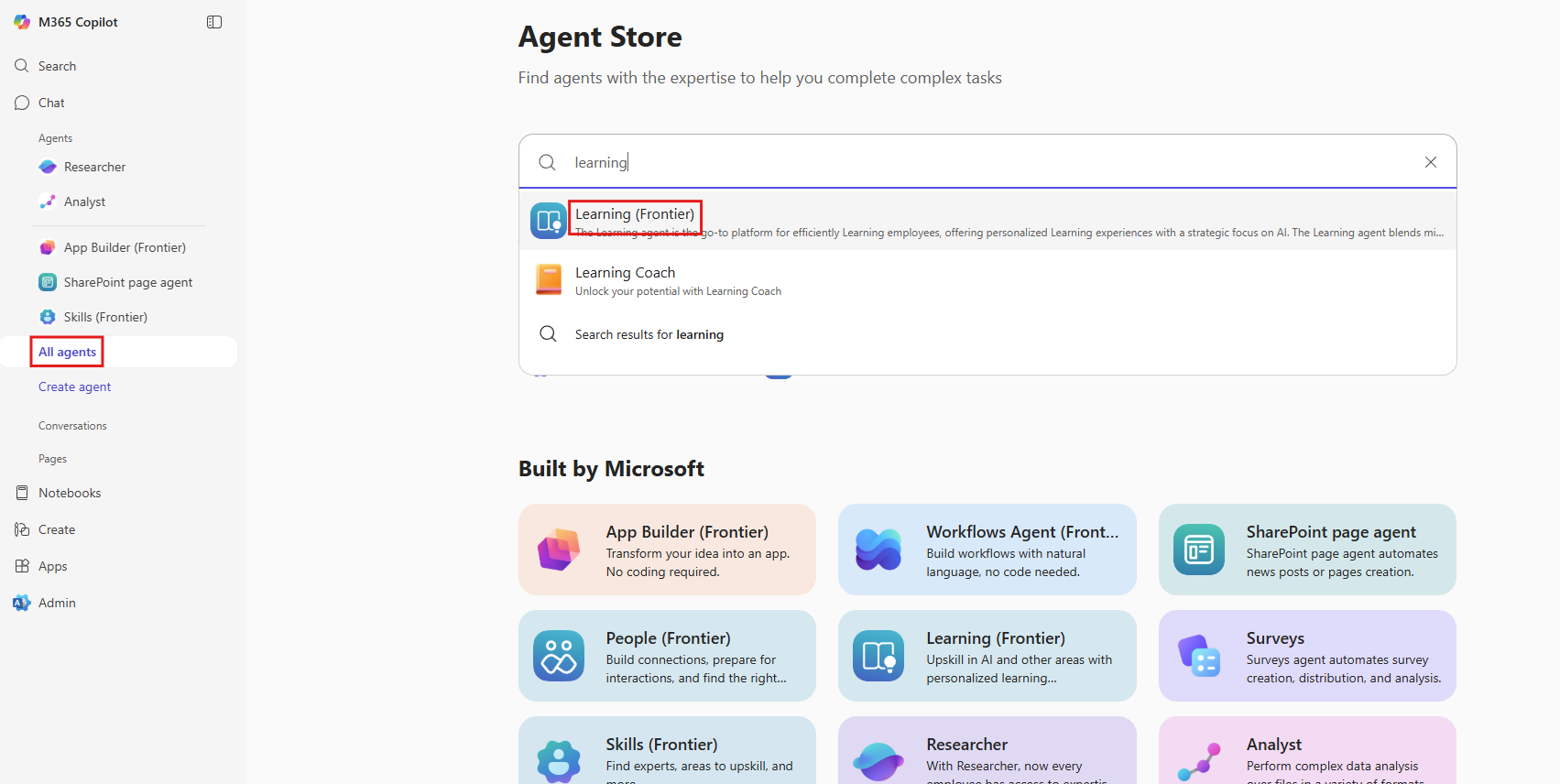
Frontier Agent Setting
Frontier is Microsoft’s advanced AI research and innovation program focused on pushing boundaries in AI safety, performance, and scalability. For more information, see Frontier.
As Learning agent is currently previewed through Frontier, Admins must ensure that the user groups enabled for Learning agents are also embedded into Frontier.
Frontier User configuration:
Default behavior: When an agent is published in Frontier, it's visible to all users in the tenant who have the required license.
Admin configuration: Admins can control which users or groups can access agents or features released under the Frontier program.

Try these prompts to get started
Give me a tip to use Copilot for [Scenario]
Help me improve in this task: [Scenario]
Recommend short videos to learn a specific skill [Specific skill].
How can I use Copilot to work more effectively?
Generate a SWOT analysis for [Company or product].
Start a role play simulation for handling [Scenario, like a customer escalation].
Frequently asked questions
Q - How do I access the Learning agent?
A - It's available in Microsoft Teams and Microsoft Copilot once enabled by your admin in the Microsoft 365 admin center.
Q - Does the Learning agent use my personal data?
A - It uses organizational role and learning preferences from Microsoft’s learning ecosystem but doesn't access private files or Teams chats.
Q - Is LinkedIn Learning required?
A - Only for role-play coaching scenarios. Other features work independently of LinkedIn Learning.
Q - What licenses are required for Private Preview?
A - A Microsoft Copilot license is mandatory for full functionality. Viva Learning Premium unlocks advanced features like custom academies and assignments, while seeded licenses provide limited access.