Note
Access to this page requires authorization. You can try signing in or changing directories.
Access to this page requires authorization. You can try changing directories.
OLS lifecycle
OLS expiration timeline
The following scenario is a typical deprovision scenario timeline for an OLS customer:
Active: An active Volume Licensing (VL) subscription goes into grace status, either because the agreement is active but the order coverage period expired or because the agreement expired. The commerce portal moves the subscription from active to grace.
Grace period: Customers can continue using the service. However, they get a message indicating that they’re out of compliance and must take corrective steps to renew the licenses so that they don’t risk losing service. When the preset grace period (typically 90 days but might vary between offers) expires, the commerce portal moves the seats from grace to disabled. (This happens automatically; there’s no payload from VL.)
Disabled: Customers are unable to use the service (such as accessing mailboxes and SharePoint sites) according to what they have purchased. When the preset disabled period (typically 90 days but might vary between offers) expires, the commerce portal moves the seats from disabled to deprovisioned.
Deprovisioned: User data is deleted. For more information, read: What happens to my data and access when my subscription ends?
Lifecycle functionality

Extended Period Term Service
EPT is a feature for all Enterprise and Enterprise Subscription customers. If a customer's enrollment expires and isn't renewed, their EPT-enabled Online Services will continue month-to-month. Customers are billed monthly at the current published price for the enrolled affiliate’s price level, plus a 3 percent administrative fee for up to one year. Pricing is reset to level A for each new year, plus a 3 percent administrative fee.
The EPT functionality is in place to avoid users’ loss of service due to late renewal. It allows customers to use their existing EPT-enabled OLS outside of their agreement term, for example, while they’re in the process of renewing or signing a new agreement.
The extended term monthly billing purchase order (PO) is marked with "EXT" in the PO sequence number (for example, EXT_6165739_A5BA8F4C). All services provided under EPT are billed as they're provided, even if not consumed.
Notes:
- All corporate customers are opted in to EPT by default.
- All government customers are opted out of EPT by default, except for Server and Cloud Enrollment (SCE) where all entities are opted in by default.
- The EPT service only applies to EPT-enabled OLS.
EPT Data Life Cycle

Note: No new licenses or reservations can be added to an expired enrollment. The admin can manage existing licenses, but they can’t add any (increase the number of) users until the enrollment is renewed.
We invoice EPT monthly if you don't process a renewal on time. This also applies if you don't submit an Online Services Extended Term Option Form (OLSET) before the enrollment end date. EPT invoices might be credited when a renewal is submitted late, depending on when the renewal is submitted after the enrollment expiration date. EPT credits are considered when the customer renews into another Enterprise enrollment, not across programs.
Renewal submitted less than 30 days after enrollment expiration:
OLS licenses on the renewal channel price sheet (CPS) can be backdated to the first of the processing month, which aligns to the day after the previous enrollment expiration.
If an EPT invoice generates for that same month, it's credited in full.
Renewal submitted more than 30 days after enrollment expiration:
OLS licenses on the renewal CPS can be backdated to the first of the processing month.
If an EPT invoice has already generated for that same month, it's credited in full.
EPT invoices before the month of processing aren't credited.
Which services are eligible for EPT?
Refer to the OLS product offerings available in the product terms to determine if a service is eligible for EPT.
The product conditions might show a service as EPT eligible, but eligibility also depends on how the customer acquired the service because not all services enable EPT, such as step-ups.
Services that are usually eligible include the following:
- User subscription licenses (USLs)
- Add-ons
- From Software Assurance (SA)

End of enrollment required actions:
If a customer is opted in to EPT, at the end of their enrollment term, they need to take one of the following actions. Otherwise, the EPT service begins.
- Renew the enrollment within the same program—Enterprise Agreement (EA), Enterprise Agreement Subscription (EAS), or Server and Cloud Enrollment (SCE).
- Opt-out of the EPT service by completing and submitting the OLSET (available in explore.ms). This is used when the customer no longer needs the extended service. It is also used if they migrate programs. For example, they might move from EA to Cloud Solution Provider, Microsoft Products and Services Agreement, Open Value, or other programs.
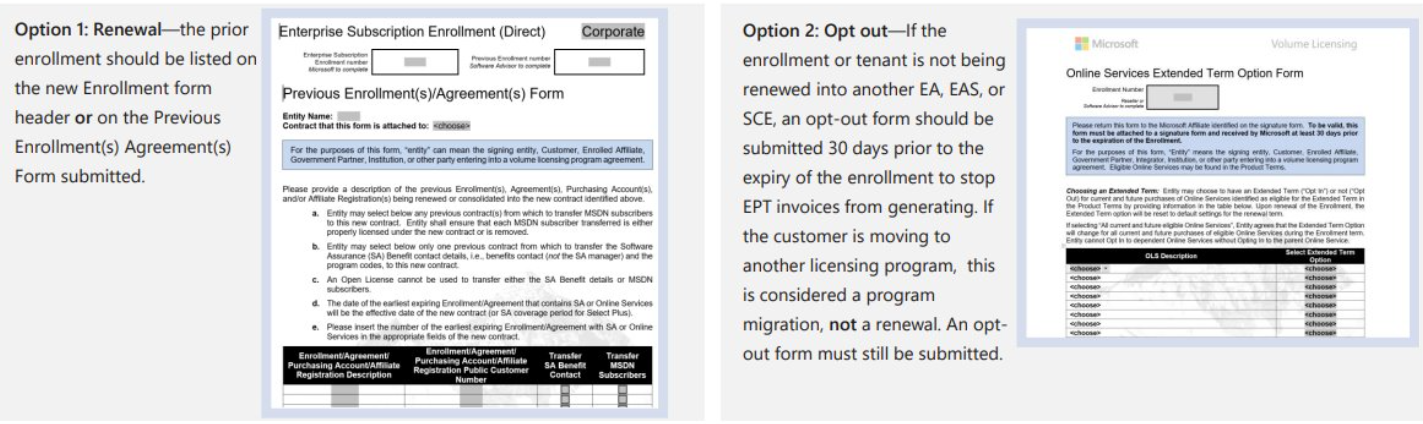
The Online Services Extended Term Option Form (OLSET)
The OLSET is available on Volume Licensing Central and includes all applicable online service offerings in the dropdown menu. There are 170 online services available to choose from the dropdown menu. Refer to the product terms to identify all EPT-eligible services. The form is available in both English and localized versions. You can download the form now from Volume Licensing Central. Note: The customer can opt-out of OLS using the OLSET, except for Azure services. The termination or migration of Azure services requires the user to open a support ticket with the Azure Support Team, via the Azure portal, requesting the appropriate action.

Customer EPT Status
- An opt-out form (the OLSET) is required for each enrollment that’s not being renewed. It is also needed to prevent or stop EPT billing. (Lead and billing enrollments need their own.)
The customer can change their status.
- They can alter their opt-in/out status while their enrollment is active.
- After the enrollment has expired, customer can still choose to opt-out, but they can no longer opt-in to EPT.
Office 365 opt-in/out behavior

EPT billing occurs mid-month for EPT-eligible OLS products. The generation of the invoice enables the service. (If no invoice is generated, the grace period for the product starts.) Opting out only is effective from the next monthly EPT cycle. Billing occurs for a full month minimum.
Notes:
This applies to VL programs.
Information is accurate as of February 2021.
Corporate customers opt-in to EPT by default. Government and public sector customers opt-out by default. However, all entities in SCE opt-in by default.
Refer to the Enterprise enrollment terms and conditions (T&Cs) and product terms for more details.
Example Scenarios
Example scenario 1: No opt-out
Scenario: Customer doesn’t renew their agreement and doesn’t send the opt-out form at least 30 days before the enrollment expiration, as required by the T&Cs for opting out of EPT.
Action: Post-enrollment expiry, the EPT invoice is generated and EPT service is enabled.
Outcome: EPT and monthly billing are initiated, and existing Online Services remain fully enabled.
Note: Per enrollment T&Cs, monthly billing is done at the then-current published price for the customer’s price level plus 3 percent for up to 12 months’ duration. After 12 months, pricing is reset to price level A of the price list applicable at that time plus 3 percent. EPT invoices don't stop until the customer takes action.
Example scenario 2: On-time opt-out
Scenario: The customer doesn’t renew their agreement and sends out the EPT opt-out form at least 30 days before the enrollment expiration, as required by the T&Cs, to opt-out of EPT.
Action: ROC opts out the customer.
Outcome: EPT and monthly billing don’t initiate. Customer licenses and subscriptions go through the standard deprovisioning lifecycle process.
Example scenario 3: Late opt-out
- Scenario: The customer doesn’t renew their agreement and the monthly EPT billing has already started. They send the EPT opt-out form to stop the EPT service.
- Action: ROC opts out the customer.
- Outcome: The ROC does not credit any of the EPT monthly invoices already issued but stops the extended period service and any future monthly billings.
Example scenario 4: Full OLS renewal
- Scenario: The customer doesn't renew their agreement on time, and monthly EPT billing starts. For example, the renewal is three months late with three EPT invoices generated. Later they renew and request credit for the EPT invoices.
- Action: Renewal is submitted with the previous enrollment listed. An OLSET form isn’t required. ROC credits the EPT invoice from the CPS processing date. All OLS products on the CPS are prorated to begin from the month the renewal is processed. ROC opts out the customer from any future EPT invoices.
- Outcome: All OLS products are prorated from the month the renewal is processed. One EPT invoice from the month the renewal is processed is credited. All previous EPT invoices remain due. Enrollment is backdated to one day after the expiry of the previous enrollment.
Example scenario 5: Migration
- Scenario: The customer migrates to another program (such as Open Value or CSP) but doesn’t submit an opt-out form. EPT invoices were created and the customer requests a credit for the monthly invoices received.
- Example: Customer migrates to Open Value from an Enterprise Agreement but doesn’t submit an opt-out form. ROC was advised of the migration three months after the expiration of the previous enrollment.
- Action: ROC doesn't issue a credit because a program migration isn't a renewal and is therefore ineligible for credit adjustment. The opt-out form wasn’t submitted to cancel the service that was made available to the customer.
- Outcome: The extended service continues until the opt-out form is submitted. ROC won't credit the EPT invoices. Invoices remain due.

EPT FAQ
How do I opt-OUT of EPT? Submit an EPT opt-out form to ROC for processing at least 30 days before the customer enrollment expires. This form, known as the OLSET, is available on explore.ms.
How do I make sure the OLS service stops at EA expiration? Opt-out of EPT functionality at least 30 days before the customer enrollment expires. Also, ensure the renewal into another Enterprise agreement is processed on time.
I’m in EPT now, how do I stop future monthly billings? Submit the OLSET to cancel service and future monthly billings or renew the enrollment into another Enterprise agreement.
I have Azure services. Can I submit the OLSET to opt-out after my EA enrollment has expired? Opting out doesn’t apply to Azure services and the service continues to be provided and billed for. For Azure service termination, cancel via the Azure Portal.
I'm a government customer, can I get EPT services? Yes, but you’re programmatically opted out so you need to submit an OLSET to opt-in at least 30 days before your enrollment expires. You can't opt-in after the enrollment expires.
I'm a government customer with an SCE, so can I get EPT services? All entities with an SCE enrollment are programmatically opted in for EPT services. No action is required to get EPT services.
If customer decides early to opt-out of EPT during the renewal discussions, can they include the OLSET in the renewal agreement package? Yes. To avoid EPT services and associated invoices, submit the OLSET at least 30 days before the enrollment expires. For example, a commercial customer who is opted in by default can include the OLSET in the renewal agreement pack to opt-out. However, the risk in three years’ time is that if they don’t renew on time, they goes into the OLS deprovisioning cycle and might lose access to OLS.
If I renew late, is my EPT invoice(s) be credited in full? The EPT invoice applicable to the month the renewal is processed is credited. Any other outstanding EPT invoices from previous months remain payable.