Note
Access to this page requires authorization. You can try signing in or changing directories.
Access to this page requires authorization. You can try changing directories.
The Windows 365 for Agents Security Baseline provides a Microsoft-recommended set of security configurations designed to help organizations establish a secure foundation for W365 for Agents Cloud PCs.
As organizations increasingly use AI agents to access resources, automate tasks, and interact with business applications, maintaining a consistent security posture becomes increasingly important. This baseline helps administrators quickly deploy Microsoft-recommended security settings through Microsoft Intune, reducing the complexity of configuring hundreds of individual security settings while helping protect agent workloads from common security risks.
W365 for Agents Cloud PCs often operate with access to enterprise applications, business data, organizational resources, and external services. The baseline is built on Microsoft's security best practices and includes recommended settings across device protection, credential security, attack surface reduction, browser security, and operating system hardening. By applying the baseline, organizations can accelerate deployment of secure agent environments while maintaining a consistent security posture across agent Cloud PCs.
The baseline helps organizations apply Microsoft-recommended security settings, establish a consistent security posture across agent Cloud PCs, and support broader security initiatives such as Zero Trust.
What is included in the security baseline?
This security Baseline includes Microsoft-recommended settings across several security categories such as Microsoft Defender Antivirus, Microsoft Defender Firewall, Attack Surface Reduction (ASR), credential protection, browser security, and operating system hardening.
This baseline provides a secure starting point. Organizations should review the settings and evaluate any additional security, compliance, or operational requirements specific to their environment.
Device-focused security configuration
This baseline includes device-based security settings only. User-based settings aren't included. This approach allows security controls to be applied as soon as a Cloud PC is provisioned and enrolled in Microsoft Intune, without waiting for the agent user sign-in.
In agent scenarios, workloads can begin running shortly after provisioning. Device-based settings can help ensure foundational protections are applied before agent activity begins.
By focusing on device-based settings, the baseline helps organizations:
Apply security protections early in the provisioning process.
Establish a consistent security posture before agent workloads begin.
Reduce reliance on user sign-in for critical security controls.
Accelerate policy deployment and synchronization.
Help maintain a consistent security configuration across W365 for Agents Cloud PCs.
The baseline is intended to provide a recommended starting point. Organizations should review the settings and make adjustments based on their security, compliance, and operational requirements.
Get started
Prerequisites
Before deploying the security baseline:
Microsoft Intune is configured to manage Windows 365 for Agents Cloud PCs.
Appropriate administrator permissions are assigned. For more information, see Manage security baseline profiles in Microsoft Intune.
Target groups with agent Cloud PCs for deployment are identified. For more information, see Use cases for device grouping and preparation.
Deploy the security baseline
Sign in to the Microsoft Intune admin center select Endpoint Security > Security Baselines.
Select Windows 365 for Agents Security Baseline Version 24H1.
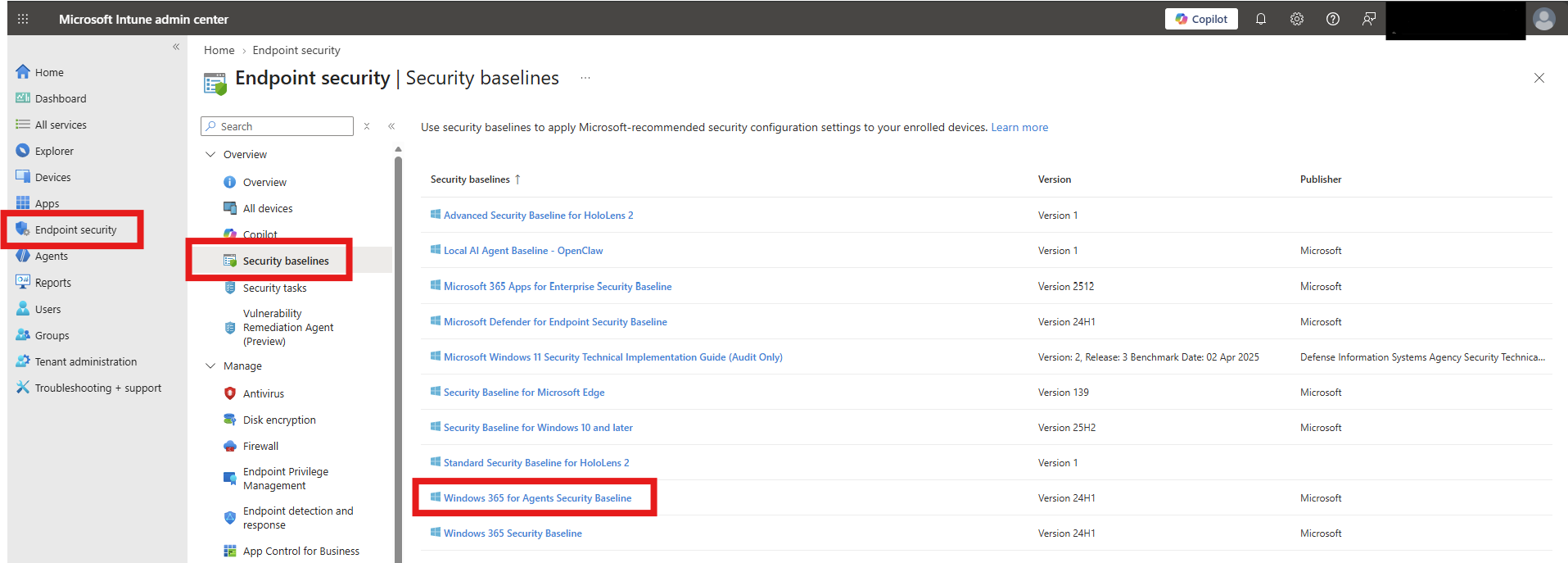
Click on Create policy. On the Create a profile pane, select Create profile > Create.
On the Basics page, provide a Name > Next.
On the Configuration settings tab, view the groups of settings that are available in the baseline you selected. You can expand a group to view the settings in that group, and the default values for those settings in the baseline. To find specific settings:
Select a group to expand and review the available settings.
To display only those groups that contain your search criteria, use the Search bar and specify keywords that filter the view.
Each setting in a baseline has a default configuration for that baseline version. Reconfigure the default settings to meet your business needs. Different baselines might contain the same setting, and use different default values for the setting, depending on the intent of the baseline.
Select Next.
On the Scopes page, optionally select scope tags > Next.
On the Assignments tab, select a device group with the Cloud PCs to include and then assign the baseline to one or more groups with your W365 for Agents Cloud PCs. Use Add groups under Excluded groups to fine-tune the assignment. Select Next.
When you're ready to deploy the baseline, advance to the Review + create tab and review the details for the baseline. Select Create to save and deploy the profile.
As soon as you create the profile, it's pushed to the assigned group and is applied immediately.
Validate and monitor
After deployment
Review assignment status reports.
Monitor setting conflicts.
Track compliance and security posture.
Validate that agent workloads continue to function as expected.
Review exceptions and customizations periodically.
Additional resources
- Device grouping and preparation for Cloud PC agent pools
- Use security baselines to help secure Windows devices you manage with Microsoft Intune
- Windows 365 for Agents security baseline settings reference