Note
Access to this page requires authorization. You can try signing in or changing directories.
Access to this page requires authorization. You can try changing directories.
Introduction
This document provides a detailed explanation of the single sign-on (SSO) authentication flow, in Windows Cloud in hybrid identity scenarios. It covers the integration of Kerberos objects and RdsAadAuth, highlighting the steps involved in the authentication process. The main section, Windows Cloud SSO Authentication Flow, explains how RDS Azure Active Directory (AAD) Auth is enforced as a protocol, and ensuring secure access to both cloud and on-premises resources.
Intended audience
Security Professionals: Focused on ensuring the security of authentication mechanisms and protecting sensitive data.
System Architects: Involved in designing and integrating SSO solutions within the overall IT architecture.
Product Managers: Overseeing the development and implementation of SSO features and ensuring they meet business requirements.
Developers: Working on the technical aspects of integrating SSO with various applications and services.
Compliance Officers: Ensuring that the SSO implementation adheres to relevant regulations and standards.
Single sign-on with Windows 365 and Azure Virtual Desktop – Token Flow & Authentication (RDS AAD Auth Protocol)
| Cloud-Native SSO Protocol | Hybrid Kerberos Trust |
|---|---|
| RDS AAD Auth is a new Remote Desktop authentication protocol integrated with Microsoft Entra ID. It replaces legacy methods (like PKU2U/RDSTLS) by using Entra ID tokens for signing into Windows. This method provides a seamless single sign-on experience without other prompts and supports modern credentials (including password-less methods) for Cloud PC logins. | In Hybrid Microsoft Entra ID Join scenarios, Entra ID works with a Kerberos Server object to extend authentication to on-prem AD. Entra ID can issue a partial Kerberos ticket (TGT) for the user's AD domain, which the Cloud PC trades with an on-prem DC for a full TGT. With both an Entra ID Primary Refresh Token and an AD TGT, the Cloud PC can seamlessly access cloud and on-premises resources in the same SSO session. |
Overview of Windows 365 single sign-on (SSO) with RDS AAD Auth
Windows 365 Cloud PCs supports a native single sign-on using the Remote Desktop Services Microsoft Entra ID Auth protocol (RDS AAD Auth). When SSO is enabled for Windows 365, RDS AAD Auth becomes the default authentication method. This authentication method is used if the client OS, Windows App client, and Virtual Machine (VM) OS are enabled to use the protocol. The protocol on by default, taking intentional action to disable.
[MS-RDPBCGR]: RDS AAD Auth Connection Sequence | Microsoft Learn
This protocol is considered both a security feature and a cloud-native authentication method, as it applies Microsoft Entra ID and token-based credentials instead of passwords. It's essentially an enhanced Remote Desktop Protocol (RDP) security mode operating over Transport Layer Security (TLS), where Microsoft Entra ID issues an access token tied to the specific target device, with protocol implemented to reduce reuse of the token.
[MS-RDPBCGR]: Acquiring an RDP Access Token | Microsoft Learn
Key Benefits
RDS AAD Auth provides a true SSO experience for Cloud PC users – after the initial Microsoft Entra ID sign-in, users aren't prompted again when the remote session launches. Microsoft Entra ID acts as the identity provider for both the Windows 365 service (including the connection infrastructure) and the Cloud PC’s Windows logon.
This mechanism allows first-class integration with Conditional Access policies and MFA: administrators can enforce policies (including requiring MFA or compliant devices) at Cloud PC sign-in by targeting the "Windows Cloud Login" cloud app in Conditional Access. The protocol also supports modern authentication factors (Windows Hello, FIDO2 keys, etc.), enabling passwordless login flows into the Cloud PC.
The use of Microsoft Entra ID tokens and device certificates makes the connection resistant to phishing and man-in-the-middle attacks: the RDP token is short-lived and is cryptographically bound to the target device’s identity, and the TLS channel ensures server identity verification and encryption.
Supported Environments
RDS AAD Auth works for both Entra joined (AADJ) Cloud PCs and Entra hybrid joined Cloud PCs. (It isn't supported for Microsoft Entra ID Domain Services–joined VMs, since those aren’t true AADJ/HAADJ.) Client-side, any supported Remote Desktop client (Windows MSTSC, the Windows App, web client, etc.) that is updated to use the new protocol, can initiate a Microsoft Entra ID–based connection.
Notably, unlike older “PKU2U” authentication, the local client machine doesn't need to be domain-joined or AAD-joined for RDS AAD Auth to function. The trust is established via Microsoft Entra ID and the Cloud PC’s device identity. The client can be any device where the user can authenticate to Microsoft Entra ID. On the Cloud PC (session host) side, Windows 10/11, or Windows Server 2022 (and fully patched/UpToDate Server 2019 for Entra joined) is required. Additionally for hybrid scenarios a Kerberos Server Object must be created in on-prem Active Directory Domain Services (AD DS) to enable the Microsoft Entra ID Kerberos trust (described later).
Summary
Enabling SSO on Windows 365 means that RDS AAD Auth handles the entire login: the user authenticates with Entra ID and gets seamlessly signed into their Cloud PC.

Windows 365 identity and authentication | Microsoft Learn
In a hybrid join scenario, the user authentication is transparently validated against both Microsoft Entra ID and on-prem AD if the Cloud PC is Entra hybrid joined. Microsoft Entra ID can’t directly log the user into AD, so a special Microsoft Entra ID Kerberos ticket is used to finalize on-prem authentication (via the Cloud Kerberos trust).
This unique capability allows a user to gain access to cloud resources (via the Microsoft Entra ID Primary Refresh Token) and on-prem resources (via a Kerberos TGT) without any more login prompts. The following sections break down the detailed token flow and the client/server interaction sequence.
Token Flow Sequence - Microsoft Entra ID Authentication Steps
The RDS AAD Auth process involves a multi-step exchange between the Remote Desktop client (Windows App or MSTSC), Microsoft Entra ID, and the Cloud PC (session host). Below is a high-level sequence of the token flow:
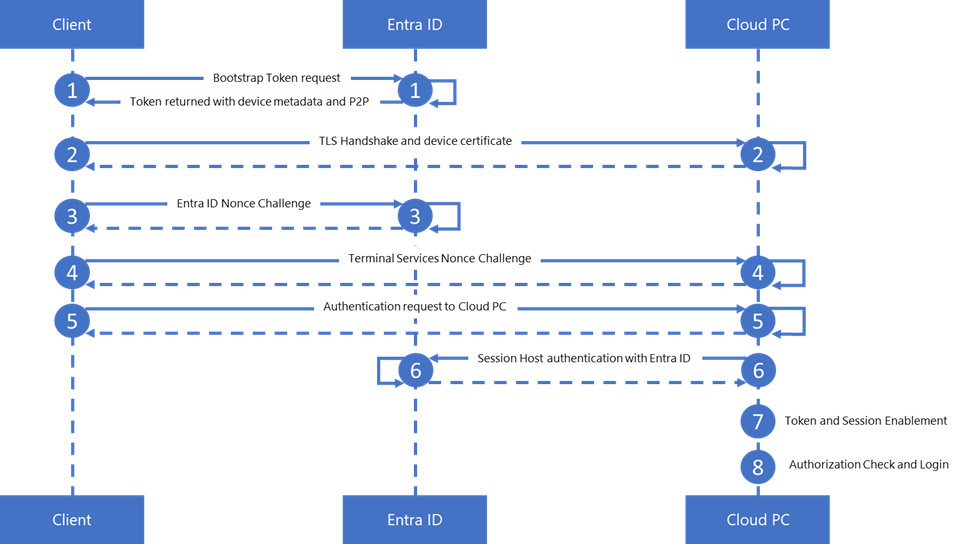
| Step | Interaction | Description |
|---|---|---|
| 1 | Client -> Entra ID | Bootstrap Token Acquisition: The Remote Desktop Client first obtains a bootstrap token for the target Cloud PC. It uses the Microsoft Entra SDK to request this token from Entra ID, providing the Cloud PC's identifier (its Microsoft Entra ID Fully Qualified Domain Name (FQDN) or ID). Before making this request, the client generates an ephemeral asymmetric key pair. The public key is included in the bootstrap token request so that Entra ID can bind the issued token to this key. This establishes a proof-of-possession (PoP) relationship: the RDP token later issued by Entra ID can only be used by the holder of the corresponding private key. After verifying the client identity and enforcing applicable Conditional Access policies, Microsoft Entra ID locates the target Cloud PC and returns a bootstrap token along with device metadata - including the tenant's P2P root certificate, the Cloud PC's Entra Device ID, and Tenant ID. This bootstrap token is a Microsoft Entra delegation that the Cloud PC uses to obtain a user logon token during the RDP session establishment. Because the token is PoP-bound, stealing the RDP token alone is insufficient; the attacker would also need the ephemeral private key. This is why the same ephemeral key must be reused in Step 5. |
| 2 | Client <-> Cloud PC | TLS Handshake and Device Certificate: The Client initiates a TLS/SSL handshake with the Cloud PC (over RDP). For Azure Virtual Desktop (AVD) and Windows 365, the client establishes a TLS handshake with the session host using a self-signed certificate generated by the host. This certificate is trusted because the AVD or Windows 365 broker validates it during orchestration, including the client-to-Cloud PC authentication step. Brokered authentication relies on this broker validation process and doesn't use the Microsoft Entra-issued MS-Organization-P2P-Access certificate. The MS-Organization-P2P-Access certificate is primarily used for PKU2U (Peer-to-Peer Kerberos) scenarios, such as peer-to-peer authentication and certain Remote Desktop Services (RDS) Azure AD authentication cases. It isn't typically involved in broker-mediated TLS handshakes for AVD or Windows 365. This confirms the client is indeed connecting to the intended Microsoft Entra joined device (mitigating man-in-the-middle). Once the TLS channel is established and the host is verified, all further exchanges occur over this secure channel. |
| 3 | Client -> Entra ID | Microsoft Entra ID Nonce Challenge: In parallel or next, the client contacts Microsoft Entra ID to obtain a Nonce (a one-time number). This nonce is a challenge from Microsoft Entra to ensure freshness of the authentication request. Microsoft Entra ID returns the nonce to the client, which the client includes in the final token proof to prevent replay attacks. |
| 4 | Client -> Cloud PC | Terminal Services Nonce (TS Nonce): The client then gets a Terminal Services (TS) nonce from the Cloud PC. The Local Security Authority (LSA) on the Cloud PC generates this nonce to ensure it originates from a trusted component and is unique for the session. After the X.224 negotiation, the Cloud PC initiates the RDS AAD Auth handshake by sending a server-generated TS nonce to the client over the established TLS channel. This nonce is later used to bind the authentication request to this specific session. |
| 5 | Client -> Cloud PC | Send Auth Request to Cloud PC: The client now holds three elements: the bootstrap token (Step 1), the Microsoft Entra ID nonce (Step 2), and the TS nonce (Step 3). It combines these into an RDP assertion, signs the assertion with a locally generated ephemeral key to ensure integrity and authenticity, and sends it to the Cloud PC as part of the sign-in request. In essence, the client is proving to the Cloud PC that "I have a Microsoft Entra ID token for this device and here are fresh nonces from both Entra and you." |
| 6 | Cloud PC (LSA CloudAP) -> Entra ID | Host Authentication with Entra ID: The Cloud PC/Entra ID plugin receives the assertion and validates it. The Cloud PC validates the RDP assertion by contacting Microsoft Entra ID. This ensures that the bootstrap token, Microsoft Entra ID nonce, and TS nonce are all verified before the user session is established. Microsoft Entra ID verifies that the bootstrap token is indented for the correct device (matching device ID and tenant) and that the Microsoft Entra nonce from Step 3 matches its expectations. The TS nonce from Step 4 is validated locally by the Cloud PC's LSA during assertion processing. Once verified, Microsoft Entra ID issues a Primary Refresh Token (PRT) for the user, which is essentially a long-lived session token for that user on this Cloud PC. Along with the PRT, Microsoft Entra ID may include an RDP application token (an OAuth access token for the RDP service) and, in hybrid scenarios, a partial Kerberos Ticket-Granting Ticket (TGT) to enable Microsoft Entra Kerberos trust for on-premises resource access. |
| 7 | Cloud PC | Token and Session Enablement: The Microsoft Entra-issued PRT is returned to the Cloud PC's CloudAP component. The Cloud PC now has a valid Microsoft Entra ID session token for the user. The PRT is encrypted and stored in the Cloud PC's secure token cache for reuse. CloudAP also extracts an NT Access Token (Windows logon token) from the RDP application token included with the PRT. The NT token represents the user's identity on the local machine. The terminal services service uses this token to process with Windows logon. |
| 8 | Cloud PC | Authorization Checks and Login: Authorization is enforced through an access check against the RDP listener's security descriptor, which ensures the user has the required permissions to log on to the remote session. If the access check succeeds, Winlogon completes the logon process, either unlocking an existing session or creating a new desktop session for the user. At this point, the user is fully signed in to the Cloud PC. If these checks pass, the Cloud PC completes the logon via Winlogon, either unlocking an existing session or creates a new desktop session for the user. At this point, the user is fully signed in to the Cloud PC. |
Result
The user is now authenticated to the Cloud PC with their Microsoft Entra ID credentials and has a Primary Refresh Token (PRT). The Cloud PC must be Microsoft Entra ID joined (or Hybrid AAD joined) for this to work, as device authentication is required for Entra ID to issue a PRT. When a PRT is present, the user can seamlessly sign in to Windows and access Entra ID-protected resources (for example, Microsoft 365 apps) without reentering credentials. However, Conditional Access policies may still require more factors. For example, if the RDP session was established using only a password but Office 365 requires MFA, the user may be prompted for an extra factor. In many cases, WAM-integrated apps or Windows components can refresh the PRT with MFA, reducing repeated prompts.
Hybrid Authentication Flow - Kerberos Cloud Trust for on-premises
For Entra hybrid joined Cloud PCs, the above token flow is augmented by the Microsoft Entra Kerberos trust to allow access to on-premises resources. Because a Cloud PC that's hybrid joined needs to authenticate to an on-prem Active Directory (for things like file shares or legacy apps), Microsoft Entra ID can't directly provide AD domain credentials. This is where the Kerberos Server Object comes into play.
When an SSO to hybrid joined device is attempted, Microsoft Entra ID (Entra ID) uses the Kerberos server object to issue a partial Kerberos TGT for the user’s on-prem AD domain.
In the token flow above, during Step 6 when CloudAP contacts Microsoft Entra ID, Microsoft Entra ID not only issues the PRT but also creates a Kerberos TGT (Ticket-Granting Ticket) that includes the user’s Active Directory Security Identifier (SID) and is encrypted for that domain. This is often called a partial TGT because it contains no authorization data (no group memberships etc.), just an identification of the user.
The Cloud PC receives this partial TGT from Microsoft Entra ID along with the PRT. Over the network, the Cloud PC (via the LSA) then contacts an on-prem domain controller for the user’s AD domain and presents the partial TGT. The domain controller, recognizing it was issued by Microsoft Entra ID’s Kerberos trust, exchanges it for a full Kerberos TGT for the user (a process analogous to normal Kerberos cross-realm trust). Now the Cloud PC has obtained a standard AD TGT as if the user had logged on with AD credentials. At this point, the Cloud PC holds two key tokens: the Microsoft Entra ID PRT (for cloud auth) and an AD Kerberos TGT (for on-prem auth).
With both tokens available, the user can seamlessly access cloud and on-premises resources from the Cloud PC. For example, the user can use their Cloud PC to open SharePoint Online (which uses the PRT for SSO) and also map a network drive to a file server (which uses the AD TGT for SSO) without any additional login prompts.
This hybrid SSO magic is possible only if your environment is configured for Microsoft cloud Kerberos: it requires setting up the Kerberos server object in AD and syncing it to Entra ID via Microsoft Entra ID Connect. (This object isn't a real server - it’s a representation in AD that Microsoft Entra ID uses to generate valid Kerberos tickets.)
In essence, the Kerberos server object allows Microsoft Entra ID to act like a domain KDC (Key Distribution Center) for the initial logon, bridging the gap so that the Cloud PC thinks "AD has partially logged this user on," and the on-prem DC can finish the job.
Security Consideration
The partial TGT issued by Microsoft Entra ID includes minimal info (just the user SID). This ensures that Microsoft Entra ID isn't making any authorization decisions – those remain with the on-prem DC when it issues the full TGT (which includes group memberships etc.).
The entire exchange is secure: the partial TGT is encrypted such that only the on-prem domain controllers (via the Kerberos server object’s keys) can decrypt it. Thus, only a valid DC can turn it into a usable TGT. The Cloud PC’s communication with the DC to trade the ticket uses standard Kerberos protocol over the network (which may require the Cloud PC to have line-of-sight or VPN to the DC).
Once the full TGT is acquired, the user experience is as if they had logged on with a domain password - except it all happened using Microsoft Entra ID credentials under the hood.
Conclusion
The detailed flow of SSO using Kerberos objects and RdsAadAuth highlights the synergy between traditional authentication protocols and modern cloud-based identity systems. The combined approach ensures secure, scalable, and user-friendly access to both on-premise and cloud resources. This makes it an ideal solution for organizations aiming to implement comprehensive and efficient authentication mechanisms.